


PC tips
 Oct 6, 2005 | 08:19 AM
#41

Senior Member
Joined: Jun 2002
Posts: 1,896
Likes: 0
From: Arkansas
Nov 23, 2005 | 07:24 AM
#42
Senior Member
Joined: Jun 2002
Posts: 1,896
Likes: 0
From: Arkansas
 Jul 11, 2006 | 07:48 AM
#44

Registered User
Joined: Apr 2003
Posts: 17
Likes: 0
From: Cartersville, Ga
Windows Explorer shourtcut tip
When using windows explorer to manage your files, would you prefer that is automaticly displayed the contents of a specfic drive right away rather then having to click on it. If so, all you have to do is modify an existing shourtcut.
The standard "target" in the shortcut should look like this "%windir%\explorer.exe"
Change it to this "%windir%\explorer.exe /e, C:\" to have it automaticly display the contents of the C:\ drive or change C to whatever drive letter you want to it show automaticly.
I will say that it's best not to choose the drive letter of a CD/DVD device as if you don't have anything in those drives at the time, it can cause a long hang/pause which can ultimately cause the explorer shell to crash.
The standard "target" in the shortcut should look like this "%windir%\explorer.exe"
Change it to this "%windir%\explorer.exe /e, C:\" to have it automaticly display the contents of the C:\ drive or change C to whatever drive letter you want to it show automaticly.
I will say that it's best not to choose the drive letter of a CD/DVD device as if you don't have anything in those drives at the time, it can cause a long hang/pause which can ultimately cause the explorer shell to crash.
Jul 26, 2006 | 12:52 PM
#45

Registered User
Joined: Jan 2003
Posts: 4,087
Likes: 1
From: Hattiesburg, MS
Relocate your "My Documents" folder.
Why? To prevent loss in event of a system crash or hard drive failure.
Right click "My Documents", then "Properties". Under Target folder location, click "Move", and select the new location. Click OK, then watch it work. From now on, your documents will be stored there, but will work like usual. Just remember where they are so you don't accidentally delete it!
For most machines, a secondary internal hard drive is the ideal place to relocate your documents. If you do this, create a directory on the secondary drive and point the new target to that. I wouldn't recommend an external drive, because those can be turned on and off too easily. Another possibility is to partition your main drive... one for the OS and programs, and one for your documents. Problem with that is if you run out of space, you're stuck unless you have a partitioning tool like Partition Magic.
Lots of possibilities with this, but the idea is simple... to preserve your files. Also, this is not a substitute for regular backups... it just adds to your peace of mind.
Why? To prevent loss in event of a system crash or hard drive failure.
Right click "My Documents", then "Properties". Under Target folder location, click "Move", and select the new location. Click OK, then watch it work. From now on, your documents will be stored there, but will work like usual. Just remember where they are so you don't accidentally delete it!
For most machines, a secondary internal hard drive is the ideal place to relocate your documents. If you do this, create a directory on the secondary drive and point the new target to that. I wouldn't recommend an external drive, because those can be turned on and off too easily. Another possibility is to partition your main drive... one for the OS and programs, and one for your documents. Problem with that is if you run out of space, you're stuck unless you have a partitioning tool like Partition Magic.
Lots of possibilities with this, but the idea is simple... to preserve your files.
Also, this is not a substitute for regular backups... it just adds to your peace of mind.
Feb 20, 2007 | 09:52 PM
#46

Registered User
Joined: Apr 2004
Posts: 907
Likes: 0
From: Northern New Mexico
This link was in another thread here.
http://www.anandtech.com/
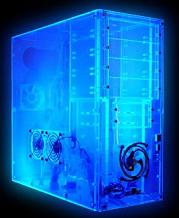
Good place for tech info via forums, and also great tech articles on gear with reviews such as this transparent case.
http://www.anandtech.com/
Good place for tech info via forums, and also great tech articles on gear with reviews such as this transparent case.
CCleaner...trust me your PC will thank you. get it at www.ccleaner.com
Mar 5, 2011 | 09:48 PM
#47

Registered User

Joined: Dec 2010
Posts: 176
Likes: 21
To show ALL devices in Device Manager in Windows 2000/XP/2003, do the following:
1. Right click My Computer, select Properties
2. Click the Advanced tab
3. Press the Environment variables button at the bottom
4. Select any item in the System variables section at the bottom
5. Press the New button and do the following:
In the Variable name field, type: DEVMGR_SHOW_NONPRESENT_DEVICES
In the Variable value field, type: 1
6. Click Ok a few times.
7. Go to Device Manager and click View\Show hidden devices
You will notice a few new categories and you can also see all the hardware that was once installed in your system and that still may have entries hanging around in the registry. They will be "greyed out" and fainter in appearance. We call them "Ghosts". This is a useful switch when troubleshooting hardware errors.
Hope you found this interesting.
G
1. Right click My Computer, select Properties
2. Click the Advanced tab
3. Press the Environment variables button at the bottom
4. Select any item in the System variables section at the bottom
5. Press the New button and do the following:
In the Variable name field, type: DEVMGR_SHOW_NONPRESENT_DEVICES
In the Variable value field, type: 1
6. Click Ok a few times.
7. Go to Device Manager and click View\Show hidden devices
You will notice a few new categories and you can also see all the hardware that was once installed in your system and that still may have entries hanging around in the registry. They will be "greyed out" and fainter in appearance. We call them "Ghosts". This is a useful switch when troubleshooting hardware errors.
Hope you found this interesting.
G
Mar 5, 2011 | 09:58 PM
#48
Registered User
Joined: Dec 2010
Posts: 176
Likes: 21
Do not fall victim to those pop up ads saying you may have spyware on your computer.
They scam you into scanning your PC for you, and often put on spyware themselves.
This article was linked from Spybot's home page.
http://www.pcworld.com/news/article/...62,pg,1,00.asp
I run Spybot Search & Destroy because it is good and free, and I also run a paid version of Spysweeper which is very good.
Also I have Ad-Aware another free one, but I prefer the first two mentioned ones over it.
I get my new definition files every Thursday, and scan that night.
Once a week scanning is good, or more often, and I never have spyware on any of my PCs.
They scam you into scanning your PC for you, and often put on spyware themselves.
This article was linked from Spybot's home page.
http://www.pcworld.com/news/article/...62,pg,1,00.asp
I run Spybot Search & Destroy because it is good and free, and I also run a paid version of Spysweeper which is very good.
Also I have Ad-Aware another free one, but I prefer the first two mentioned ones over it.
I get my new definition files every Thursday, and scan that night.
Once a week scanning is good, or more often, and I never have spyware on any of my PCs.
I've done computer repair for years and have used it on my customers computers and have never had one complain of a virus. In fact, every time I found a customer that had Spybot S&D or AVG, I've removed it, installed WD, and that cleared up the problems they were having.
But yes...definitely beware of those popups that want to scan your system, and if one comes up (careful, they look awfully real) immediately exit out of it or disconnect your internet. That one will ruin your day easily with millions of IE windows randomly opening, and it's near impossible to remove from your system once infected without a complete OS reinstall.
Last edited by JoshToy84; Mar 5, 2011 at 10:02 PM.
Mar 5, 2011 | 10:18 PM
#49
Registered User
Joined: Dec 2010
Posts: 176
Likes: 21
Sorry for the multi-post. Just saw a few things I wanted to throw my 2 cents in on.
Oh, and here's a tip:
If you've run your antivirus program, it reports your system is clear, and you still have incredibly slow performance (eg windows takes 10 minutes just to load), you more than likely have a bad memory module. You can find out which one(s) it is by shutting down, removing one and starting the system back up. Remember to ground yourself to the case, either with a strap or by keeping your arms touching the metal.
If Windows loads properly, you've found the defective module. If not, put the one you just took out back in, and move to the next one. Repeat the process until you've found the defective one. If Windows still loads slowly, all of your memory modules may be bad, or incompatible with the system. You have to remember that even though the part may fit, and it's the same type, it may not be compatible with your system due to firmware differences. A lot of BSOD errors (Blue Screen of Death) are caused by memory problems too.
Last edited by JoshToy84; Mar 6, 2011 at 09:10 AM.
Apr 5, 2011 | 07:02 AM
#50

Registered User
Joined: Jan 2011
Posts: 45
Likes: 0
From: Hartford, Wisconsin
my legitimate tip, if u think u can, install win 7 i have this AMD computer and i had so many driver problems in xp, which i didnt think was possible i loved xp, they all smoothed right out when i installed 7 instead, i personally love what windows 7 can do for u
for virus protection
i ALWAYS use AVG free and would NEVER touch norton or mcafee (sp?) the former is almost impossible to get rid of, and they both slow down ur computer more than they should, and i have not used mcafee personally but i used norton once, hated it.
one word for browsing: firefox, ive heard decent things about opera but never used, anything but IE really
with win 7 install 64 bit if u can, allows for the most expansion and best utilization of multiple cores.
thats my tips, take them as u will
for virus protection
i ALWAYS use AVG free and would NEVER touch norton or mcafee (sp?) the former is almost impossible to get rid of, and they both slow down ur computer more than they should, and i have not used mcafee personally but i used norton once, hated it.
one word for browsing: firefox, ive heard decent things about opera but never used, anything but IE really
with win 7 install 64 bit if u can, allows for the most expansion and best utilization of multiple cores.
thats my tips, take them as u will
Apr 5, 2011 | 09:50 AM
#51

Registered User
Joined: Oct 2009
Posts: 1,499
Likes: 1
From: Downtown Heckronto, Ontario, Soviet Canuckistan
Uh, Josh, Trend Micro's hijackthis is most assuredly NOT loaded up with that kind of crap. It's actually a very powerful tool for not only removing that bunk but also really really really good at messing up a Windows install if you don't know what you are doing since you have to interpret the results to determine what is bad and what is critical to system stability. hijackthis is not a program that you keep running all the time, it does nothing to protect your system.
Also, people should be ignoring the post at the top of page 2. You should buy all your cables from http://monoprice.com unless you don't like the idea of paying $4 for a 10' hdmi cable.
Also, people should be ignoring the post at the top of page 2. You should buy all your cables from http://monoprice.com unless you don't like the idea of paying $4 for a 10' hdmi cable.
Last edited by Magnusian; Apr 5, 2011 at 11:21 AM.
Apr 5, 2011 | 10:30 AM
#52

Registered User
Joined: Feb 2008
Posts: 176
Likes: 0
Regarding avg free: I never had any problems with them until this year. It worked great and was actually a very good av program. I deleted it this year though, because it was very slow and started to act like mcafee with all the popups and reminders.
For security, go with windows defender. The new security suite is far better than any other 3rd party software you will find.
For security, go with windows defender. The new security suite is far better than any other 3rd party software you will find.
Apr 5, 2011 | 10:49 AM
#53

Registered User
Joined: Oct 2009
Posts: 1,560
Likes: 1
From: Santa Cruz, CA
X2monoprice.com got 2 USB cigerette chargers for my phone for a dollar each there. Best buy wanted 29.99 they have all of your cable needs at a steal of a price.
Last edited by SCToy; Apr 5, 2011 at 10:50 AM.
Apr 5, 2011 | 07:59 PM
#55
Registered User
Joined: Oct 2009
Posts: 1,560
Likes: 1
From: Santa Cruz, CA
It's a money saving PC tip... sorry don't have all your random problems on my Mac 
You're generally not paying for quality from a store. You're paying for that guy who doesn't really know what he's talking about who wanders around and attempts to 'assist' and for shelf space.
You're generally not paying for quality from a store. You're paying for that guy who doesn't really know what he's talking about who wanders around and attempts to 'assist' and for shelf space.
Last edited by SCToy; Apr 5, 2011 at 08:01 PM.
Apr 5, 2011 | 09:00 PM
#58
Registered User
Joined: Feb 2008
Posts: 176
Likes: 0


Thread
Thread Starter
Forum
Replies
Last Post
hiluxinargentina
86-95 Trucks & 4Runners
0
Sep 30, 2015 11:12 PM
hiluxinargentina
86-95 Trucks & 4Runners
3
Sep 30, 2015 05:51 PM


