


Carnage 6/10
 Jun 11, 2006 | 03:42 PM
#1
Thread Starter
Contributing Member
Joined: Apr 2004
Posts: 5,464
Likes: 6
From: Arvada, Colorado
Carnage 6/10
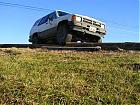
No one was around, so i went up to get out of the house for a while. Truck was unscathed this time, but the trail has gotten much worse than it was a couple months ago. Good times.
Pics:


Pics:
Jun 11, 2006 | 04:23 PM
#3

photobucket.com will auto-shrink them and keep the same quality. BTW, nice pics.
Did you have a passenger? My comp monitor at work really sucks so i can't tell if your in the drivers seat or not...
Did you have a passenger? My comp monitor at work really sucks so i can't tell if your in the drivers seat or not...
 Jun 11, 2006 | 05:44 PM
#5
Thread Starter
Contributing Member
Joined: Apr 2004
Posts: 5,464
Likes: 6
From: Arvada, Colorado
No passenger, i would just take pictures after i got out to see where i was, and make sure i wasn't going to hit my tcase, which is still exposed. I would then pause to take some pictures. Took a while, but no one was on the trail with me, so it was a nice time.
Thanks gregory
Thanks gregory
 Jun 11, 2006 | 06:37 PM
#7
Thread Starter
Contributing Member
Joined: Apr 2004
Posts: 5,464
Likes: 6
From: Arvada, Colorado
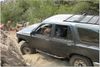
yes. I saw how close it was getting, so i stopped, hopped out to see how much farther my passenger tire had to go before it dropped, and then grabbed the camera. I thought it was going to dent, got lucky.
Trending Topics
 Jun 11, 2006 | 07:38 PM
#9

Contributing Member
Joined: Jan 2004
Posts: 231
Likes: 0
From: N39 32.872 W104 58.755
No one up there on such a nice day? Wonder why? 
Oh yea now I remember, http://www.longmontfyi.com/region-story.asp?ID=8096
Oh yea now I remember, http://www.longmontfyi.com/region-story.asp?ID=8096
Jun 12, 2006 | 08:11 AM
#11
Registered User
Joined: Dec 2004
Posts: 842
Likes: 0
From: Castle Rock, CO
From the article it sounds like carnage will be closed in 3 months.
--
One way to improve the rez of your pics when resizing is to resize them incrementally.
i.e. go from 1600x1200 -> 1280x1024 -> 1024x768 -> 800x600
Of course if the program you're using to resize sux, you may be out of luck
--
One way to improve the rez of your pics when resizing is to resize them incrementally.
i.e. go from 1600x1200 -> 1280x1024 -> 1024x768 -> 800x600
Of course if the program you're using to resize sux, you may be out of luck
Jun 12, 2006 | 10:00 AM
#12
Thread Starter
Contributing Member
Joined: Apr 2004
Posts: 5,464
Likes: 6
From: Arvada, Colorado
Good point, i didn't see that.
Yeah, i'm just using microsoft photo editor. That could be a majority of the problem.
My camera will take smaller pictures, but i like them big for viewing on my home computer, and its easy to shrink. I will try resizing incrimentally. We'll see how that works.
Yeah, i'm just using microsoft photo editor. That could be a majority of the problem.
My camera will take smaller pictures, but i like them big for viewing on my home computer, and its easy to shrink. I will try resizing incrimentally. We'll see how that works.
Jun 12, 2006 | 10:08 AM
#13
Registered User
Joined: Aug 2005
Posts: 2,419
Likes: 8
From: Peoria IL
Originally Posted by AxleIke
Good point, i didn't see that.
Yeah, i'm just using microsoft photo editor. That could be a majority of the problem.
My camera will take smaller pictures, but i like them big for viewing on my home computer, and its easy to shrink. I will try resizing incrimentally. We'll see how that works.
Yeah, i'm just using microsoft photo editor. That could be a majority of the problem.
My camera will take smaller pictures, but i like them big for viewing on my home computer, and its easy to shrink. I will try resizing incrimentally. We'll see how that works.
photoeditor is great, when you save as just hit the advanced button at the bottom and it will show you the slider bar for the compression ratio. a lower compression ratio (bigger file) will do a better job of keeping the detail in a numercially smaller number of pixels. (if that makes sence)
 Sep 8, 2006 | 08:41 AM
#15
Thread Starter
Contributing Member
Joined: Apr 2004
Posts: 5,464
Likes: 6
From: Arvada, Colorado

Thread
Thread Starter
Forum
Replies
Last Post
Lysmachia
Off Road Trip Planning, Expeditions, Trips, & Events
11
May 25, 2006 02:47 PM


