


headunit and sat radio advice
 Aug 16, 2005 | 08:00 AM
#1
Thread Starter
Registered User
iTrader: (1)
Joined: Jul 2002
Posts: 1,190
Likes: 1
From: Northern CA
headunit and sat radio advice
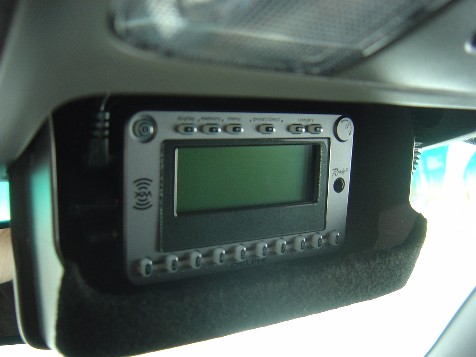
Time to consult the knowledgeable. The factory CD player in my 2000 4Runner no longer works so it needs a new headunit. In addition I want satellite radio. The Delphi Roady 2 is a nice unit and I’ve seen it cleanly mounted in the sunglass holder. What should I be looking for in a headunit?
I also want to use the sat radio in my home and in my other car, which has an “XM ready” Pioneer stereo. What would be a good route to go without spending a fortune?
I also want to use the sat radio in my home and in my other car, which has an “XM ready” Pioneer stereo. What would be a good route to go without spending a fortune?
Last edited by paddlenbike; Aug 16, 2005 at 09:57 AM.
Aug 16, 2005 | 10:20 AM
#2

Registered User
Joined: Feb 2003
Posts: 3,689
Likes: 4
From: Sarasota, FL
Well the one problem with the Roady2/1 as well as with the Myfi, Skyfi, and Skyfi2 is that they are FM modulated into your radio. What this means is that the sound quality is only that of a radio station and not the 100% digital music that is being sent from the satellite.
You have a number of options...
The first, and BEST imo, would be to buy a Pioneer deck that was XM ready and then buy the 99 bux worth of parts to enable XM reception. This gives you cd (or better) sound quality and it's 100% controllable from the pioneer so that you dont have to fumble around on another interface while driving in traffic. And you'll get to keep your sunglasses in your sunglasses holder! The only draw back to the above is that it is only for your car. You cant bring the XM tuner inside your home...
The next best bet if you want to bring the XM reciever into your home are the Skyfi1/2, Roady 1/2, or the myfi. All of these devices have a headphone jack (1/8" jack.) If you buy a radio with an AUX IN, all you have to do is buy an 1/8" jack to RCA jack converter. Then when you want to hear XM on your radio, just hit source till you are on 'AUX' and then plug in whatever device you want into the end of the 1/8" jack be it a Roady2, your Ipod, or your mp3 player. While this isnt the same as the 100% digital sound of an XM ready HU, it's very close.
The 3rd option is to use a WIRED FM modulator. You will have to pay extra for it about 25 bux. This route basically introduces the XM material into your antenna directly through a mechanical connection to your antenna. If you go the route of FM modulation, this is the way to do it. A wired FM Modulator is almost never going to pick up interferance from another station broadcasting.
The last, and least desirable option is wireless FM modulation. It works to get signal to your radio but thats about it! Drive 50 miles in one direction and you'll have to find another open station for the XM unit to broadcast on. (The XM unit's broadcast is VERY weak and will not override a radio station coming in on the channel the XM is broadcasting on.) And when you begin to get interferrance, and you will, it will show up as static, loud static. The aforementioned 3 options NEVER have this problem.
As far as the units themselves, the roady is a good value, its quality is equal to that of the skyfi and myfi. However it does not have the ability to record up to 30 min on a RAM hard drive like the skyfi will. The myfi also has a ROM harddrive that allows it to act just like an MP3 player - only you get your music from XM's satellites and it saves it! Up to 5 hours!! The myfi also comes with a home kit, a car kit, a personal kit, and every accessory Delphi makes for it! (This is why they are more expensive - they are delphi's flagship model and a damn good value!)
Hope that helped.
ps - if you do go any of the first 3 routes I highly suggest you replace your speakers. IMO even the JBL premium system toyota puts in '05s sounds like tookie and wont do XM justice.
You have a number of options...
The first, and BEST imo, would be to buy a Pioneer deck that was XM ready and then buy the 99 bux worth of parts to enable XM reception. This gives you cd (or better) sound quality and it's 100% controllable from the pioneer so that you dont have to fumble around on another interface while driving in traffic. And you'll get to keep your sunglasses in your sunglasses holder!
The only draw back to the above is that it is only for your car. You cant bring the XM tuner inside your home...The next best bet if you want to bring the XM reciever into your home are the Skyfi1/2, Roady 1/2, or the myfi. All of these devices have a headphone jack (1/8" jack.) If you buy a radio with an AUX IN, all you have to do is buy an 1/8" jack to RCA jack converter. Then when you want to hear XM on your radio, just hit source till you are on 'AUX' and then plug in whatever device you want into the end of the 1/8" jack be it a Roady2, your Ipod, or your mp3 player. While this isnt the same as the 100% digital sound of an XM ready HU, it's very close.
The 3rd option is to use a WIRED FM modulator. You will have to pay extra for it about 25 bux. This route basically introduces the XM material into your antenna directly through a mechanical connection to your antenna. If you go the route of FM modulation, this is the way to do it. A wired FM Modulator is almost never going to pick up interferance from another station broadcasting.
The last, and least desirable option is wireless FM modulation. It works to get signal to your radio but thats about it! Drive 50 miles in one direction and you'll have to find another open station for the XM unit to broadcast on. (The XM unit's broadcast is VERY weak and will not override a radio station coming in on the channel the XM is broadcasting on.) And when you begin to get interferrance, and you will, it will show up as static, loud static. The aforementioned 3 options NEVER have this problem.
As far as the units themselves, the roady is a good value, its quality is equal to that of the skyfi and myfi. However it does not have the ability to record up to 30 min on a RAM hard drive like the skyfi will. The myfi also has a ROM harddrive that allows it to act just like an MP3 player - only you get your music from XM's satellites and it saves it! Up to 5 hours!! The myfi also comes with a home kit, a car kit, a personal kit, and every accessory Delphi makes for it! (This is why they are more expensive - they are delphi's flagship model and a damn good value!)
Hope that helped.
ps - if you do go any of the first 3 routes I highly suggest you replace your speakers. IMO even the JBL premium system toyota puts in '05s sounds like tookie and wont do XM justice.
Last edited by Bumpin' Yota; Aug 16, 2005 at 10:23 AM.
Aug 16, 2005 | 10:20 AM
#3
Registered User
Joined: Oct 2004
Posts: 215
Likes: 0
From: Sacramento, CA
You could get a used stock radio and attach a PIE adapter. Then get an external sat radio device that will just hook up thru the headphone jack to your car and you can use it in the house as well. If you want the stock look for the HU you should look into getting the scion HU. It plays mp3 cds and sounds a lot better then the stock HU ever did. It should plug right into your 2000 runner.
Aug 16, 2005 | 12:19 PM
#4
Thread Starter
Registered User
iTrader: (1)
Joined: Jul 2002
Posts: 1,190
Likes: 1
From: Northern CA
Originally Posted by Bumpin' Yota
The first, and BEST imo, would be to buy a Pioneer deck that was XM ready and then buy the 99 bux worth of parts to enable XM reception.
If you buy a radio with an AUX IN, all you have to do is buy an 1/8" jack to RCA jack converter.
However it does not have the ability to record up to 30 min on a RAM hard drive like the skyfi will.
You could get a used stock radio and attach a PIE adapter. Then get an external sat radio device that will just hook up thru the headphone jack to your car and you can use it in the house as well. If you want the stock look for the HU you should look into getting the scion HU. It plays mp3 cds and sounds a lot better then the stock HU ever did. It should plug right into your 2000 runner.
Thank you both very much!
Aug 16, 2005 | 01:07 PM
#5
Registered User
Joined: Oct 2004
Posts: 215
Likes: 0
From: Sacramento, CA
A ton of people on t4r.org have done the scion swap, myself included. Do a search there for a lot more info on it. It sounds so much better then the stock one i was amazed. It made me realize how crappy the stock one was. The scion HU is manufactured by pioneer. They go for $60-100 on ebay.
Aug 16, 2005 | 01:21 PM
#6

Registered User
Joined: Nov 2003
Posts: 536
Likes: 0
From: Blowing Rock, NC
I'm happy with my alpine cda-9826 sat. ready head-unit. It will work with XM OR Sirius. I have had both services and prefer Sirius, but both have their advantages. I've discovered that XM fades out and loses signal much more often than Sirius does.
I know it's more expensive, but I would get a direct signal via a tuner/antenna rather than the roady( FM modulator ) route. Much better sound quality and no need to worry about if your stock power antenna stops working -- which 4runners are notorious for!!
Give ebay a try.. i've had plenty of success w/ audio equipment on there. Make sure it is an un-opened item though when dealing with sat. radio tuners. It may be difficult or impossible to set up an account w/out the consent of the previous subscriber if you buy used.
I know it's more expensive, but I would get a direct signal via a tuner/antenna rather than the roady( FM modulator ) route. Much better sound quality and no need to worry about if your stock power antenna stops working -- which 4runners are notorious for!!
Give ebay a try.. i've had plenty of success w/ audio equipment on there. Make sure it is an un-opened item though when dealing with sat. radio tuners. It may be difficult or impossible to set up an account w/out the consent of the previous subscriber if you buy used.
Aug 18, 2005 | 07:12 AM
#7
Thread Starter
Registered User
iTrader: (1)
Joined: Jul 2002
Posts: 1,190
Likes: 1
From: Northern CA
I did my homework and it looks like the 2005 Scion headunit might be the way to go in my 4Runner. I will need a $65 adapter to utilize the HU's CD changer port to drive the Roady 2 XM sat unit. The 2006 Scion unit's have such a port built-in, however these receivers are pushing $500 new and haven't become readily available second-hand. Once they do, they'll be more expensive than the adapter I need. One cool feature though, the 2006 HU has seven user-adjustable colors. The 2005 illuminates orange, which I will try and change to green before installing.
To install in my house, I'll get the house adapter.
For the Supra, I might just break-down and get the $110 part from Pioneer to take advantage of the XM ready HU.
Correct me if I'm wrong on any of the above or you see a better option. Thanks again for all the help.
Ken
To install in my house, I'll get the house adapter.
For the Supra, I might just break-down and get the $110 part from Pioneer to take advantage of the XM ready HU.
Correct me if I'm wrong on any of the above or you see a better option. Thanks again for all the help.
Ken
Trending Topics
Aug 18, 2005 | 08:21 AM
#8
Registered User
Joined: Oct 2004
Posts: 215
Likes: 0
From: Sacramento, CA
Sounds like a good option to me. For the scion unit, sometime you can find a really good deal over at www.scionlife.com in the classifieds. I have had good luck there.
 Nov 15, 2005 | 08:41 PM
#10
Registered User
Joined: Nov 2005
Posts: 27
Likes: 0
From: Lakewood, CO.
06 scion HU
This 06 Head Unit may be something I'm interested in my 4Runner. I prefer the features and styling of the 06 models. I'm not sure if it will fit. They are measured 8" in width. The opening and face width of the stock 4Runner unit is 7". So I wonder if I will have to do some trimming. If any of you have done this before please let me know.
Again. I'm interested in knowing for a fact if the 06 is that much different than the 05 scion models. The width may be wider, and I wonder if the 2000 Ltd 4runners will work speaker wise. AND (if it matters?) I don't know if my stereo has a JBL 6 speaker sys or not.
thanks
ew
Again. I'm interested in knowing for a fact if the 06 is that much different than the 05 scion models. The width may be wider, and I wonder if the 2000 Ltd 4runners will work speaker wise. AND (if it matters?) I don't know if my stereo has a JBL 6 speaker sys or not.
thanks
ew
Last edited by erik; Nov 15, 2005 at 08:42 PM.
Nov 16, 2005 | 10:36 AM
#11

I just installed a JVC AR800 HU in my 1st gen and it has the ability to control JVC's Sirius tuner through the CD changer control port as well. Since I had the changer already, I am using it that way. But w/o a changer, you plug in the DIN connector from the HU into the Sirius tuner to operate it. Everything is then controlled from the HU.
 Dec 18, 2005 | 08:56 PM
#13

Registered User
Joined: May 2005
Posts: 48
Likes: 0
From: Baltimore, MD
I just installed a Sirius One sat radio in my 3rd gen. I spliced into the map lights for power. It's a very stealthy install, and the radio tucks in nicely between my sun visor and the headliner. It's a bare bones unit, but it's small (about the size of a small radar detector) and only two wires to hook up.
For the antenna, I mounted it at the back of the truck and tucked it under the trim along roof on the passenger side of the truck. When I got to the right-front corner, theres one inch that can be seen where the wire jumps out of the trim and into the passenger sun visor hole. (Be careful! If you disconnect the wire that powers the sun visor's light, it'll try to disapear on you. I would recommend a long cable tie to leash it, so that when you go to hook it up again, you can pull it back out even if it's dissapeared into the hole.)
Then the antenna wire exits same place as the power wire on the driver side of the map light/sunglasses console. The two wires come out for about 10 inches, where they snake around my visor and get into the radio.
Overall, it took about 4 hours, and it's relatively well hidden without any major mods.
For the antenna, I mounted it at the back of the truck and tucked it under the trim along roof on the passenger side of the truck. When I got to the right-front corner, theres one inch that can be seen where the wire jumps out of the trim and into the passenger sun visor hole. (Be careful! If you disconnect the wire that powers the sun visor's light, it'll try to disapear on you. I would recommend a long cable tie to leash it, so that when you go to hook it up again, you can pull it back out even if it's dissapeared into the hole.)
Then the antenna wire exits same place as the power wire on the driver side of the map light/sunglasses console. The two wires come out for about 10 inches, where they snake around my visor and get into the radio.
Overall, it took about 4 hours, and it's relatively well hidden without any major mods.


Thread
Thread Starter
Forum
Replies
Last Post
DiggnDeep
84-85 Trucks & 4Runners
4
Sep 3, 2015 02:45 PM


