


Vista Service Pack 1
 May 22, 2008 | 03:45 PM
#1

Thread Starter
Co-Founder/Administrator
iTrader: (1)
Joined: May 2002
Posts: 32,242
Likes: 21
From: Auburn, Washington
Vista Service Pack 1
Picked up the new CPU magazine the other day, good article in it on Vistas SP 1.
Speed up of bootup/shutdown, and other enhancements.
No extra apps are installed, so no dramatical interface changes, but it does improve it.
I am installing it now on my Dell laptop.
I put XPs Service Pack 3 on a short time back after seeing Bob's thread in this section.
The SP1 for Vista can take a long time to install, and it does about three reboots my screen is telling me.
Looks like Firefox 3 is coming out soon too from the link above.
Speed up of bootup/shutdown, and other enhancements.
No extra apps are installed, so no dramatical interface changes, but it does improve it.
I am installing it now on my Dell laptop.
I put XPs Service Pack 3 on a short time back after seeing Bob's thread in this section.
The SP1 for Vista can take a long time to install, and it does about three reboots my screen is telling me.
Looks like Firefox 3 is coming out soon too from the link above.
May 22, 2008 | 09:15 PM
#2

Contributing Member
Joined: Sep 2002
Posts: 1,610
Likes: 0
From: Mission, British Columbia
Vista 64 SP1 actually resolved an issue with my logitech orbit webcam. The picture was distorted and move the cam by motor was impossible.
Works all good now.
I am still pissed at HP for not releasing drivers for the 3150 laserprinters. There are still lots of them around, but are unusable with Vista.
No more HP products for me.
Works all good now.
I am still pissed at HP for not releasing drivers for the 3150 laserprinters. There are still lots of them around, but are unusable with Vista.
No more HP products for me.
 May 23, 2008 | 05:27 AM
#4
Thread Starter
Co-Founder/Administrator
iTrader: (1)
Joined: May 2002
Posts: 32,242
Likes: 21
From: Auburn, Washington
Arjan, that is a crock they will not update the dirvers.
Hayes, my laptop is a core 2 duo 2.2 or a 2.0 GHz with two GB of RAM.
I can fire it up, wait about 20 seconds, then fire up my gaming PC I built over Christmas.
It has XP Pro, a 3.0 core 2 duo, and also two GB of RAM.
It boots up into Windows faster and finishes first, even though I fired up the Vista machine first.
I prefer XP over Vista for gaming, as it does it better form all of my research, but Vista is OK.
It works good on the laptop.
First thing I did after booting it up for the first time was to Google how to get rid of that stupid nag screen when you are installing stuff, and it asks you if you really want to do that or not.
That was really irritating.
I do not like arguing with a computer, and when I tell it to do something, it had better darn well do it now
There were also some good tips in a few back issues of CPU on how to speed up both XP and Vista by trimming down stuff that you really do not need.
Some of it you have to enter the BIOS at bootup, and tell it not to check your CD drive first, but to check the main disc for the OS.
That alone can shave a few seconds off at bootup.
Hayes, my laptop is a core 2 duo 2.2 or a 2.0 GHz with two GB of RAM.
I can fire it up, wait about 20 seconds, then fire up my gaming PC I built over Christmas.
It has XP Pro, a 3.0 core 2 duo, and also two GB of RAM.
It boots up into Windows faster and finishes first, even though I fired up the Vista machine first.
I prefer XP over Vista for gaming, as it does it better form all of my research, but Vista is OK.
It works good on the laptop.
First thing I did after booting it up for the first time was to Google how to get rid of that stupid nag screen when you are installing stuff, and it asks you if you really want to do that or not.
That was really irritating.
I do not like arguing with a computer, and when I tell it to do something, it had better darn well do it now
There were also some good tips in a few back issues of CPU on how to speed up both XP and Vista by trimming down stuff that you really do not need.
Some of it you have to enter the BIOS at bootup, and tell it not to check your CD drive first, but to check the main disc for the OS.
That alone can shave a few seconds off at bootup.
May 23, 2008 | 09:21 AM
#5
Contributing Member
Joined: Sep 2002
Posts: 1,610
Likes: 0
From: Mission, British Columbia
I agree on the drivers issue Corey, a big company like that who is largely in bed with Microsoft should have their act together.
Disabling that nag screen is also the first thing I did in Vista. No need to second guess everything you do all the time.
I only occasionally play GTA and it seems to work fine under Vista 64 sofar. I can play it in 1440x900 32bit colour and graphic details all turned up.
I have a basic video card to boot.
The other game I play is solitaire . I like the updated look in Vista for that.
I can see your point about XP and gaming, a more lightweight operating system leaves more power for running other software. That's why I ran win2k for a long time before I switched to XP.
For what I do I am liking Vista very much, it looks nice and the machine is fast enough to run it all at the same time.
I do notice 40% memory usage all the time to run the system, I have 4gig in here so 2gig would probably run a lot slower.
Vista is resource hungry, but then again, hardware is relatively cheap nowadays.
Disabling that nag screen is also the first thing I did in Vista. No need to second guess everything you do all the time.
I only occasionally play GTA and it seems to work fine under Vista 64 sofar. I can play it in 1440x900 32bit colour and graphic details all turned up.
I have a basic video card to boot.
The other game I play is solitaire
. I like the updated look in Vista for that.I can see your point about XP and gaming, a more lightweight operating system leaves more power for running other software. That's why I ran win2k for a long time before I switched to XP.
For what I do I am liking Vista very much, it looks nice and the machine is fast enough to run it all at the same time.
I do notice 40% memory usage all the time to run the system, I have 4gig in here so 2gig would probably run a lot slower.
Vista is resource hungry, but then again, hardware is relatively cheap nowadays.
May 23, 2008 | 09:25 AM
#6
Thread Starter
Co-Founder/Administrator
iTrader: (1)
Joined: May 2002
Posts: 32,242
Likes: 21
From: Auburn, Washington
I have a 2 GB USB stick I sometimes will insert into a USB port on the laptop to do that Memory Boost thing they call it, but really, I do not see it running any faster.
For the most part though, I am happy with Vista on the laptop.
For the most part though, I am happy with Vista on the laptop.
May 23, 2008 | 11:51 AM
#7
Contributing Member
Joined: Sep 2002
Posts: 1,610
Likes: 0
From: Mission, British Columbia
The speed of memory blows away the speed of a usb drive. I've never understood that theory. My memory is running at 800Mhz for now. I am waiting for DDR3 to become more affordable. Then I can run it at 1333Mhz, the same speed as my front side bus.
DDR3 was 4x the price of DDR2 when I bought my machine a couple of weeks ago, that's why I held off for now.
My memory usage might be a bit higher because I am running Vista Ultimate. I wanted the mediacenter option.
DDR3 was 4x the price of DDR2 when I bought my machine a couple of weeks ago, that's why I held off for now.
My memory usage might be a bit higher because I am running Vista Ultimate. I wanted the mediacenter option.
Trending Topics
May 23, 2008 | 02:33 PM
#8
Thread Starter
Co-Founder/Administrator
iTrader: (1)
Joined: May 2002
Posts: 32,242
Likes: 21
From: Auburn, Washington
Yeah, I have Dell Home on mine.
Dell includes their own Media Center which is pretty cool.
You can also use it when the laptop is not even booted up.
Push a button and the app starts up, and you can watch a DVD without even being in Windows.
I could have sworn though that it also has Windows Media Center on it.
I will have to look later.
Now my gaming PC I built over last Christmas, I believe I used DDR3 in it.
I would have to check, but the RAM was very expensive.
Dell includes their own Media Center which is pretty cool.
You can also use it when the laptop is not even booted up.
Push a button and the app starts up, and you can watch a DVD without even being in Windows.
I could have sworn though that it also has Windows Media Center on it.
I will have to look later.
Now my gaming PC I built over last Christmas, I believe I used DDR3 in it.
I would have to check, but the RAM was very expensive.
May 23, 2008 | 02:52 PM
#9

Registered User
Joined: Oct 2007
Posts: 957
Likes: 1
From: Wauconda, IL/Edwardsville, IL
I had Vista on my laptop for awhile, but just got tired of it. I installed XP Pro yesterday, and after putting all my data back on (90 GB of personal stuff) & all my programs, it still is faster than with Vista.
Believe me, I work on computers for a living. Vista is good eye candy, but I just use Vistamizer and get the same thing. The only good thing in Vista is MC and Windows Movie Maker (Hell of alot better than previous versions.) In Vista I had driver problems and the like, and were not resolved after SP1. I have done a fresh install after I got it(crapware from manf.). Vista is also alot harder on resources. With 2 GB of DDR2, and 384 for the video card, it was always using at least (no programs running) 45% of the available memory, now while running much more, it is at 39%. Boot time is so quick.
Drivers were not that hard to find, easier than back in November when I tried.
If anyone needs help, PM me.
Believe me, I work on computers for a living. Vista is good eye candy, but I just use Vistamizer and get the same thing. The only good thing in Vista is MC and Windows Movie Maker (Hell of alot better than previous versions.) In Vista I had driver problems and the like, and were not resolved after SP1. I have done a fresh install after I got it(crapware from manf.). Vista is also alot harder on resources. With 2 GB of DDR2, and 384 for the video card, it was always using at least (no programs running) 45% of the available memory, now while running much more, it is at 39%. Boot time is so quick.
Drivers were not that hard to find, easier than back in November when I tried.
If anyone needs help, PM me.
May 23, 2008 | 02:52 PM
#10
Contributing Member
Joined: Sep 2002
Posts: 1,610
Likes: 0
From: Mission, British Columbia
4gig of DDR2 is just over a $100, DDR3 was over $400.
I figured that it will be at the $100 level next year most likely, I think DDR2 is cheaper now then DDR ever was.
That trend will probably continue.
It sounds like dell added a TV tuner independent of the operating system on your dell. Not a bad way of doing it, it's a nice option.
We mostly like to record some shows which are always on when we put the kids to bed etc.
I like the big bang theory for example, always on at eight.
I figured that it will be at the $100 level next year most likely, I think DDR2 is cheaper now then DDR ever was.
That trend will probably continue.
It sounds like dell added a TV tuner independent of the operating system on your dell. Not a bad way of doing it, it's a nice option.
We mostly like to record some shows which are always on when we put the kids to bed etc.
I like the big bang theory for example, always on at eight.
May 23, 2008 | 04:36 PM
#11
Thread Starter
Co-Founder/Administrator
iTrader: (1)
Joined: May 2002
Posts: 32,242
Likes: 21
From: Auburn, Washington
24, I will have to check out the Movie Maker later. I use it on my XP gaming machine quite often.
I am on the laptop as I type this, I may fire up the app and see what has been added to it.
Arjan, no TV tuner on the laptop.
The interface is to watch shows you have downloaded to the laptop, or to play music CDs or movie DVDs.
I will have to grab a screenshot of it sometime.
I did see a nice USB stick not much bigger than a standard USP stick that has a TV tuner in it.
I may check it out, but really do not need it.
I have two TV tuner cards in my old 2.4c Intel PC in the spare room.
I use it nightly to record shows after I am in bed.
Then I play them back to the TV set in the living room via cable and a remote for the tuner card.
Its nice to be able to record two shows at the same time.
My new gaming PC I built recently I put a tuner card in it too, but I use it for watching live TV only if I feel like turning in early and want to catch something before I go to
I Googled Dell Media Center, got a few hits.
http://www.winsupersite.com/reviews/...experience.asp
Mine is newer than what the review shows above, and Dell updates it from time to time.


I am on the laptop as I type this, I may fire up the app and see what has been added to it.
Arjan, no TV tuner on the laptop.
The interface is to watch shows you have downloaded to the laptop, or to play music CDs or movie DVDs.
I will have to grab a screenshot of it sometime.
I did see a nice USB stick not much bigger than a standard USP stick that has a TV tuner in it.
I may check it out, but really do not need it.
I have two TV tuner cards in my old 2.4c Intel PC in the spare room.
I use it nightly to record shows after I am in bed.
Then I play them back to the TV set in the living room via cable and a remote for the tuner card.
Its nice to be able to record two shows at the same time.
My new gaming PC I built recently I put a tuner card in it too, but I use it for watching live TV only if I feel like turning in early and want to catch something before I go to
I Googled Dell Media Center, got a few hits.
http://www.winsupersite.com/reviews/...experience.asp
Mine is newer than what the review shows above, and Dell updates it from time to time.
May 23, 2008 | 05:03 PM
#12
Registered User
Joined: Oct 2007
Posts: 957
Likes: 1
From: Wauconda, IL/Edwardsville, IL
Then you will def like the new one. Very simple, but NOTHING is as good as iMovie, hands down. And I dabble in video editing and have tried all sorts. Besides Movie Maker in Vista (NOT XP), they only other one I use is Sony Vegas 7.0. The Dell Media Experience is a good clone of MC, but I prefer plain ol' video players. MC would be better for overall, well "Home Theater".
OHH! That reminds me! I have a brand new ExpressCard tuner card sitting in its box back from December. It never worked with Vista.
OHH! That reminds me! I have a brand new ExpressCard tuner card sitting in its box back from December. It never worked with Vista.
May 23, 2008 | 05:07 PM
#13
Contributing Member
Joined: Sep 2002
Posts: 1,610
Likes: 0
From: Mission, British Columbia
Last year I picked up an adaptec dual tv tuner from ebay. It does have mpeg encoders on board so it doesn't tax your computer much either when recording.
It uses a usb 2 connection.

http://www.adaptec.com/en-US/support...prod/AVC-3610/
I think it set me back about $90 at the time, works fine.
The dell interface looks good also, the Vista ultimate MCE looks much better then the XP version does imo.
Just a lot of neat effects, nothing important but it looks nice.
An example of the Vista MCE, I like how the tv channel is transparant through the guide for example.
It uses a usb 2 connection.
http://www.adaptec.com/en-US/support...prod/AVC-3610/
I think it set me back about $90 at the time, works fine.
The dell interface looks good also, the Vista ultimate MCE looks much better then the XP version does imo.
Just a lot of neat effects, nothing important but it looks nice.
An example of the Vista MCE, I like how the tv channel is transparant through the guide for example.
May 23, 2008 | 05:31 PM
#14
Thread Starter
Co-Founder/Administrator
iTrader: (1)
Joined: May 2002
Posts: 32,242
Likes: 21
From: Auburn, Washington
Have not heard of iMoive, sounds like an Apple app like iTunes kind of.
I just checked, and my version of Vista does have Windows Media Center on it.
Does the same stuff that the Dell Media Center does.
Yeah, I really do not use those apps either, I prefer to open up vids with plain old MS Media Player.
This laptop though has a lot of stuff on it that I have not had the time to even tap into yet.
I have used the built in webcam though with MS Messenger to communicate with my sons.
That rocks being able to see each other, and not even have to type since it supports voice.
Just like using the tele, but we can see each other too.
Oh, I forgot to mention earlier, I can also view the TV shows I recored to the old PC on the laptop since I have all of my PCs networked.
Buying the new laptop though was a good choice for me.
I am sitting here watching a movie on TV on the Sci-Fi channel, and surfing on the laptop at the same time.
Before I would jump out of the recliner during a commercial break to check my email and threads on forums.
I just checked, and my version of Vista does have Windows Media Center on it.
Does the same stuff that the Dell Media Center does.
Yeah, I really do not use those apps either, I prefer to open up vids with plain old MS Media Player.
This laptop though has a lot of stuff on it that I have not had the time to even tap into yet.
I have used the built in webcam though with MS Messenger to communicate with my sons.
That rocks being able to see each other, and not even have to type since it supports voice.
Just like using the tele, but we can see each other too.
Oh, I forgot to mention earlier, I can also view the TV shows I recored to the old PC on the laptop since I have all of my PCs networked.
Buying the new laptop though was a good choice for me.
I am sitting here watching a movie on TV on the Sci-Fi channel, and surfing on the laptop at the same time.
Before I would jump out of the recliner during a commercial break to check my email and threads on forums.
May 23, 2008 | 05:40 PM
#15
Thread Starter
Co-Founder/Administrator
iTrader: (1)
Joined: May 2002
Posts: 32,242
Likes: 21
From: Auburn, Washington
Arjan, just checked, I do not have the TV guide since I do not have a tuner installed.
It does list games in the Windows Media Center, maybe the same games that are in the main game folder.
Did not know I had 3D chess on here.
Pretty darn cool, and it lets you play against the PC or an online opponent.
So much on here, have not really had time to explore it all.
I mainly have just surfed with the laptop, but it pretty much has the power to be a desktop replacement too.
17" screen is really nice.
It does list games in the Windows Media Center, maybe the same games that are in the main game folder.
Did not know I had 3D chess on here.
Pretty darn cool, and it lets you play against the PC or an online opponent.
So much on here, have not really had time to explore it all.
I mainly have just surfed with the laptop, but it pretty much has the power to be a desktop replacement too.
17" screen is really nice.
May 23, 2008 | 05:45 PM
#16
Registered User
Joined: Oct 2007
Posts: 957
Likes: 1
From: Wauconda, IL/Edwardsville, IL
What brand did you get? JW, cuz some of that bloatware maybe slowing it down.
Also download CCleaner
Awesome little utility, cleans out cache, temp files, ect. I install it on all my clients PC's.
If you want install it, go to start-up, snapshot, and post it. I'll tell you what you can get rid of. I can guarantee that it will make boot-up time faster.
Also download CCleaner
Awesome little utility, cleans out cache, temp files, ect. I install it on all my clients PC's.
If you want install it, go to start-up, snapshot, and post it. I'll tell you what you can get rid of. I can guarantee that it will make boot-up time faster.
May 23, 2008 | 05:59 PM
#17
Thread Starter
Co-Founder/Administrator
iTrader: (1)
Joined: May 2002
Posts: 32,242
Likes: 21
From: Auburn, Washington
I have the Inspiron 1720.
2.0 core 2 duo Centrino, 2 GB of RAM, Nvidia 8400 vid card.
Weak card, but I did not get this for gaming.
It does play the old Unreal Tournament fine though.
That is my new gaming rig too, but I have a better mouse now, the new Logitech G9.
I went back to a wired mouse.
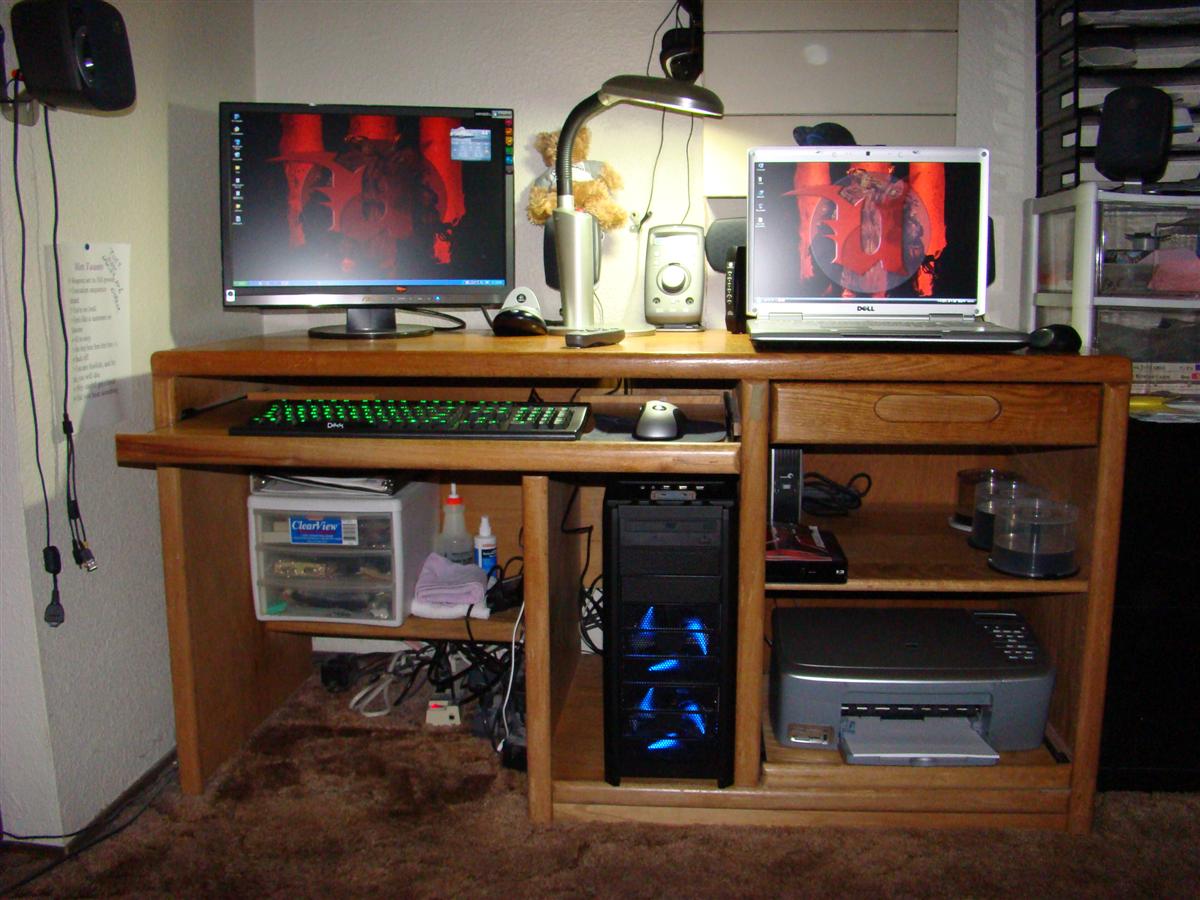
I may look into that CC cleaner later.
2.0 core 2 duo Centrino, 2 GB of RAM, Nvidia 8400 vid card.
Weak card, but I did not get this for gaming.
It does play the old Unreal Tournament fine though.
That is my new gaming rig too, but I have a better mouse now, the new Logitech G9.
I went back to a wired mouse.
I may look into that CC cleaner later.

Thread
Thread Starter
Forum
Replies
Last Post
justdifferentials
Just Differentials
5
Jun 13, 2022 07:40 PM
Dale Johnston
86-95 Trucks & 4Runners (Build-Up Section)
11
Oct 31, 2015 10:22 PM
clok
General Electrical & Lighting Related Topics
3
Sep 21, 2015 08:18 PM
JookUpVandetti
86-95 Trucks & 4Runners
8
Sep 17, 2015 09:25 PM


