


How to post photos on this forum (and most others) - how-to-guide
 Aug 27, 2010 | 12:51 PM
#1

Thread Starter
Registered User
iTrader: (2)
Joined: Dec 2009
Posts: 2,159
Likes: 7
From: Pleasanton, CA - SF Bay Area
How to post photos on this forum (and most others) - how-to-guide
I've seen so many posts asking how to upload photos here. Most online forums use vBulletin, the same engine as on YT, so the method for uploading is the same across most forums.
First, open a free account at an image hosting website, like Photobucket.com (examples here are from PhotoBucket).
When logged in to PhotoBucket, create an album, and choose "upload":
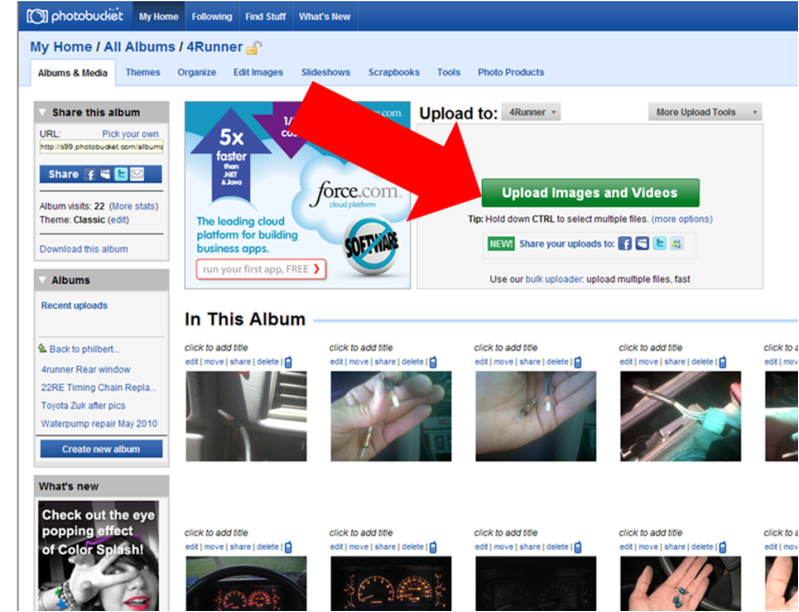
Once you've selected photos (from your hard drive, or memory stick), and uploaded them, you'll be prompted to save them. You can name them before saving if you want (I usually skip this due to time...):

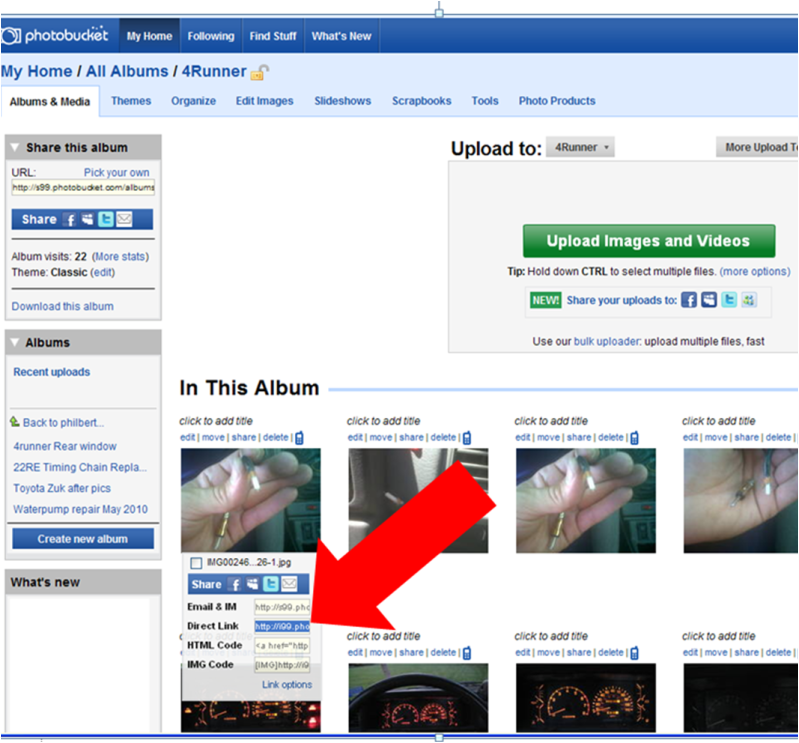
Once you've saved your new uploaded photo(s), you'll be taken to your overall album, where you can mouse over your desired image. Mousing over means hovering your mouse over the icon without pressing a mouse button. Once your mouse is hovering over the photo you want to show for a second or two, you'll see a drop down with several links. You'll want to double click on the DIRECT LINK and then copy the URL, using either "CTRL+C" or right clicking and selecting "copy".
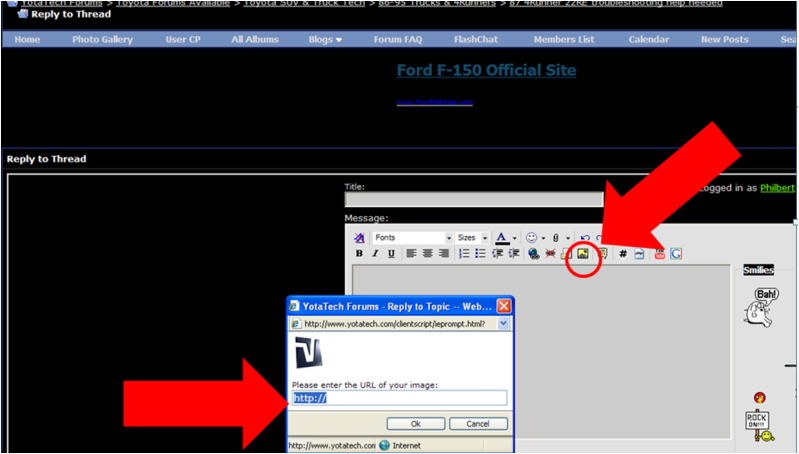
Now that you've copied your direct link, it's time to paste it into the forum photo hosting tool. When making a post on the forum, click on the yellow "landscape" icon here. You'll get a small pop up window to appear, prompting you to enter the direct link URL.
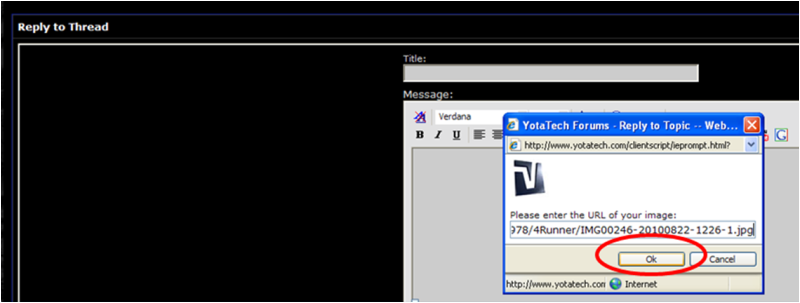
Next, just paste in your direct link and click "OK" - that will make your photo appear as part of the forum posting.
THAT'S IT - pretty easy. It's a little time consuming but you get used to it.
Hope this helps
First, open a free account at an image hosting website, like Photobucket.com (examples here are from PhotoBucket).
When logged in to PhotoBucket, create an album, and choose "upload":
Once you've selected photos (from your hard drive, or memory stick), and uploaded them, you'll be prompted to save them. You can name them before saving if you want (I usually skip this due to time...):
Once you've saved your new uploaded photo(s), you'll be taken to your overall album, where you can mouse over your desired image. Mousing over means hovering your mouse over the icon without pressing a mouse button. Once your mouse is hovering over the photo you want to show for a second or two, you'll see a drop down with several links. You'll want to double click on the DIRECT LINK and then copy the URL, using either "CTRL+C" or right clicking and selecting "copy".
Now that you've copied your direct link, it's time to paste it into the forum photo hosting tool. When making a post on the forum, click on the yellow "landscape" icon here. You'll get a small pop up window to appear, prompting you to enter the direct link URL.
Next, just paste in your direct link and click "OK" - that will make your photo appear as part of the forum posting.
THAT'S IT - pretty easy. It's a little time consuming but you get used to it.
Hope this helps
Jun 15, 2011 | 07:57 AM
#2
Registered User
Joined: Sep 2010
Posts: 669
Likes: 2
From: Cohutta (near Dalton) Georgia
I like the writeup and im glad someone decided to do this, but instead of doing all that with the direct link code, just copy the [IMG] code (which is the last one when you hover over the picture) and paste it into the reply box on the forum of your choice, hopefully yotatech! i dont men to be a dick about this but i was attempting to make things simpler for you and anyone who reads this.



 Oct 6, 2011 | 08:22 PM
#6

Registered User
Joined: Sep 2006
Posts: 18
Likes: 0
From: Bunnell, Florida
I like the writeup and im glad someone decided to do this, but instead of doing all that with the direct link code, just copy the [IMG] code (which is the last one when you hover over the picture) and paste it into the reply box on the forum of your choice, hopefully yotatech! i dont men to be a dick about this but i was attempting to make things simpler for you and anyone who reads this.

Trending Topics


 Jul 25, 2018 | 07:19 PM
#14
Registered User
Joined: Jul 2018
Posts: 9
Likes: 0
From: Martinsburg wv
Build thread
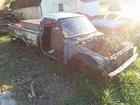
Im new to this page and im still figuring stuff out, how do I go about making a new thread? I wanna start a build thread of my 83 toyota pickup and can't seem to figure it out, if it helps any im using a phone not a desktop or laptop.
Jul 25, 2018 | 08:16 PM
#15

Thread
Thread Starter
Forum
Replies
Last Post
coffey50
Offroad Tech
17
Jul 28, 2015 10:55 AM


