Yotatech RSS Feed?
 Sep 13, 2005 | 11:21 AM
#1

Thread Starter
Registered User
Joined: Feb 2005
Posts: 1,059
Likes: 0
From: Ohio
Yotatech RSS Feed?
Does Yotatech allow RSS feeds from the site does anyone know? I would like to feed my buildup thread to my website if possible and link back here of course.
TIA guys, great job here
TIA guys, great job here
Dec 28, 2005 | 12:07 PM
#4

Registered User
Joined: Dec 2002
Posts: 9,048
Likes: 2
From: Seattleish, WA
Here's some babble Corey (and Christopher):Basically it's a system where the server would broadcast all new posts into a single feed. Anyone "subscribing" to the feed will see the new post immediately versus having to come to the site and look at posts in "batch mode" via the New Posts button.
Dec 28, 2005 | 12:24 PM
#5

Contributing Member
Joined: Oct 2002
Posts: 5,089
Likes: 0
From: Duvall, WA
Here's a thread on the Vbulletin site that talks about the modules that are available for Vbulletin.
http://www.vbulletin.com/forum/showthread.php?t=134222
Here's a quick and dirty explanation of RSS from "http://www.rssfeeds.com/".
What is RSS?
RSS is a mechanism used to distribute news content without depending on the browser or email client. Not everyone agrees precisely what RSS stands for, but “Really Simple Syndication” is a popular choice.
What are the advantages of RSS?
In general it means time savings because, thanks to RSS, you stay ahead of what’s new without having to browse every site you normaly visit. An RSS reader aggregates the content for you to view in one place, this saves time and brings you the content like when you're reading a newspaper with the advantage to view only headlines. You're in control of which articles you want to read.
RSS enabled sites
The following type of sites are typically now RSS-enabled;
- News services
- Databases
- many web logs (commonly called "blogs")
http://www.vbulletin.com/forum/showthread.php?t=134222
Here's a quick and dirty explanation of RSS from "http://www.rssfeeds.com/".
What is RSS?
RSS is a mechanism used to distribute news content without depending on the browser or email client. Not everyone agrees precisely what RSS stands for, but “Really Simple Syndication” is a popular choice.
What are the advantages of RSS?
In general it means time savings because, thanks to RSS, you stay ahead of what’s new without having to browse every site you normaly visit. An RSS reader aggregates the content for you to view in one place, this saves time and brings you the content like when you're reading a newspaper with the advantage to view only headlines. You're in control of which articles you want to read.
RSS enabled sites
The following type of sites are typically now RSS-enabled;
- News services
- Databases
- many web logs (commonly called "blogs")
Dec 28, 2005 | 12:27 PM
#6
Contributing Member
Joined: Oct 2002
Posts: 5,089
Likes: 0
From: Duvall, WA
Here's what the feed for CNN looks like.
http://rss.cnn.com/rss/cnn_topstories.rss
Now imagine that being collected with other feeds in a reader on your desktop. You can then click on the "headlines" that strike your fancy and read those threads/posts.
http://rss.cnn.com/rss/cnn_topstories.rss
Now imagine that being collected with other feeds in a reader on your desktop. You can then click on the "headlines" that strike your fancy and read those threads/posts.
Trending Topics
Dec 28, 2005 | 12:34 PM
#8
Contributing Member
Joined: Oct 2002
Posts: 5,089
Likes: 0
From: Duvall, WA
You need a reader or a browser that has a reader built into it. IE7 works and I imagine there is some sort of plugin for Firefox, but I don't use it, so I can't say for sure.
Otherwise, http://www.feedreader.com/ is a lightweight, free reader that works really well. But watch it, having all your news and forums in one place is addictive.
Otherwise, http://www.feedreader.com/ is a lightweight, free reader that works really well. But watch it, having all your news and forums in one place is addictive.
Dec 28, 2005 | 12:40 PM
#10

Co-Founder/Administrator
iTrader: (1)
Joined: May 2002
Posts: 32,242
Likes: 21
From: Auburn, Washington
Yeah, it looks like gibberish here
http://www.pnw4runners.com/temp/rss.jpg
I will have to get a reader and try it later to see how it looks.
I will look at the VB info too Rob.
http://www.pnw4runners.com/temp/rss.jpg
I will have to get a reader and try it later to see how it looks.
I will look at the VB info too Rob.
Dec 28, 2005 | 12:57 PM
#11
Registered User
Joined: Dec 2002
Posts: 9,048
Likes: 2
From: Seattleish, WA
Originally Posted by WATRD
You need a reader or a browser that has a reader built into it. IE7 works and I imagine there is some sort of plugin for Firefox, but I don't use it, so I can't say for sure.

Originally Posted by Corey
Yeah, it looks like gibberish here
http://www.pnw4runners.com/temp/rss.jpg
http://www.pnw4runners.com/temp/rss.jpg
Last edited by midiwall; Dec 28, 2005 at 12:58 PM.
Dec 28, 2005 | 12:59 PM
#13
Contributing Member
Joined: Oct 2002
Posts: 5,089
Likes: 0
From: Duvall, WA
Originally Posted by Corey
Yeah, it looks like gibberish here
http://www.pnw4runners.com/temp/rss.jpg
I will have to get a reader and try it later to see how it looks.
I will look at the VB info too Rob.
http://www.pnw4runners.com/temp/rss.jpg
I will have to get a reader and try it later to see how it looks.
I will look at the VB info too Rob.
And in the FeedReader stand alone reader, it looks like this; http://www.watrd.com/work/feedreader.jpg
Dec 28, 2005 | 01:00 PM
#14

Sponsor
Joined: Jul 2004
Posts: 9,173
Likes: 6
From: Puyallup WA.
Originally Posted by midiwall
Plugin? Peh! Firefox knows what to do on it's own!
That ain't gibberish Corey, that's a might purty RSS feed!
That ain't gibberish Corey, that's a might purty RSS feed!
what do you mean by firefox knows what to do on its own, i am using firefox and all i see it the code..
Dec 28, 2005 | 01:01 PM
#15
Contributing Member
Joined: Oct 2002
Posts: 5,089
Likes: 0
From: Duvall, WA
Originally Posted by midiwall
Plugin? Peh! Firefox knows what to do on it's own!
Dec 28, 2005 | 01:02 PM
#16
Registered User
Joined: Dec 2002
Posts: 9,048
Likes: 2
From: Seattleish, WA
Originally Posted by ToferUOP
how do i view it, when i open that link in either firefox or IE i just see the xml code.
http://rss.cnn.com/services/rss/
Then note that in the URL address field, there's an orange box with white lines in it. Click that and you get a drop list of "add" options.
The link that Rob posted is the first feed in that list, "Top Stories".
Last edited by midiwall; Dec 28, 2005 at 01:05 PM.
Dec 28, 2005 | 01:11 PM
#17

Contributing Member
Joined: Sep 2002
Posts: 1,610
Likes: 0
From: Mission, British Columbia
Sorry, you're right. I have had the RSS buttom show up on some websites next to the URL in the bar on top. I am not sure what happened here, maybe an earlier version of RSS?
But a quick search for rss extensions gave me this:
https://addons.mozilla.org/quicksear...cation=firefox
Don't know what happened, but I remember having a rss button show every so often. I'll keep an eye out.
But a quick search for rss extensions gave me this:
https://addons.mozilla.org/quicksear...cation=firefox
Don't know what happened, but I remember having a rss button show every so often. I'll keep an eye out.
Dec 28, 2005 | 01:18 PM
#18
Contributing Member
Joined: Sep 2002
Posts: 1,610
Likes: 0
From: Mission, British Columbia
Thanks Mark,
that's right, it is just that the icon changes with different themes. I was using the Noia extreme 2.0 theme and then the icon changes in some sort of a medal.
I remember reading about the rss button being moved up to the adress bar when I installed version FF 1.5. I temporarely changed back to the original theme and the orange symbol is back.
that's right, it is just that the icon changes with different themes. I was using the Noia extreme 2.0 theme and then the icon changes in some sort of a medal.
I remember reading about the rss button being moved up to the adress bar when I installed version FF 1.5. I temporarely changed back to the original theme and the orange symbol is back.
Dec 28, 2005 | 01:29 PM
#19
Registered User
Joined: Dec 2002
Posts: 9,048
Likes: 2
From: Seattleish, WA
Originally Posted by arjan
that's right, it is just that the icon changes with different themes...
One thing to do here before this turns into a FF vs IE7 war is to point out the differences between FF's and IE's internal support for RSS.
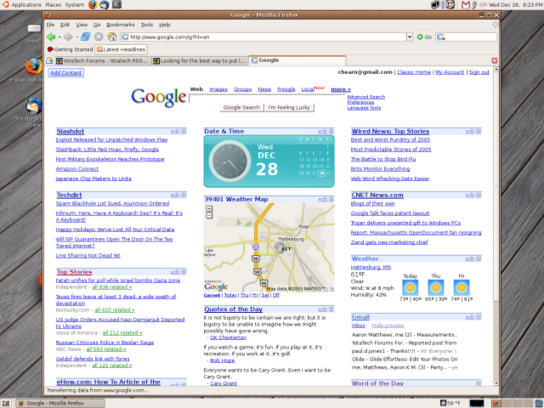
FF is based around a simple list of bookmarks which you can plop onto the Bookmarks toolbar. When you click it, you a list of the latest from the feed, you can click on one and get taken to the related page, or click the option to open them all in tabs. This bookmark list is automagically updated on a timed interval. FF calls this a "live bookmark". The result is this: