please post up gps pics
 May 23, 2006 | 06:32 PM
#21
Contributing Member
Joined: May 2006
Posts: 1,066
Likes: 0
From: Morgan Hill, Ca
Garmin Bean Bag solution
Originally Posted by Ric
Hey all,
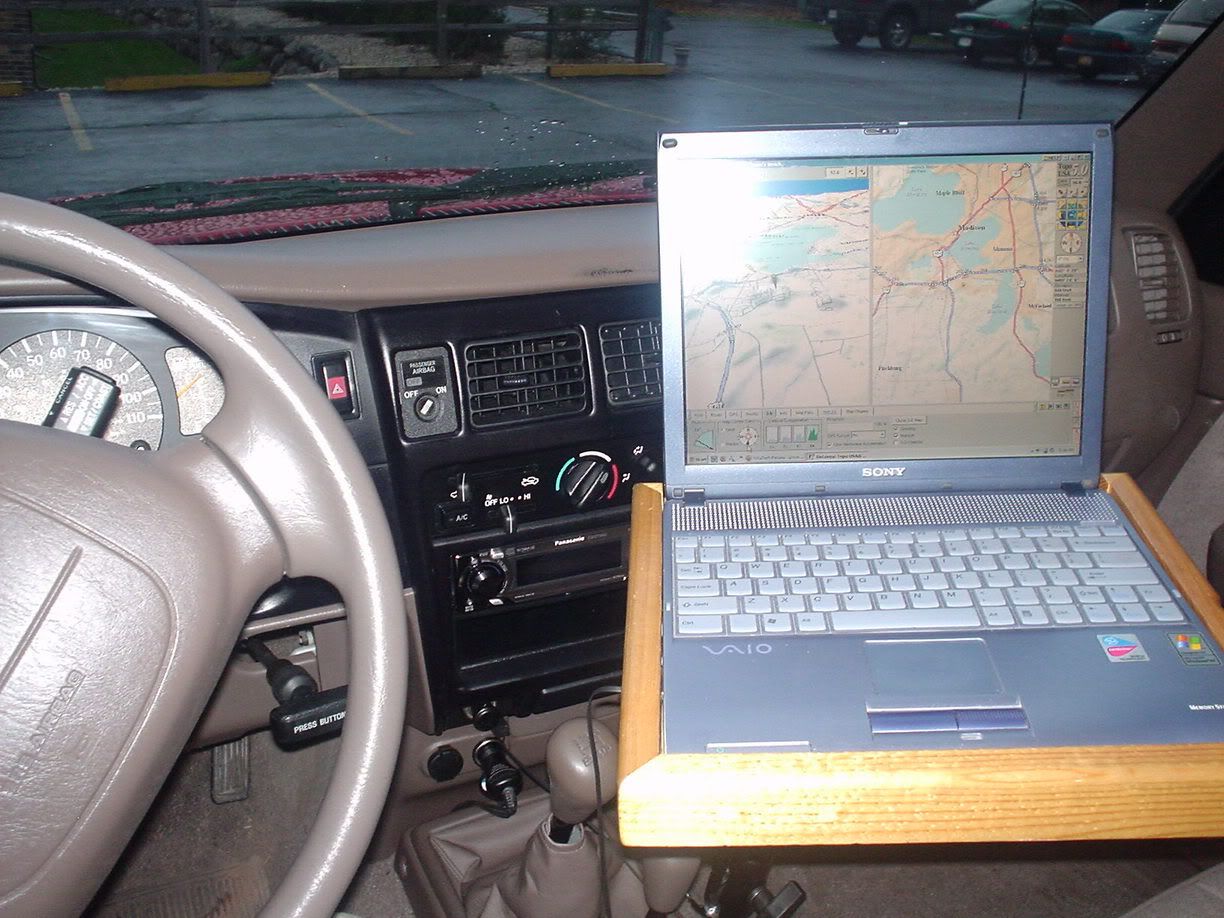
Id like to see pics of your GPS units, installed, or how you have them mounted when wheeling. oh, if ya can, post up where ya got the mounts.
Thankx in advanced.
Id like to see pics of your GPS units, installed, or how you have them mounted when wheeling. oh, if ya can, post up where ya got the mounts.
Thankx in advanced.
One reason I've gone to this, as I can easily move the device to the other Toyota. And no glueing or drilling the dash.
How do you insert images... only way I could find was to attach the two files.. which is not as useful.


.jpg)

 May 24, 2006 | 09:45 PM
#25

Contributing Member
Joined: Jan 2004
Posts: 231
Likes: 0
From: N39 32.872 W104 58.755
RAM all the way. Pro-Fits are nice and look good, but if you want to mount a *REAL* GPSr (i.e. one that has a screen big enough to read at arms length, has mapping, auto routing, memory, ext. ant., and has just enough bells and whistles to make it worth while) skip the Pro-Fit, they vibrate like hell with the weight of a large unit on them when traveling rough roads. Makes it hard to read the screen.
I keep the 301 on the Pro-fit to keep it handy and so it has some view of the birds. I can't read the tiny screen while driving, but having it running makes for fast TTF when I stop and get out to hike or look for a geocache.

GPS V is mounted in front of the map light. Close enough to read the screen, yet far enough away so I don't crack my head on it.


Wires are run from the unit to behind the rear view, then through the headliner to the pass. A pillar. The power and data cable run down the A pillar to the glove box. I can plug in a PDA, running mapping software, in the glove box. The ant. coax runs across the headliner to the 3rd brake light "bubble" on the back of the cab roof. The ant. hides under the brake light bubble.
I keep the 301 on the Pro-fit to keep it handy and so it has some view of the birds. I can't read the tiny screen while driving, but having it running makes for fast TTF when I stop and get out to hike or look for a geocache.
GPS V is mounted in front of the map light. Close enough to read the screen, yet far enough away so I don't crack my head on it.
Wires are run from the unit to behind the rear view, then through the headliner to the pass. A pillar. The power and data cable run down the A pillar to the glove box. I can plug in a PDA, running mapping software, in the glove box. The ant. coax runs across the headliner to the 3rd brake light "bubble" on the back of the cab roof. The ant. hides under the brake light bubble.
May 24, 2006 | 10:25 PM
#27
Contributing Member
Joined: Jan 2004
Posts: 231
Likes: 0
From: N39 32.872 W104 58.755
Yea, the V has an active ant. hidden under the dome on the roof for the 3rd brake light.
Wait till you see the solution I came up with for the 4Runner
*edit* Both Minnesota and California just passed a law that bans suction cup mounts on the windshield. Word on the street is Colorado will pass one soon too.
Wait till you see the solution I came up with for the 4Runner
*edit* Both Minnesota and California just passed a law that bans suction cup mounts on the windshield. Word on the street is Colorado will pass one soon too.
Last edited by Jake94; May 24, 2006 at 10:51 PM.
May 25, 2006 | 05:18 AM
#29

Registered User
Joined: Dec 2002
Posts: 4,655
Likes: 0
From: Idaho
I use the Garmin suction cup mount, I can read it when driving, it never looses signal, and doesnt vibrate as long as the GPS is touching the dash. Its also small enough it doesnt block my view at all. The GPS is a eTrex Vista C.


May 25, 2006 | 07:15 PM
#30
Contributing Member
Joined: Jan 2004
Posts: 231
Likes: 0
From: N39 32.872 W104 58.755
Originally Posted by Ric
:bounce2: lets see, lets see...
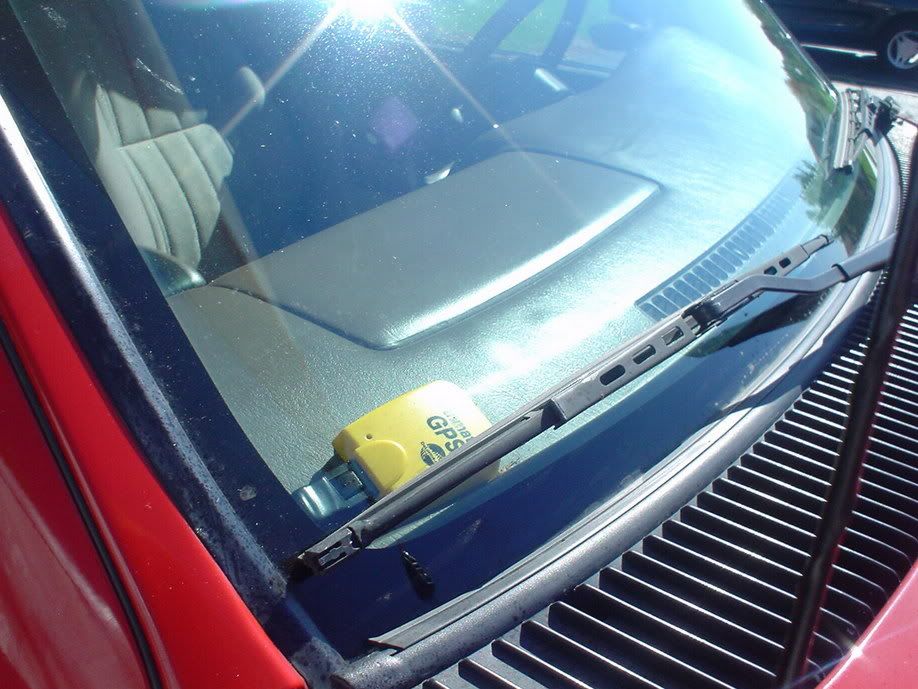
Here's a tease

For your antenna, why not get a mag mount ant. take the magnetic base off and mount it directly to a bracket that can be attached to the upper front bar of your Yak Rack with some snap-a-rounds?
May 25, 2006 | 08:45 PM
#31

Thread Starter
Banned - User requested
Joined: Feb 2003
Posts: 3,496
Likes: 0
From: earth
you'll probably be one of the 1st to see it up and running
For your antenna, why not get a mag mount ant. take the magnetic base off and mount it directly to a bracket that can be attached to the upper front bar of your Yak Rack with some snap-a-rounds?
 May 29, 2006 | 10:55 AM
#35
Thread Starter
Banned - User requested
Joined: Feb 2003
Posts: 3,496
Likes: 0
From: earth
what programs are people running for Topo maps ? Ive found a few that "say" they are free, lol, I dont buying something, if its what i want/need of corse this will need to be newbie friendly, lol
May 30, 2006 | 12:31 AM
#36

Registered User
Joined: Dec 2003
Posts: 1,526
Likes: 0
From: N37 39* W122 3*
i recently picked up delorme's TOPO 6. good improvement over TOPO 5 (and 4 and 3, IIRC...lol...).
for streets, i just picked up micrsoft's STREETS and TRIPS for $35 at costco with a $20 rebate.
i wish they come with a birdseye view though. maybe next version.
i also picked delorme's STREET ATLAS since it was on sale at frys. but i really prefer the interface of S&T...
for streets, i just picked up micrsoft's STREETS and TRIPS for $35 at costco with a $20 rebate.
i wish they come with a birdseye view though. maybe next version.
i also picked delorme's STREET ATLAS since it was on sale at frys. but i really prefer the interface of S&T...
May 30, 2006 | 09:36 AM
#38
Registered User
Joined: Dec 2003
Posts: 1,526
Likes: 0
From: N37 39* W122 3*
i HAD the NG topo map too. a loooooooong time ago. all they did was scan in the maps.
too me, that was too "messy" for a look. i'm sure a million other people disagree with me.
been a gps owner since 95, and i have gone through too many software packages... even on a mac powerbook circa 1996-07... that was my only laptop avaiable then. and the interfaces... oh boy...
too me, that was too "messy" for a look. i'm sure a million other people disagree with me.
been a gps owner since 95, and i have gone through too many software packages... even on a mac powerbook circa 1996-07... that was my only laptop avaiable then. and the interfaces... oh boy...