


what happened ???

 Jun 2, 2014 | 06:18 PM
#2

Registered User
Joined: Jan 2008
Posts: 11,338
Likes: 120
From: Austin, Texas
Here you go. Bookmark this and never go to the home page again.
https://www.yotatech.com/search.php?do=getnew

https://www.yotatech.com/search.php?do=getnew


 Jun 4, 2014 | 11:50 PM
#4

Co-Founder/Administrator
iTrader: (1)
Joined: May 2002
Posts: 32,242
Likes: 21
From: Auburn, Washington
There is a thread in the announcement section.
Tech is working on bringing it back, I do not know why it was taken out in the first place.
Plus there is a workaround in my thread here.
https://www.yotatech.com/forums/f121...s-link-280966/
Tech is working on bringing it back, I do not know why it was taken out in the first place.
Plus there is a workaround in my thread here.
https://www.yotatech.com/forums/f121...s-link-280966/
Jun 8, 2014 | 10:44 AM
#5
Registered User
Joined: Jan 2007
Posts: 6,106
Likes: 27
I stepped out for a little while. Came back and was like WTF is going on here? Is my computer screwed up again or something? Why does the screen keep halving itself? And where's all the stuff missing from the home page. Then I logged in and found out where all the things I couldn't find went. You just have to log in to get a bunch of stuff to even show up so you can get anywhere fast now. Which sucks. But whatever, I'll get used to it I guess. Poor non-members though, they probably can't figure out how to use the site at all anymore. Which is dumb. And I still can't figure out what the deal is with everything on the screen suddenly getting squished over to the left half. That keeps happening on a random basis now. Figured out that refreshing(right click Refresh) is the quickest/easiest way to fix that. At first I thought it was on my end, like one of my PCs was acting up. But it's happened on 2 different computers of mine now. And that never happened before these recent changes either. That's for sure. So...what's up with that?
Why is change never for the better?
Why is change never for the better?
Jun 8, 2014 | 10:49 AM
#6

Registered User
Joined: Jan 2011
Posts: 1,051
Likes: 0
From: Memphis, TN
I stepped out for a little while. Came back and was like WTF is going on here? Is my computer screwed up again or something? Why does the screen keep halving itself? And where's all the stuff missing from the home page. Then I logged in and found out where all the things I couldn't find went. You just have to log in to get a bunch of stuff to even show up so you can get anywhere fast now. Which sucks. But whatever, I'll get used to it I guess. Poor non-members though, they probably can't figure out how to use the site at all anymore. Which is dumb. And I still can't figure out what the deal is with everything on the screen suddenly getting squished over to the left half. That keeps happening on a random basis now. Figured out that refreshing(right click Refresh) is the quickest/easiest way to fix that. At first I thought it was on my end, like one of my PCs was acting up. But it's happened on 2 different computers of mine now. And that never happened before these recent changes either. That's for sure. So...what's up with that? Why is change never for the better?
Trending Topics
 Jun 9, 2014 | 09:05 AM
#10


Corey helped me out with this last week. That was basically the only button I used on the YT interface and was confused as well.
You have 2 options to get that feature back:
1) drop down menu under your user name in upper right.
2) bottom left corner of YT page has a "style chooser". change this to something like "YT Extreme w/mud" and you'll get the button back.
You have 2 options to get that feature back:
1) drop down menu under your user name in upper right.
2) bottom left corner of YT page has a "style chooser". change this to something like "YT Extreme w/mud" and you'll get the button back.
Jun 13, 2014 | 11:28 AM
#12

Registered User
Joined: Sep 2011
Posts: 1,463
Likes: 3
From: monroe nc
yea i would like to have the todays posts back too.
if you search "todays posts" in the search function you do not have all of todays posts.
i liked the link that showed all the posts in the last 24 hours.
if you search "todays posts" in the search function you do not have all of todays posts.
i liked the link that showed all the posts in the last 24 hours.
Jun 14, 2014 | 06:44 AM
#15

Registered User
Joined: Dec 2011
Posts: 1,388
Likes: 8
From: CA, Until TSHTF!
Agreed, that was a good thing to have, it would be nice to have it back.
Jun 21, 2014 | 03:00 PM
#17

Registered User


Joined: Mar 2012
Posts: 7,124
Likes: 681
Search Button Does Not Return Specific Posts
Hi Corey and admins,
Somehow, when I used the search button as shown below, it does not return "specific" posts.
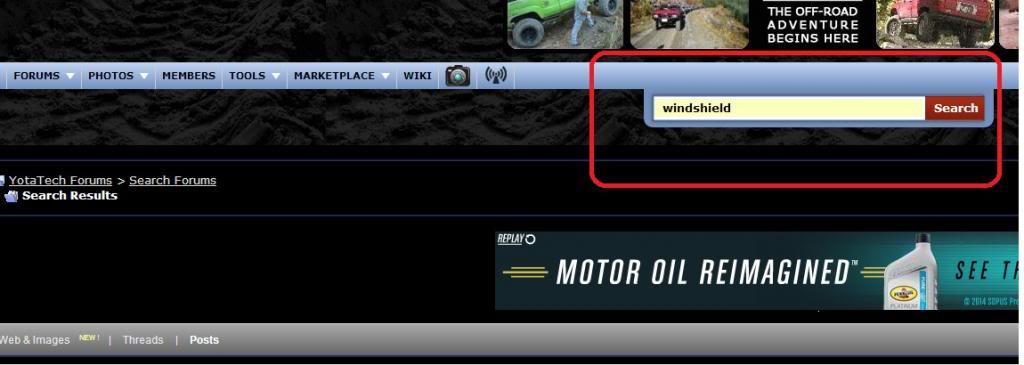
For example, I need to find windshield-specific posts so I enter "windshield" then I get these results, none of which even has "windshield" in their titles.
Reason for searching "windshield" is to find what OEM brand is used for first-gen 4Runner windshield. For example, Honda's use AP tech brand.
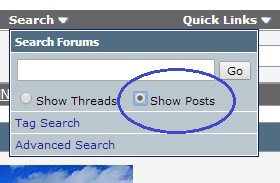
IIRC, there used to be a search function where one specifies "Show Posts" similar to this one:
TIA
Somehow, when I used the search button as shown below, it does not return "specific" posts.
For example, I need to find windshield-specific posts so I enter "windshield" then I get these results, none of which even has "windshield" in their titles.
Reason for searching "windshield" is to find what OEM brand is used for first-gen 4Runner windshield. For example, Honda's use AP tech brand.
IIRC, there used to be a search function where one specifies "Show Posts" similar to this one:
TIA
Last edited by RAD4Runner; Jun 21, 2014 at 03:05 PM.
Jun 22, 2014 | 05:39 AM
#20

Contributing Member
Joined: Nov 2010
Posts: 5,125
Likes: 4
From: Columbia River Gorge, Oregon...east side
The Dyslexic Friendly style seems to be the only style with Search options that RAD4Runner mentions above. We need this Search option added back to all the styles. IMO.
Update: There is a round-about way to get to the longer search..... Click on New Posts under User Name in upper right and then click on the Search Forums i.e. YotaTech Forums > Search Forums after New Posts loads.
Link: https://www.yotatech.com/search.php
Update: There is a round-about way to get to the longer search..... Click on New Posts under User Name in upper right and then click on the Search Forums i.e. YotaTech Forums > Search Forums after New Posts loads.
Link: https://www.yotatech.com/search.php
Last edited by rworegon; Jun 22, 2014 at 07:57 AM.


