


Speakers for laptop
 Sep 25, 2005 | 08:37 AM
#1

Thread Starter
Contributing Member
Joined: Jul 2003
Posts: 9,076
Likes: 1
From: Orlando, FL
Speakers for laptop
OK guys, I'm spoiled with my desktop speaker setup but I need to try and get the best quality out of my laptop because its in a different room than my desktop and I do all my homework on my laptop and I HAVE to have music while I do homework.
On my desktop I've got the Klipsch 5.1 setup with an additional woofer so there's no problem there. I found a Klipsch 2.0 setup thats 30W total and also found an Altec Lansing 12W setup that seems like it may not be as powerful but might be more clear.
If you have had any experience with either of these let me know, please recommend other ones to look at. Pretty much anything under $100 is fine, if its over go ahead and show me and I'll look at it. My only criteria is that the only port that I have on my laptop is my headphone jack so I can't have a 2.1 system due to the need for dual hookups. I've been looking to see if I can get a Soundblaster card for my laptop but haven't had any luck with that...so.
Post away guys!
Here are links to the two systems I've been looking at:
Altec Lansing-
http://www.newegg.com/Product/Produc...82E16836113150
Klipsch-
http://www.newegg.com/Product/Produc...82E16836119107
Here's a comparison page for the two-
http://www.newegg.com/Product/Produc...SubCategory=60
Let me know what you guys think!
Fink
On my desktop I've got the Klipsch 5.1 setup with an additional woofer so there's no problem there. I found a Klipsch 2.0 setup thats 30W total and also found an Altec Lansing 12W setup that seems like it may not be as powerful but might be more clear.
If you have had any experience with either of these let me know, please recommend other ones to look at. Pretty much anything under $100 is fine, if its over go ahead and show me and I'll look at it. My only criteria is that the only port that I have on my laptop is my headphone jack so I can't have a 2.1 system due to the need for dual hookups. I've been looking to see if I can get a Soundblaster card for my laptop but haven't had any luck with that...so.
Post away guys!
Here are links to the two systems I've been looking at:
Altec Lansing-
http://www.newegg.com/Product/Produc...82E16836113150
Klipsch-
http://www.newegg.com/Product/Produc...82E16836119107
Here's a comparison page for the two-
http://www.newegg.com/Product/Produc...SubCategory=60
Let me know what you guys think!
Fink
Sep 25, 2005 | 08:59 AM
#2

Registered User
Joined: Feb 2005
Posts: 895
Likes: 0
From: thunder bay, ontario
klipsch are definetely better, I've never seen a good set of Altec Lansings, they've always had a flaw here or there... i use a 4.1 set of speakers with mine, i just plug in a simple Y-adapter first. although it seems like 4.1 is harder and harder to find... you could get a 5.1 set and just not plug in the center speaker. 

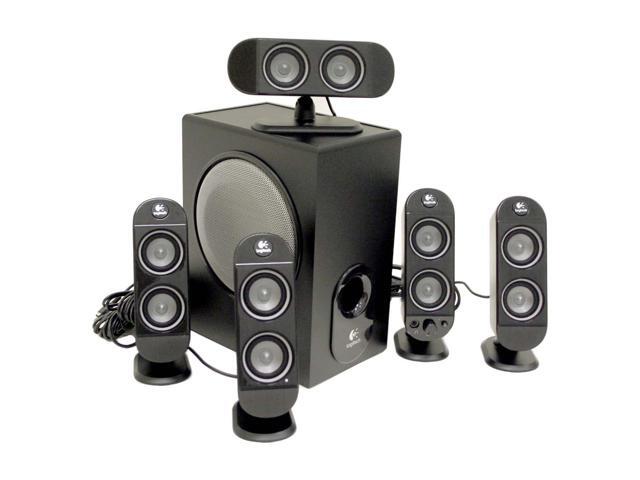
This set of Logitech's are actualy cheaper then both the 2.1's you have picked out, offer higher SnR, better frequency range and more power. (even if you leave 1 speaker unplugged) I'll vouche for Logitech's quality... crisp and clean, with a thunderous bass.
http://www.newegg.com/Product/Produc...82E16836121118
just my .02.
(oh, and to anyone that thinks 70watts isn't that much, my set of 40watt Logitech speakers are insanley loud, when they're cranked you can't hear the person next to you.)
This set of Logitech's are actualy cheaper then both the 2.1's you have picked out, offer higher SnR, better frequency range and more power. (even if you leave 1 speaker unplugged) I'll vouche for Logitech's quality... crisp and clean, with a thunderous bass.
http://www.newegg.com/Product/Produc...82E16836121118
just my .02.
(oh, and to anyone that thinks 70watts isn't that much, my set of 40watt Logitech speakers are insanley loud, when they're cranked you can't hear the person next to you.)
Last edited by green91runner; Sep 25, 2005 at 09:04 AM.
Sep 25, 2005 | 09:01 AM
#3

Contributing Member
Joined: Dec 2003
Posts: 4,586
Likes: 1
From: Richland, Washington
Since you said "I'd like to spend around 100.00 but if you have any other suggestions post away", so this is my suggestion. My assistant trainer purchased these speakers and all I can say is WOW! I have a really crappy set of radio shack speakers and am saving every penny on the side to get a set of these or maybe the next step up since my computer is my stereo as well. They're 2.5x as much as your looking at, but I haven't heard any speakers that sound as good.

link
link
Sep 25, 2005 | 09:18 AM
#4
Registered User
Joined: Feb 2005
Posts: 895
Likes: 0
From: thunder bay, ontario
those are pretty slick EWAY, a lil pricey but slick... thought i'd look up the specs, but I can't find them. no power rating, snr ratio, frequency response, anything... only thing they give is the dimensions. seems like bose is so comfortable as to their rep that they don't feel the need to release that information, not even in the owner's manual. weird... 
Sep 25, 2005 | 09:34 AM
#6
Thread Starter
Contributing Member
Joined: Jul 2003
Posts: 9,076
Likes: 1
From: Orlando, FL
green91:
With that Y-adapter is it pretty clear, I would think the two signals would mess with eachother and the bass would be scrambled. If not then that would solve all my problems and I would get the Klipsh 2.1 setup.
I just found a PCMCIA Audgy 2 card from Creative, take a look and see what you think. If that y-adapter really does work then there's no reason to spend the 90 bucks on a sound card and then the additonal cash on some speakers, so..let me know what you guys think.
Thanks for all the links and suggestions, keep em coming. I really hope that y-adapter solves my problems!
Fink
With that Y-adapter is it pretty clear, I would think the two signals would mess with eachother and the bass would be scrambled. If not then that would solve all my problems and I would get the Klipsh 2.1 setup.
I just found a PCMCIA Audgy 2 card from Creative, take a look and see what you think. If that y-adapter really does work then there's no reason to spend the 90 bucks on a sound card and then the additonal cash on some speakers, so..let me know what you guys think.
Thanks for all the links and suggestions, keep em coming. I really hope that y-adapter solves my problems!
Fink
Sep 25, 2005 | 10:00 AM
#7

Co-Founder/Administrator
iTrader: (1)
Joined: May 2002
Posts: 32,242
Likes: 22
From: Auburn, Washington
Have you thought about headphones?
I do not have a write-up yet of the ones I have, but I did post a small review of them over at DSL Reports hardware review forum.
For $20 they kick some major booty.
I do not have a write-up yet of the ones I have, but I did post a small review of them over at DSL Reports hardware review forum.
For $20 they kick some major booty.
Trending Topics
Sep 25, 2005 | 11:34 AM
#10
Co-Founder/Administrator
iTrader: (1)
Joined: May 2002
Posts: 32,242
Likes: 22
From: Auburn, Washington
Originally Posted by 4x4Fink
Corey, do you have the Audigy 2 for your laptop?
Fink
Fink
It just has built in sound I think, or an elcheapo soundcard.
I only use the laptop for the webadmin page of UT2004 to make changes to the server when gaming on it.
Sep 25, 2005 | 12:39 PM
#11

Registered User
Joined: Jan 2003
Posts: 4,087
Likes: 1
From: Hattiesburg, MS
Definitely get the Audigy 2 PCMCIA. I don't have it, but I've seen it. That's the best thing you can do for sound on your laptop. Then as far as the speakers go, that's your own personal preference.
Sep 25, 2005 | 03:51 PM
#13
Registered User
Joined: Feb 2005
Posts: 895
Likes: 0
From: thunder bay, ontario
personally.. if you're just listening to music I think it's a waste of money, however if you're going to be editing and so forth, then definetely get it. the onboard sound will be fine for $50-100 speakers.
 Sep 26, 2005 | 08:12 PM
#17
Thread Starter
Contributing Member
Joined: Jul 2003
Posts: 9,076
Likes: 1
From: Orlando, FL
Well I've got a desktop that has the Klipsch 5.1 system converted to a 5.2 on it but I don't ever do my homework on that since I take my laptop to class everyday so...I just want some music to do homework to and stuff. Sounds like its a worthwhile investment though, I just hope it doesnt get in the way when I try to transport it to and from school.
Thanks for the input, I'll probably be ordering it and then some Klipsch 2.1's! I'm pumped now!
Thanks again,
Fink
Thanks for the input, I'll probably be ordering it and then some Klipsch 2.1's! I'm pumped now!
Thanks again,
Fink
Sep 27, 2005 | 08:19 PM
#18
Registered User
Joined: Feb 2005
Posts: 895
Likes: 0
From: thunder bay, ontario
if you're getting the audigy 2, then why are you still only getting 2.1s?? i know you have klipsch already, but honestly, when you're on the low end like that, and just looking at the specs, logitech makes a better product. just my .02 again. either way you go you'll have music, just a matter of how costly that music is...
i know you have klipsch already, but honestly, when you're on the low end like that, and just looking at the specs, logitech makes a better product. just my .02 again. either way you go you'll have music, just a matter of how costly that music is...
Sep 28, 2005 | 05:16 AM
#19

Senior Member
Joined: Jun 2002
Posts: 1,896
Likes: 0
From: Arkansas
Are these the ones you're going to buy?
http://www.amazon.com/gp/product/B00...72282&v=glance
If so, then these rock. Sound quality is excellent and you can crank these bad boys up pretty loud. I have a set of these and they're quite loud. I love em.
http://www.amazon.com/gp/product/B00...72282&v=glance
If so, then these rock. Sound quality is excellent and you can crank these bad boys up pretty loud. I have a set of these and they're quite loud. I love em.
Sep 28, 2005 | 10:30 AM
#20
Thread Starter
Contributing Member
Joined: Jul 2003
Posts: 9,076
Likes: 1
From: Orlando, FL
Yup those are the ones I'm looking at.
green91:
There is no point in getting anything bigger than the 2.1 since I have nowhere to mount the satellite speakers. Plus, if I want that sound I'll just go on my desktop and do it. On a side note, if you are a serious audiophile and like to watch movies and listen to really cool music demos in Dolby Digital then I would definitely recommend the Klipsch 5.1 with an additional woofer, its amazing the clarity it gives. The bass is massively strong yet if you use a good equalizer the highs and mids are crystal clear.
Anyway, yeah Data...those are the ones, I love Klipsch!
Fink
green91:
There is no point in getting anything bigger than the 2.1 since I have nowhere to mount the satellite speakers. Plus, if I want that sound I'll just go on my desktop and do it. On a side note, if you are a serious audiophile and like to watch movies and listen to really cool music demos in Dolby Digital then I would definitely recommend the Klipsch 5.1 with an additional woofer, its amazing the clarity it gives. The bass is massively strong yet if you use a good equalizer the highs and mids are crystal clear.
Anyway, yeah Data...those are the ones, I love Klipsch!
Fink


