


Overclocked temps
 Jan 9, 2005 | 10:48 AM
#1

Thread Starter
Co-Founder/Administrator
iTrader: (1)
Joined: May 2002
Posts: 32,242
Likes: 21
From: Auburn, Washington
Overclocked temps
I have the Intel 2.4c chip that runs at 800 FSB.
I run it all the time overclocked to 2.88 GHz with no problems.
I was on Newegg's site earlier, and I see they have it dirt cheap right now.
Was reading the reviews of it, and many have been successful overclocking it to 3 GHz and above.
I decided to crank mine up in the BIOS for my Asus P4P800 motherboard to 3.12 GHz and recorded the temps at idle for both 2.88 and 3.12 GHz.
Intel 2.4 C 800 FSB chip on an Asus P4P800 mother board
Temps below are at an idle with no loads.
At 2.88 GHz:
CPU temp is 27c
System is 30c
CPU fan is 2700 RPM
Power fan is 2743 RPM
Chassis fan is 2812 RPM
At 3.12 GHz
CPU temp is 26c
System is 30c
CPU fan is 2721 RPM
Power fan is 2743 RPM
Chassis fan is 2789 RPM
As you can see, the temps remained pretty much the same for both 2.88 and 3.12 GHz.
I tested the system further by firing up Halflife 2 multiplayer and played a game with a few others for 30 minutes.
Here are the results.
At 3.12 GHz
CPU temp is 30c
System is 34c
CPU fan is 2700 RPM
Power fan is 2743 RPM
Chassis fan is 2812 RPM
It creeped up a little bit, but nothing to be worried about.
This is with the stock Intel fan unit too on the CPU.
I could lower it further with a good aftermarket fan and Artic Silver paste compound.
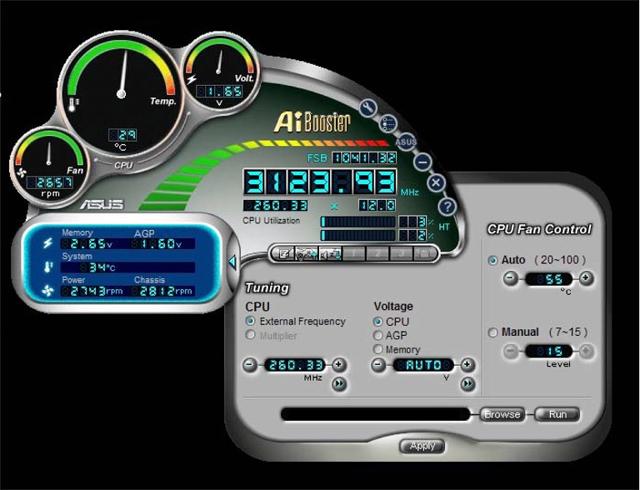
Above temps are after playing the game.
That is a utility from Asus that works with my mobo, and you can also overclock the PCs CPU and memory right from Windows instead of the BIOS.
If anyone is looking to build a good gaming rig on the cheap right now, that is a very good price on the CPU, and I am sure you can still pick up the P4P800 mobo for a good price from Newegg too.
When I get my new case later this year, I was going to buy a 3.0 or 3.2 CPU, but I may just get the same one I have now and overclock it, and put the current CPU back into the old tower.
This way I will have to fast gaming rigs here.
The PIII 500 in the other room will not play the current crop of games out this year.
It is still good though for Unreal and Quake III.
Just thought I would pass along this info for someone thinking about building a gaming rig for low bucks.
Just add a good soundcard and graphics card, and you would have a great gaming rig.
I run it all the time overclocked to 2.88 GHz with no problems.
I was on Newegg's site earlier, and I see they have it dirt cheap right now.
Was reading the reviews of it, and many have been successful overclocking it to 3 GHz and above.
I decided to crank mine up in the BIOS for my Asus P4P800 motherboard to 3.12 GHz and recorded the temps at idle for both 2.88 and 3.12 GHz.
Intel 2.4 C 800 FSB chip on an Asus P4P800 mother board
Temps below are at an idle with no loads.
At 2.88 GHz:
CPU temp is 27c
System is 30c
CPU fan is 2700 RPM
Power fan is 2743 RPM
Chassis fan is 2812 RPM
At 3.12 GHz
CPU temp is 26c
System is 30c
CPU fan is 2721 RPM
Power fan is 2743 RPM
Chassis fan is 2789 RPM
As you can see, the temps remained pretty much the same for both 2.88 and 3.12 GHz.
I tested the system further by firing up Halflife 2 multiplayer and played a game with a few others for 30 minutes.
Here are the results.
At 3.12 GHz
CPU temp is 30c
System is 34c
CPU fan is 2700 RPM
Power fan is 2743 RPM
Chassis fan is 2812 RPM
It creeped up a little bit, but nothing to be worried about.
This is with the stock Intel fan unit too on the CPU.
I could lower it further with a good aftermarket fan and Artic Silver paste compound.
Above temps are after playing the game.
That is a utility from Asus that works with my mobo, and you can also overclock the PCs CPU and memory right from Windows instead of the BIOS.
If anyone is looking to build a good gaming rig on the cheap right now, that is a very good price on the CPU, and I am sure you can still pick up the P4P800 mobo for a good price from Newegg too.
When I get my new case later this year, I was going to buy a 3.0 or 3.2 CPU, but I may just get the same one I have now and overclock it, and put the current CPU back into the old tower.
This way I will have to fast gaming rigs here.
The PIII 500 in the other room will not play the current crop of games out this year.
It is still good though for Unreal and Quake III.
Just thought I would pass along this info for someone thinking about building a gaming rig for low bucks.
Just add a good soundcard and graphics card, and you would have a great gaming rig.
 Jan 9, 2005 | 12:30 PM
#3
Thread Starter
Co-Founder/Administrator
iTrader: (1)
Joined: May 2002
Posts: 32,242
Likes: 21
From: Auburn, Washington
You are welcome Wade.
I just checked the temps again, and they are low, just like above in the idle example for 3.12.
I am going to leave it at 3.12 this week and see how it goes.
I guess this 2.4c chip responds very well to overclocking according to the reviews at Newegg.
I just checked the temps again, and they are low, just like above in the idle example for 3.12.
I am going to leave it at 3.12 this week and see how it goes.
I guess this 2.4c chip responds very well to overclocking according to the reviews at Newegg.
Jan 10, 2005 | 06:15 AM
#4

Registered User
Joined: Jul 2004
Posts: 1,969
Likes: 1
From: Canada
My overclocked Cleron 1000 is running at 2.15 gig (A little more that double the speed) My CPU Runs at a max temp of 32. I have an artic fan on the CPU, a 5 1/4" bay fan, a PCI slot fan, 4 Case fans, And modded my power supply to have two fans in it aswell.
I have also upgragded the cooling fins on fan on the motherboard chipset's and video card, and added cooling fins to the memory sticks
My PC is a big wind tunnel
I have also upgragded the cooling fins on fan on the motherboard chipset's and video card, and added cooling fins to the memory sticks
My PC is a big wind tunnel
Jan 10, 2005 | 08:43 AM
#5

Registered User
Joined: Jan 2003
Posts: 4,087
Likes: 1
From: Hattiesburg, MS
Corey -
Definitely get the Artic Silver. Makes a noticeable difference. I upgraded the processor in my laptop from a 1.6 to a 2.4, adding the Artic Silver while I went. My temps didn't change, which is pretty good for almost a gigahertz increase in processing power.
Definitely get the Artic Silver. Makes a noticeable difference. I upgraded the processor in my laptop from a 1.6 to a 2.4, adding the Artic Silver while I went. My temps didn't change, which is pretty good for almost a gigahertz increase in processing power.
 Jan 10, 2005 | 01:19 PM
#7
Registered User
Joined: Jan 2003
Posts: 4,087
Likes: 1
From: Hattiesburg, MS
Trending Topics
Jan 10, 2005 | 02:32 PM
#8
Thread Starter
Co-Founder/Administrator
iTrader: (1)
Joined: May 2002
Posts: 32,242
Likes: 21
From: Auburn, Washington
Originally Posted by 4Hummer
I have also upgragded the cooling fins on fan on the motherboard chipset's and video card, and added cooling fins to the memory sticks
My PC is a big wind tunnel
My PC is a big wind tunnel
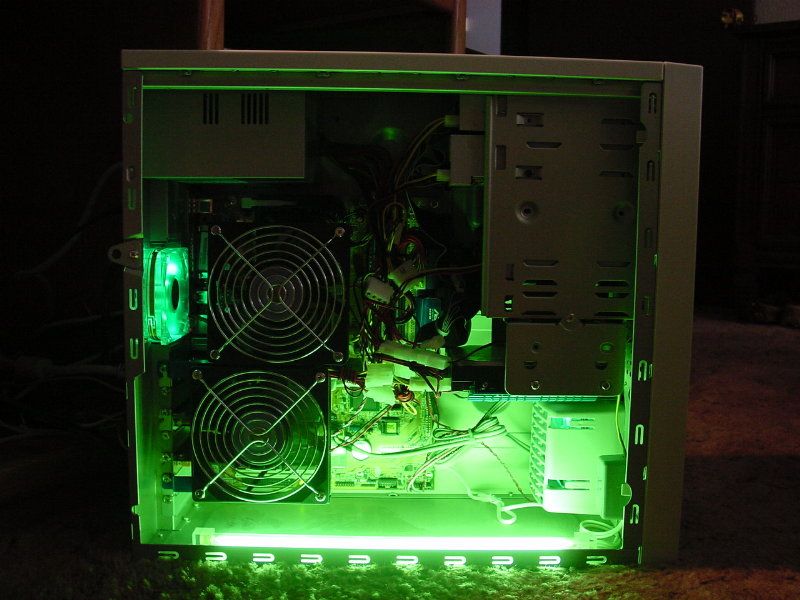
That big dual fan setup blows right on all of the cards.
It added very little noise to the case too.
Chris, I will get some Artic Silver for sure.
Red, Asus mobos are the king of overclocking, and make it a cinch right from the BIOS, or from that utility as seen in the above pics in a few posts above.
I personaly OC it from the Asus Bios instead of that utility.
I have not even played around with overclocking my memory, doing just the CPU is enough and sometimes the GPU.

Thread
Thread Starter
Forum
Replies
Last Post
coryc85
86-95 Trucks & 4Runners
27
Dec 5, 2015 08:42 AM


