


Need new router
 Dec 5, 2004 | 07:01 AM
#1

Thread Starter
Co-Founder/Administrator
iTrader: (1)
Joined: May 2002
Posts: 32,242
Likes: 21
From: Auburn, Washington
Need new router
I have a Netgear RP614 router which I bought about 4 or 5 years ago, give or take a year.
It is not wireless.
It has been a very good router and very easy to configure games as in opening up ports as seen here.
As of the past few months the connection will freeze up for a few seconds to a minute sometimes.
Latest firmware is loaded.
From reading reviews of this router online, it is a common problem with this model, and I am surprised I got this many years out of it.
Netgear makes the metal blue business routers which are of a higher quality, but from what I hear they suck at the interface for opening up ports to game play.
I am currently looking at the Netgear WGT624 wireless model.
They make another model called the WGU624, but online reviews says it has connection problems like my model does.
However the WGT624 gets rave reviews over at NewEgg with 33 reviews.
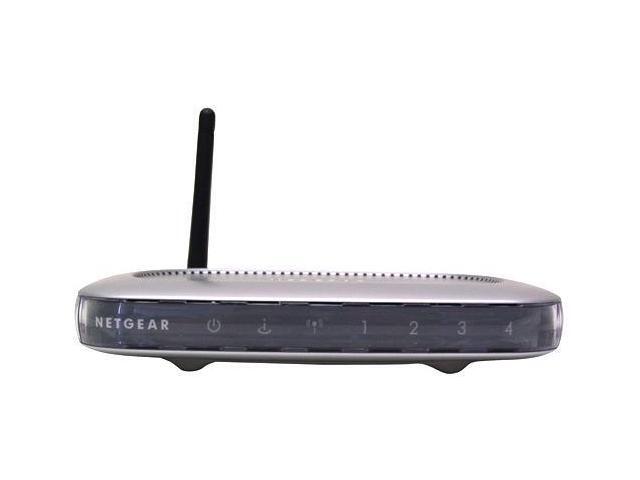
I would assume it has the same easy interface for port forwarding so you can let other users online join in your games while letting them past the built in firewall.
Does anyone here have this model, and if so, would you recommend it?
I plan on still using cat 5 cable to hook up my two desktops to it, but the laptop will be getting a wireless card so I can take advantage of it being wireless so I can sit out on the porch or in the living room and be online.
A few of us played Unreal last night, and I had to disconnect the router since it is acting up.
Also I did some speed tests over at DSL Reports, and I get the 3.0 MB cap that Comcast has us on.
With the router hooked up, it falls back to around 2.4 to 2.6, so I know the router is at fault.
It is not wireless.
It has been a very good router and very easy to configure games as in opening up ports as seen here.
As of the past few months the connection will freeze up for a few seconds to a minute sometimes.
Latest firmware is loaded.
From reading reviews of this router online, it is a common problem with this model, and I am surprised I got this many years out of it.
Netgear makes the metal blue business routers which are of a higher quality, but from what I hear they suck at the interface for opening up ports to game play.
I am currently looking at the Netgear WGT624 wireless model.
They make another model called the WGU624, but online reviews says it has connection problems like my model does.
However the WGT624 gets rave reviews over at NewEgg with 33 reviews.
I would assume it has the same easy interface for port forwarding so you can let other users online join in your games while letting them past the built in firewall.
Does anyone here have this model, and if so, would you recommend it?
I plan on still using cat 5 cable to hook up my two desktops to it, but the laptop will be getting a wireless card so I can take advantage of it being wireless so I can sit out on the porch or in the living room and be online.
A few of us played Unreal last night, and I had to disconnect the router since it is acting up.
Also I did some speed tests over at DSL Reports, and I get the 3.0 MB cap that Comcast has us on.
With the router hooked up, it falls back to around 2.4 to 2.6, so I know the router is at fault.
Dec 5, 2004 | 10:54 AM
#2

Registered User
Joined: Dec 2003
Posts: 43
Likes: 0
From: SF Bay Area, California
netgear
I got this router. It was a little buggy at first but with their recent firmware upgrades it works great. Excellent wireless range, and I got it for around $50 with mail in rebate from amazon. I also got the 108 Mbp G card which plays nicely with the router.
I haven't tried with PC Games(my computer is too slow), but it works with X-Box live and my VOIP phone.
I had to enable uPnP for the above devices to work.
Here is a snippet from the HelpMenu
*************
UPnP Help
Universal Plug and Play (UPnP) helps devices, such as Internet appliances and computers, access the network and connect to other devices as needed. UPnP devices can automatically discover the services from other registered UPnP devices on the network.
Turn UPnP On
UPnP can be enabled or disabled for automatic device configuration. The default setting for UPnP is disabled. If disabled, the router will not allow any device to automatically control the resources, such as port forwarding (mapping), of the router
**************
hope that helps
I haven't tried with PC Games(my computer is too slow), but it works with X-Box live and my VOIP phone.
I had to enable uPnP for the above devices to work.
Here is a snippet from the HelpMenu
*************
UPnP Help
Universal Plug and Play (UPnP) helps devices, such as Internet appliances and computers, access the network and connect to other devices as needed. UPnP devices can automatically discover the services from other registered UPnP devices on the network.
Turn UPnP On
UPnP can be enabled or disabled for automatic device configuration. The default setting for UPnP is disabled. If disabled, the router will not allow any device to automatically control the resources, such as port forwarding (mapping), of the router
**************
hope that helps
Dec 6, 2004 | 04:16 PM
#3
Thread Starter
Co-Founder/Administrator
iTrader: (1)
Joined: May 2002
Posts: 32,242
Likes: 21
From: Auburn, Washington
Thanks Spiff.
Do you notice it dropping connections at all as in the # of your PC with the green light on the router not flashing, then all of a sudden it will kick in?
That is what mine is doing as I type here.
It keeps cutting in and out.
Are you hard wired to it also, or only wireless?
Do you notice it dropping connections at all as in the # of your PC with the green light on the router not flashing, then all of a sudden it will kick in?
That is what mine is doing as I type here.
It keeps cutting in and out.
Are you hard wired to it also, or only wireless?

 Dec 8, 2004 | 05:57 AM
#5
Registered User
Joined: Nov 2002
Posts: 1,655
Likes: 1
From: Urbandale, Iowa
Corey,
I have a "non-wireless Linksyss"router that I cant use anymore. Its only a month old. I cant use it cause I am switching to a wireless router for my TIVO and phone.
FREEBIE. if pick up the shipping.........
I can send you a picture if interested.
I have a "non-wireless Linksyss"router that I cant use anymore. Its only a month old. I cant use it cause I am switching to a wireless router for my TIVO and phone.
FREEBIE. if pick up the shipping.........
I can send you a picture if interested.
Originally Posted by Corey
I have a Netgear RP614 router which I bought about 4 or 5 years ago, give or take a year.
It is not wireless.
It has been a very good router and very easy to configure games as in opening up ports as seen here.
As of the past few months the connection will freeze up for a few seconds to a minute sometimes.
Latest firmware is loaded.
From reading reviews of this router online, it is a common problem with this model, and I am surprised I got this many years out of it.
Netgear makes the metal blue business routers which are of a higher quality, but from what I hear they suck at the interface for opening up ports to game play.
I am currently looking at the Netgear WGT624 wireless model.
They make another model called the WGU624, but online reviews says it has connection problems like my model does.
However the WGT624 gets rave reviews over at NewEgg with 33 reviews.
I would assume it has the same easy interface for port forwarding so you can let other users online join in your games while letting them past the built in firewall.
Does anyone here have this model, and if so, would you recommend it?
I plan on still using cat 5 cable to hook up my two desktops to it, but the laptop will be getting a wireless card so I can take advantage of it being wireless so I can sit out on the porch or in the living room and be online.
A few of us played Unreal last night, and I had to disconnect the router since it is acting up.
Also I did some speed tests over at DSL Reports, and I get the 3.0 MB cap that Comcast has us on.
With the router hooked up, it falls back to around 2.4 to 2.6, so I know the router is at fault.
It is not wireless.
It has been a very good router and very easy to configure games as in opening up ports as seen here.
As of the past few months the connection will freeze up for a few seconds to a minute sometimes.
Latest firmware is loaded.
From reading reviews of this router online, it is a common problem with this model, and I am surprised I got this many years out of it.
Netgear makes the metal blue business routers which are of a higher quality, but from what I hear they suck at the interface for opening up ports to game play.
I am currently looking at the Netgear WGT624 wireless model.
They make another model called the WGU624, but online reviews says it has connection problems like my model does.
However the WGT624 gets rave reviews over at NewEgg with 33 reviews.
I would assume it has the same easy interface for port forwarding so you can let other users online join in your games while letting them past the built in firewall.
Does anyone here have this model, and if so, would you recommend it?
I plan on still using cat 5 cable to hook up my two desktops to it, but the laptop will be getting a wireless card so I can take advantage of it being wireless so I can sit out on the porch or in the living room and be online.
A few of us played Unreal last night, and I had to disconnect the router since it is acting up.
Also I did some speed tests over at DSL Reports, and I get the 3.0 MB cap that Comcast has us on.
With the router hooked up, it falls back to around 2.4 to 2.6, so I know the router is at fault.
Dec 8, 2004 | 04:44 PM
#6
Thread Starter
Co-Founder/Administrator
iTrader: (1)
Joined: May 2002
Posts: 32,242
Likes: 21
From: Auburn, Washington
You have a deal sir.
I can try that for awhile before I take the wireless plunge.
This way I can compare it to the Netgear also.
I will PM you later with my address, and you can let me know the shipping.
Thanks a lot man,
I can try that for awhile before I take the wireless plunge.
This way I can compare it to the Netgear also.
I will PM you later with my address, and you can let me know the shipping.
Thanks a lot man,
Dec 8, 2004 | 05:20 PM
#7

Registered User
Joined: Dec 2004
Posts: 23
Likes: 0
From: Camas, Wa
blah, spend about 50 bucks and buy an old pentium box with 64mb ram, two nics, and video. then download a free firewall with DHCP (i.e. www.smoothwall.com). and buy a 40-50 WAP.
Trending Topics
Dec 23, 2004 | 09:14 PM
#8

Registered User
Joined: Apr 2003
Posts: 917
Likes: 0
From: San Diego, CA
I've been using a Linksys 802.11b wireless router for over a year now. I bought the 5.x db antennas to go with it and I can't complain. Although I just bought two Belkin 802.11g routers for $19 each after rebates. I spent a couple hours setting up a wireless bridge and hooking them up to my current wireless network. I'm giving my sister and brother-in-law an older box with win2k on it and using the 2 Belkin routers to bridge our houses. For the price... I don't think you can beat it. I should have some amazing range with all three broadcasting together. 
Dec 24, 2004 | 06:29 AM
#9

Registered User
Joined: Jun 2004
Posts: 155
Likes: 0
From: Lompoc, CA
Originally Posted by t3yfg5
blah, spend about 50 bucks and buy an old pentium box with 64mb ram, two nics, and video. then download a free firewall with DHCP (i.e. www.smoothwall.com). and buy a 40-50 WAP.
 but someone had to pay for the techknowlogy<--(spelling) right
 Jan 8, 2005 | 10:12 AM
#10
Thread Starter
Co-Founder/Administrator
iTrader: (1)
Joined: May 2002
Posts: 32,242
Likes: 21
From: Auburn, Washington
Linksys RT31p2
Thanks to jrallen I received the Linksys router he offered to me.
It is working just fine, and I will put it through some tests by seeing if pages open faster compared to my Netgear.
The pages timing out thing I have been experiencing could also be contributed to my Toshiba PCX1100U cable modem, as Comcast has been upgrading the last few months, and from reading it may no longer be compatible with certain things.
Next step is to replace it with a Motorola Surfboard 5120 modem, as that seems to be the hot one for Comcast users.
One thing I noticed was I did not have to open up a port # for Win MX.
It works by default.
With my Netgear one I had top open up a port to allow Win MX to see my PC.
More info on this unit.
http://www.linksys.com/products/prod...id=34&prid=652
I also plan on testing out the Vonage phone system later on this year.
Look what you get for $24.95 per month.
http://www.vonage.com/products_premium.php
Free long distance in the US.
When John called me last week for the final shipping details, he was calling me from Vonage, and it was crystal clear, just like a regular land line.
Cheaper than my QWest account I have now.
It is working just fine, and I will put it through some tests by seeing if pages open faster compared to my Netgear.
The pages timing out thing I have been experiencing could also be contributed to my Toshiba PCX1100U cable modem, as Comcast has been upgrading the last few months, and from reading it may no longer be compatible with certain things.
Next step is to replace it with a Motorola Surfboard 5120 modem, as that seems to be the hot one for Comcast users.
One thing I noticed was I did not have to open up a port # for Win MX.
It works by default.
With my Netgear one I had top open up a port to allow Win MX to see my PC.
More info on this unit.
http://www.linksys.com/products/prod...id=34&prid=652
I also plan on testing out the Vonage phone system later on this year.
Look what you get for $24.95 per month.
http://www.vonage.com/products_premium.php
Free long distance in the US.
When John called me last week for the final shipping details, he was calling me from Vonage, and it was crystal clear, just like a regular land line.
Cheaper than my QWest account I have now.
 Jan 8, 2005 | 02:05 PM
#13

Registered User
Joined: Sep 2002
Posts: 11,199
Likes: 2
From: Pittsburgh, PA
Corey - I am abandoning my Netgear wireless router (WGT634U). I'm on my second one and this one is flakey (getting worse with time). When the wireless would lose the connection, the wired lines would go out too. I've had enough - I use this equipment for my consulting business and it has become a real pain.
SO.....I've dusted off my old wired router (Linksys BEFSR41). I had an access point that I sold to Bob (can't remember the model). Well - back on the Linksys bandwagon for another chance. Bought another Access Point (WAP54G). The setup with a separate wireless device from the switch is a better layout for me anyway since my wires terminate in my basement and I had to have a bunch of extra patch cables run with the wireless router setup since placement of the wireless in the basment isn't good for range.
I also opted for a wired switch to expand the integrated router switch - and a few other wireless goodies (print server, range expander, and a wireless card for one of the kids PC's). I'm likely going to get their device that allows connection of an external USB drive to the network, too. That one-touch backup feature looks like a winner.
SO.....I've dusted off my old wired router (Linksys BEFSR41). I had an access point that I sold to Bob (can't remember the model). Well - back on the Linksys bandwagon for another chance. Bought another Access Point (WAP54G). The setup with a separate wireless device from the switch is a better layout for me anyway since my wires terminate in my basement and I had to have a bunch of extra patch cables run with the wireless router setup since placement of the wireless in the basment isn't good for range.
I also opted for a wired switch to expand the integrated router switch - and a few other wireless goodies (print server, range expander, and a wireless card for one of the kids PC's). I'm likely going to get their device that allows connection of an external USB drive to the network, too. That one-touch backup feature looks like a winner.
Jan 8, 2005 | 02:59 PM
#14
Thread Starter
Co-Founder/Administrator
iTrader: (1)
Joined: May 2002
Posts: 32,242
Likes: 21
From: Auburn, Washington
Mike, I was thinking about getting the same wireless one you just mentioned from Netgear, and perhaps now I will not.
I need to get ahold of jrallen and find which wireless one he just got from Linksys to work with his Vonage, as I do want to go with wireless down the road.
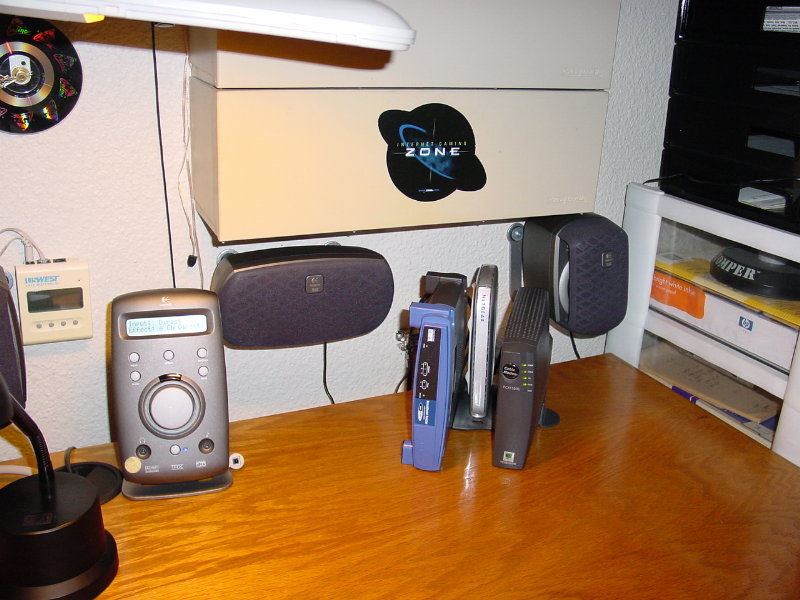
The only thing I do not like about the Linksys's are they are huge.
This one is twice the size of my Netgear.
I need to get ahold of jrallen and find which wireless one he just got from Linksys to work with his Vonage, as I do want to go with wireless down the road.
The only thing I do not like about the Linksys's are they are huge.
This one is twice the size of my Netgear.
Jan 8, 2005 | 03:12 PM
#15
Registered User
Joined: Sep 2002
Posts: 11,199
Likes: 2
From: Pittsburgh, PA
I think the size of the Netgear is part of it's problem. Not enough room for heat to escape. It looks nice though.
Most of my equipment is in my basement, so I don't really see it.
On a side note, I have DSL and still have my original modem from probably 1999 or 2000 I think. Do you think there might be any benefit in getting a newer one? I'm considering going to cable at some point, so it's probably a moot point.
Your desk is too clean...
Most of my equipment is in my basement, so I don't really see it.
On a side note, I have DSL and still have my original modem from probably 1999 or 2000 I think. Do you think there might be any benefit in getting a newer one? I'm considering going to cable at some point, so it's probably a moot point.
Your desk is too clean...
Jan 8, 2005 | 03:19 PM
#16
Thread Starter
Co-Founder/Administrator
iTrader: (1)
Joined: May 2002
Posts: 32,242
Likes: 21
From: Auburn, Washington
I would look at the Surfboard 5120.
If you go with cable, what company?
I use DSL Reports Comcast forum for my Comcast cable info, and they like the 5120.
http://www.dslreports.com/forum/comcast
Here is a listing of all their forums.
http://www.dslreports.com/forums/all
This Linksys I got from John seems to be a new model to I think, and has the Cisco name on it too since Cisco took over.
In the past I was turned off by Linksys, but may be changing my mind.
There are a few things though in the routers admin panel that are missing that I like that Netgear provides, but other than that this router seems to be working good.
I can not wait to try it with Vonage later, and perhaps get away from QWest.
He he he...my desk gets buffed every Thursday night along with all the stuff sitting on top of it.
http://www.pnw4runners.com/temp2/pc_desk.jpg
I like a clean desk to work with.
Now if I could just get rid of that antique printer...
If you go with cable, what company?
I use DSL Reports Comcast forum for my Comcast cable info, and they like the 5120.
http://www.dslreports.com/forum/comcast
Here is a listing of all their forums.
http://www.dslreports.com/forums/all
This Linksys I got from John seems to be a new model to I think, and has the Cisco name on it too since Cisco took over.
In the past I was turned off by Linksys, but may be changing my mind.
There are a few things though in the routers admin panel that are missing that I like that Netgear provides, but other than that this router seems to be working good.
I can not wait to try it with Vonage later, and perhaps get away from QWest.
He he he...my desk gets buffed every Thursday night along with all the stuff sitting on top of it.
http://www.pnw4runners.com/temp2/pc_desk.jpg
I like a clean desk to work with.
Now if I could just get rid of that antique printer...
Jan 8, 2005 | 03:35 PM
#17
Registered User
Joined: Sep 2002
Posts: 11,199
Likes: 2
From: Pittsburgh, PA
I have Comcast here for cable. Not sure I can get broadband cable though (yet). Thanks for the link.
A big issue I have is my Verizon email address. I have a ton of people who have this address and really need to keep it for a good while during any transition. What do I need to do to do this?
A big issue I have is my Verizon email address. I have a ton of people who have this address and really need to keep it for a good while during any transition. What do I need to do to do this?
Jan 8, 2005 | 04:13 PM
#18
Thread Starter
Co-Founder/Administrator
iTrader: (1)
Joined: May 2002
Posts: 32,242
Likes: 21
From: Auburn, Washington
Not sure about the addy, but I think you can get it forwarded to your new account if you ask Verizon to do so.+
You can also setup a contact list of everyone you email and send out a letter to all at once letting them know the new addy.
You can also setup a contact list of everyone you email and send out a letter to all at once letting them know the new addy.
Jan 8, 2005 | 04:17 PM
#19
Registered User
Joined: Sep 2002
Posts: 11,199
Likes: 2
From: Pittsburgh, PA
Originally Posted by Corey
You can also setup a contact list of everyone you email and send out a letter to all at once letting them know the new addy.
Jan 9, 2005 | 05:37 AM
#20
Registered User
Joined: Nov 2002
Posts: 1,655
Likes: 1
From: Urbandale, Iowa
Corey,
If you get a Linksys cable modem then you can stack them. I will send you a pic.
If you get a Linksys cable modem then you can stack them. I will send you a pic.
Originally Posted by Corey
Mike, I was thinking about getting the same wireless one you just mentioned from Netgear, and perhaps now I will not.
I need to get ahold of jrallen and find which wireless one he just got from Linksys to work with his Vonage, as I do want to go with wireless down the road.
The only thing I do not like about the Linksys's are they are huge.
This one is twice the size of my Netgear.
I need to get ahold of jrallen and find which wireless one he just got from Linksys to work with his Vonage, as I do want to go with wireless down the road.
The only thing I do not like about the Linksys's are they are huge.
This one is twice the size of my Netgear.


