


dvd player
 Aug 12, 2004 | 01:02 PM
#1

Thread Starter
Contributing Member
Joined: Jul 2002
Posts: 3,112
Likes: 0
From: Atl. Georgia
dvd player
my dvd player on my computer no longer recognizes dvds. i know thats a pretty bland description, but, anyone have any advice? i just put a dvd movie in, and nothing loads up..
Aug 12, 2004 | 01:35 PM
#2

Registered User
Joined: Jan 2003
Posts: 4,087
Likes: 1
From: Hattiesburg, MS
Well, it could be two things. I need a better description of "nothing loads up" to know what's going on. Do you mean your player software doesn't come up or is the drive itself not reading the DVD? Easy way to check... go to "My Computer" and see what the drive says (with the DVD in it). If it's reading, it'll usually show you the file name of the DVD. If it's not, it'll just show the letter of the drive. If it's not showing, you need to re-install the drivers for the drive. If it is, you've got a software problem with your player.
Oh yeah, is it a burnt DVD or a "real" one?
Oh yeah, is it a burnt DVD or a "real" one?
Aug 12, 2004 | 06:24 PM
#7

Co-Founder/Administrator
iTrader: (1)
Joined: May 2002
Posts: 32,242
Likes: 21
From: Auburn, Washington
Oh man, that is the heart and brains of your PC 
What OS are you running?
If XP, go to your Control Panel and then hit the System link.
Once the system page pops up, click on hardware, then look for the device manager on the right.
Once it is open, you will see all of your perfs hooked to your PC.
Scroll down to CD/DVD drives.
Locate it and double click it, or choose properties, then hit the uninstall button.
Reboot afterwards.
http://www.pnw4runners.com/temp2/device_manager.jpg
If running Win 98, your device manager is listed in the Control Panel.
What OS are you running?
If XP, go to your Control Panel and then hit the System link.
Once the system page pops up, click on hardware, then look for the device manager on the right.
Once it is open, you will see all of your perfs hooked to your PC.
Scroll down to CD/DVD drives.
Locate it and double click it, or choose properties, then hit the uninstall button.
Reboot afterwards.
http://www.pnw4runners.com/temp2/device_manager.jpg
If running Win 98, your device manager is listed in the Control Panel.
Trending Topics
Aug 12, 2004 | 06:26 PM
#8
Co-Founder/Administrator
iTrader: (1)
Joined: May 2002
Posts: 32,242
Likes: 21
From: Auburn, Washington
Click uninstall.
It can not be undone, but if runnning XP or 98, it will reload the drivers for you, or ask for the setup CD that came with the drive.
I do this all the time, no problemo.
I uninstall my graphics card and drivers when updating to new ones.
It can not be undone, but if runnning XP or 98, it will reload the drivers for you, or ask for the setup CD that came with the drive.
I do this all the time, no problemo.
I uninstall my graphics card and drivers when updating to new ones.
Aug 12, 2004 | 06:37 PM
#9
Registered User
Joined: Jan 2003
Posts: 4,087
Likes: 1
From: Hattiesburg, MS
Well, before you click uninstall (if you don't have XP), download the setup file for the drivers... but don't run it! Uninstall the device first, then run it. Just make sure you have that file handy first before you go uninstalling something.
Aug 12, 2004 | 07:08 PM
#13
Co-Founder/Administrator
iTrader: (1)
Joined: May 2002
Posts: 32,242
Likes: 21
From: Auburn, Washington
It should not have done anything to your wallpaper at all.
I have never ever heard of that happening before from uninstalling a DVD player and it's drivers.
Do you run spyware removal software?
Just a thought.
I have never ever heard of that happening before from uninstalling a DVD player and it's drivers.
Do you run spyware removal software?
Just a thought.
Aug 12, 2004 | 08:00 PM
#16
Thread Starter
Contributing Member
Joined: Jul 2002
Posts: 3,112
Likes: 0
From: Atl. Georgia
yeah, i know system restore will change the wallpaper.
i restored it earlier tonight, around 8 pm eastern time.
i think it was the first time i rebooted..hmm..
my comp still doesnt recognize dvds ... i think i might just take it to a computer shop tomorrow to see if they can fix it before i head back to school.
i restored it earlier tonight, around 8 pm eastern time.
i think it was the first time i rebooted..hmm..
my comp still doesnt recognize dvds ... i think i might just take it to a computer shop tomorrow to see if they can fix it before i head back to school.
Aug 13, 2004 | 04:26 PM
#17

Registered User
Joined: Jun 2004
Posts: 155
Likes: 0
From: Lompoc, CA
do you have the disc for the computer? what program do u use to play the dvd.
first is the drive regognizable. does it show up in my computer. with anything , blank cd a music cd anything?
If not it the drive itself. Have you ran windows update lately. I'd get these qurces in my system then run windows update and all my maint software. speeddisc cleansweep , windoctor the like and things go to normal
Personnly if it wasn't reading anything I'd turn the system off unplug the ide cable and power cable from the dvd player, reboot power, down plug everything back in and reboot again. If it still doesn't read the dvd and only doesn't read dvd then reload the dvd software by uninstalling the aplication in my case power dvd I'm not sure what your using and reload
first is the drive regognizable. does it show up in my computer. with anything , blank cd a music cd anything?
If not it the drive itself. Have you ran windows update lately. I'd get these qurces in my system then run windows update and all my maint software. speeddisc cleansweep , windoctor the like and things go to normal
Personnly if it wasn't reading anything I'd turn the system off unplug the ide cable and power cable from the dvd player, reboot power, down plug everything back in and reboot again. If it still doesn't read the dvd and only doesn't read dvd then reload the dvd software by uninstalling the aplication in my case power dvd I'm not sure what your using and reload
Last edited by redfox435cat; Aug 13, 2004 at 04:29 PM.
Aug 17, 2004 | 04:12 AM
#18

Senior Member
Joined: May 2002
Posts: 2,752
Likes: 0
From: Binghamton, NY
OK, I'm going to piggy back off this thread because I'm having a similar problem.
I've got a DVD-RW drive and a DVD-ROM drive in my PC (Windows XP). About a month ago, everything worked fine - I could play DVDs in my DVD-ROM drive and burn DVDs in my DVD-RW drive. Then we moved, and the PC got unhooked and stored in the basement for a month or so. I hooked it back up and now the DVD-ROM drive won't recognize DVDs. All other discs play fine, and the drive shows up under My Computer.
I went into the device manager and uninstalled it, then rebooted. XP reinstalled the drive, but it still won't recognize DVDs. The DVD-RW drive is a Pioneer and seems to be working fine (though I haven't tried burning anything recently), but the DVD-ROM drive looks to be a generic.
Any tips on how I can get my DVD-ROM drive to recognize DVDs? Could it be a software thing (i.e. corrupt Windows files/drivers)? The only thing that is different now from a month ago when everythign worked fine is that as of right now, there is no internet access to the PC. A month ago we had a Cable ISP.
I've got a DVD-RW drive and a DVD-ROM drive in my PC (Windows XP). About a month ago, everything worked fine - I could play DVDs in my DVD-ROM drive and burn DVDs in my DVD-RW drive. Then we moved, and the PC got unhooked and stored in the basement for a month or so. I hooked it back up and now the DVD-ROM drive won't recognize DVDs. All other discs play fine, and the drive shows up under My Computer.
I went into the device manager and uninstalled it, then rebooted. XP reinstalled the drive, but it still won't recognize DVDs. The DVD-RW drive is a Pioneer and seems to be working fine (though I haven't tried burning anything recently), but the DVD-ROM drive looks to be a generic.
Any tips on how I can get my DVD-ROM drive to recognize DVDs? Could it be a software thing (i.e. corrupt Windows files/drivers)? The only thing that is different now from a month ago when everythign worked fine is that as of right now, there is no internet access to the PC. A month ago we had a Cable ISP.
Aug 17, 2004 | 01:45 PM
#19

Contributing Member
Joined: Jul 2004
Posts: 2,370
Likes: 0
oh man corey.....you better book a flight to atlanta because this is gonna take ten years at this rate.....when you get there pretend to be "Nick Burns your companies computer guy" from SNL....."MOOOVVVEEE!!!"
Aug 17, 2004 | 03:01 PM
#20
Co-Founder/Administrator
iTrader: (1)
Joined: May 2002
Posts: 32,242
Likes: 21
From: Auburn, Washington
Originally Posted by CynicX
oh man corey.....you better book a flight to atlanta because this is gonna take ten years at this rate.....when you get there pretend to be "Nick Burns your companies computer guy" from SNL....."MOOOVVVEEE!!!"
Here I just got done hosin' the PC down
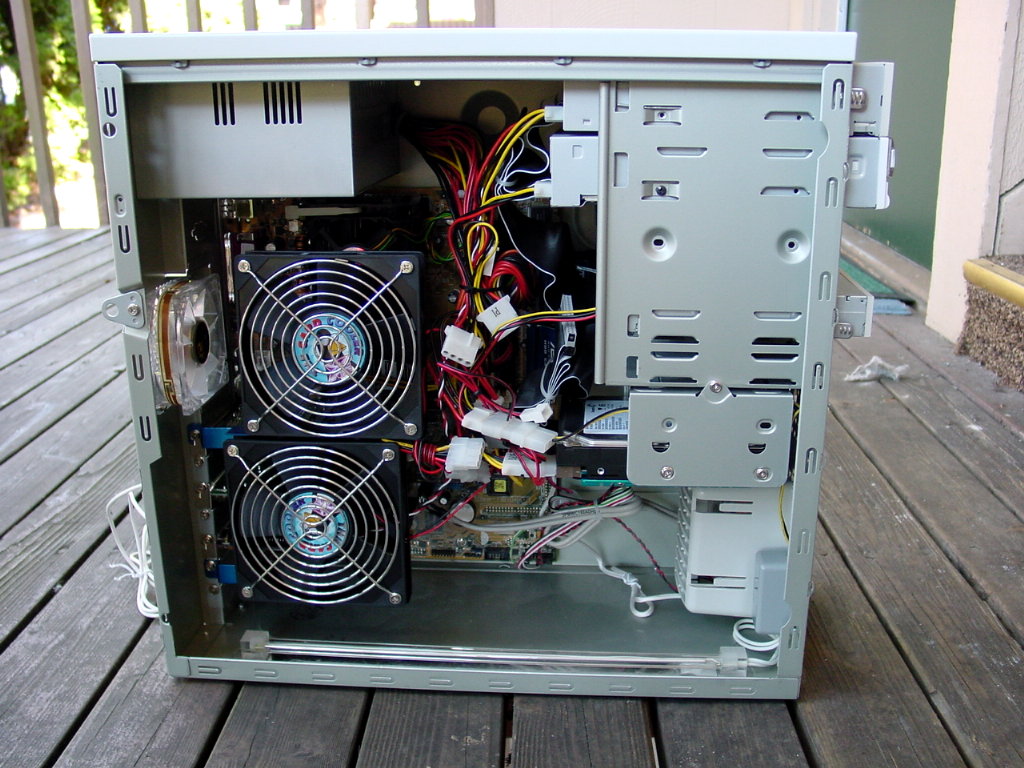
That will clean out any of the problems.
Actually I just got done blowing the crap all out of it when I got home today.
It's been a few months since the last cleaning.
You can see a big dust ball I pulled out of the front screen for the fan in front on the porch.
All clean now, and I swear it runs better

I don't know what is preventing the two PCs above from showing a DVD.
This is strange, and may require a format?


