


dvd/navigation
 Jul 5, 2002 | 07:46 AM
#1

Thread Starter
Registered User
Joined: Jun 2002
Posts: 1,409
Likes: 0
From: TX
dvd/navigation
hey, does anyone here have dvd and navigation in their runner?
i was curiuos on updating my system and right now, i only have an alpine head unit with a 6 disc in the back.. i was wondering what is a good system and what i need to have this setup. i only want one lcd screen and that's in the front of the dash. thanks!
i was curiuos on updating my system and right now, i only have an alpine head unit with a 6 disc in the back.. i was wondering what is a good system and what i need to have this setup. i only want one lcd screen and that's in the front of the dash. thanks!
 Jul 5, 2002 | 10:18 PM
#3
Thread Starter
Registered User
Joined: Jun 2002
Posts: 1,409
Likes: 0
From: TX
Hi, i checked your page but it seems your pages are down. But i'm curiuos to ask what kinda of setup you got and is there something out there that you can get for dvd and navigation instead of getting both?? i'm looking for a pretty simple setup, such as navigation, dvd, ps2 and 1 or 2 lcd's....thanks
 Jul 6, 2002 | 12:08 PM
#5

Registered User
Joined: Jun 2002
Posts: 103
Likes: 0
From: Scotts Valley, CA
Originally posted by CLin9383
Hi, i checked your page but it seems your pages are down. But i'm curiuos to ask what kinda of setup you got and is there something out there that you can get for dvd and navigation instead of getting both?? i'm looking for a pretty simple setup, such as navigation, dvd, ps2 and 1 or 2 lcd's....thanks
Hi, i checked your page but it seems your pages are down. But i'm curiuos to ask what kinda of setup you got and is there something out there that you can get for dvd and navigation instead of getting both?? i'm looking for a pretty simple setup, such as navigation, dvd, ps2 and 1 or 2 lcd's....thanks
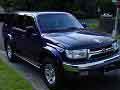
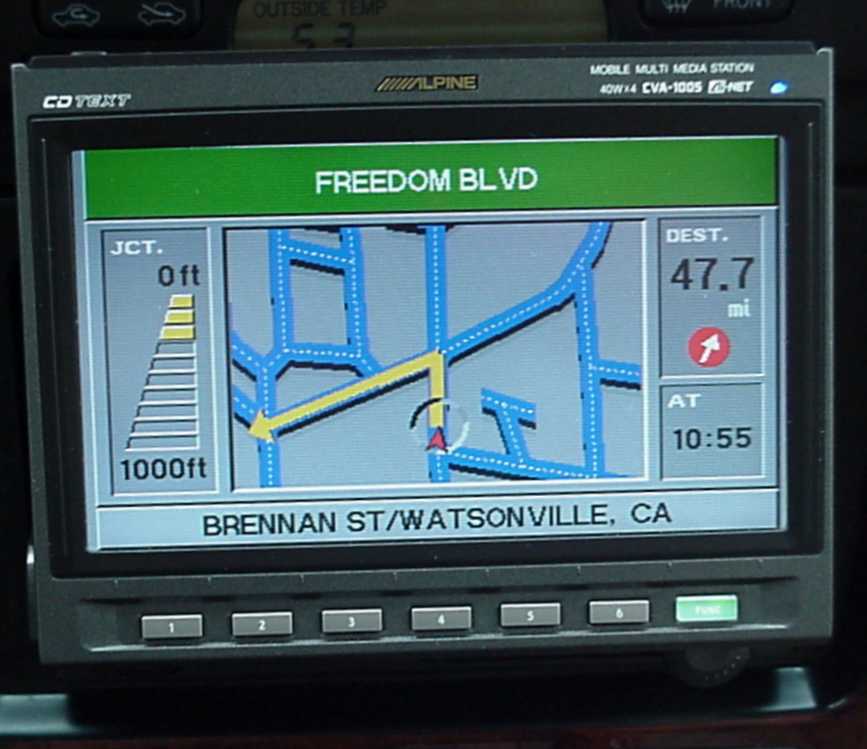
With my system (Alpine) I just leave the DVD map Software in the unit and I never have to messed with it. I'll I had is use my remote to toggle between different sources:
DVD Navigation
DVD Movie
Tuner
CD Changer
I love the fact that I can listen to audio of a CD/CD Changer or radio and have the Nav. going.
Heck, the wife and kid can be watching a movie and I can have the Navigation going with route in progress. It will smartly interrupt the movie to tell me that a turn is coming up and then toggles back to the movie. It's actually really neat.
Check out my site and let me know if you have any further questions.
Last edited by CTapia; Jul 6, 2002 at 12:14 PM.
Jul 6, 2002 | 04:21 PM
#6

Registered User
Joined: Jun 2002
Posts: 35
Likes: 0
Hi, I have Alpine DVD player and Alpine DVD Navigator similar to what CTapia has in his runner. Love them a lot. I might change my 6 disc CD changer to the new Alpine DVD changer since it works with CDRs and DVD-Rs.
My monitor and DVD player are in the dash and I have my navigator and DVD player under the driver's seat. Space is tight but they did fit. 5.1 will be the next item on my mod list.
Jeffrey
My monitor and DVD player are in the dash and I have my navigator and DVD player under the driver's seat. Space is tight but they did fit. 5.1 will be the next item on my mod list.
Jeffrey
Jul 6, 2002 | 07:50 PM
#7
Registered User
Joined: Jun 2002
Posts: 103
Likes: 0
From: Scotts Valley, CA
Originally posted by Jeffrey Yao
Hi, I have Alpine DVD player and Alpine DVD Navigator similar to what CTapia has in his runner. Love them a lot. I might change my 6 disc CD changer to the new Alpine DVD changer since it works with CDRs and DVD-Rs.
My monitor and DVD player are in the dash and I have my navigator and DVD player under the driver's seat. Space is tight but they did fit. 5.1 will be the next item on my mod list.
Jeffrey
Hi, I have Alpine DVD player and Alpine DVD Navigator similar to what CTapia has in his runner. Love them a lot. I might change my 6 disc CD changer to the new Alpine DVD changer since it works with CDRs and DVD-Rs.
My monitor and DVD player are in the dash and I have my navigator and DVD player under the driver's seat. Space is tight but they did fit. 5.1 will be the next item on my mod list.
Jeffrey
Doesn't your 6 Disc changer play CDRs? My does! However my in dash DVD player does not like them.

One of my buddies just picked up the DVD Changer and that is one sweet box.
My next mod on that department would be one screen or two for the back seats.
I also agree that real estate on the Runner is no where to be found and once you start adding all the extra toys you almost have to have some sort of custom enclosure.
Trending Topics
Jul 6, 2002 | 08:55 PM
#8
Registered User
Joined: Jun 2002
Posts: 35
Likes: 0
Phil, I'll have some pictures posted when I get back home. It's now Saturday 10:00pm and I'm still working on some stupid computer servers.
Candido, the 6 disc changer does read CDRs but it doesn't play VCDs. I do get some CDR VCDs sometime and the in-dash DVD player just refuse to read them.
Another monitor (or maybe 2) for back seats is also on my list. Which one do you want to get?
Jeffrey
Candido, the 6 disc changer does read CDRs but it doesn't play VCDs. I do get some CDR VCDs sometime and the in-dash DVD player just refuse to read them.
Another monitor (or maybe 2) for back seats is also on my list. Which one do you want to get?
Jeffrey
Jul 7, 2002 | 09:57 AM
#9
Registered User
Joined: Jun 2002
Posts: 103
Likes: 0
From: Scotts Valley, CA
Originally posted by Jeffrey Yao
Another monitor (or maybe 2) for back seats is also on my list. Which one do you want to get?
Jeffrey
Another monitor (or maybe 2) for back seats is also on my list. Which one do you want to get?
Jeffrey
Alpine recently came out with an overhead package that includes (2) wireless headphones. The part number is PKG-100G.
Lastly, I would like add a TCS-430A which is TV Tuner/Multizone AV controller. Allows to have different sources on each screen.
Jul 7, 2002 | 06:54 PM
#10
Contributing Member
Joined: Jun 2002
Posts: 4,868
Likes: 0
From: Brooklyn, NY
 DvD vs CD
My uncle has the DvD Alpine in his Yukon, and I was playing one day, and I noticed that there was NOTHING around asheville. Does it only load detaild maps of what is near your current location? or does it load the whole thing and alow you to see the whole map in detail? Because... if it thinks there is only one road running through asheville (I-40)... thats pretty sad... Asheville isn't THAT small...  Also, is the CD navi the same as the DVD they just cram it all into one disk? or did they have to cut corners? I was thinking about getting a navigation, but I think i 'd rather get a S/C first...
Also, is the CD navi the same as the DVD they just cram it all into one disk? or did they have to cut corners? I was thinking about getting a navigation, but I think i 'd rather get a S/C first...
Jul 7, 2002 | 09:30 PM
#11
Registered User
Joined: Jun 2002
Posts: 103
Likes: 0
From: Scotts Valley, CA
Re: DvD vs CD
Originally posted by turboale
My uncle has the DvD Alpine in his Yukon, and I was playing one day, and I noticed that there was NOTHING around asheville. Does it only load detaild maps of what is near your current location? or does it load the whole thing and alow you to see the whole map in detail? Because... if it thinks there is only one road running through asheville (I-40)... thats pretty sad... Asheville isn't THAT small... Also, is the CD navi the same as the DVD they just cram it all into one disk? or did they have to cut corners? I was thinking about getting a navigation, but I think i 'd rather get a S/C first...
My uncle has the DvD Alpine in his Yukon, and I was playing one day, and I noticed that there was NOTHING around asheville. Does it only load detaild maps of what is near your current location? or does it load the whole thing and alow you to see the whole map in detail? Because... if it thinks there is only one road running through asheville (I-40)... thats pretty sad... Asheville isn't THAT small...
Also, is the CD navi the same as the DVD they just cram it all into one disk? or did they have to cut corners? I was thinking about getting a navigation, but I think i 'd rather get a S/C first...
In terms of coverage, it covers the major metropolitan areas, cities and some coverage in a some rural towns. The good thing is that as newer version are released they cover more areas and are updated as roads are changed. The downside to the updates is that the disk are around $300 bucks a pop:eek: Luckly you can hold out and wait for a few revisions of software and catch up when you're ready.
I'm still running version 1.0 on the DVD Nav and it's currently at 1.30.
In fact, I'm currently testing out my buddies 1.30 version and I haven't seen any major differences, although some nice touches have been added.
Which bring up another point, all of the DVD Nav, O.S is on the disk , which makes the hardware stay current for a long time.
For those of you who are familiar with the version 1.0 of Alpine DVD Nav., version 1.30 now allows you to punch in latitude and longitude numbers to find your destination. Secondly common gas station i.e Chevron, Shell, Exxon etc.. now show up with an icon showing their symbol.
lastly, the color tone has lighten up a bit and has a slight improved look.
Ok, more than you wanted to know but there it is!

Thread
Thread Starter
Forum
Replies
Last Post
Amir904
General Electrical & Lighting Related Topics
1
Nov 19, 2006 07:18 PM
LSUMatt1514
95.5-2004 Tacomas & 96-2002 4Runners
11
Oct 27, 2006 11:24 AM


