


Need a good picture software program
 Mar 30, 2008 | 06:05 AM
#1

Thread Starter
Co-Founder/Administrator
iTrader: (1)
Joined: May 2002
Posts: 32,242
Likes: 21
From: Auburn, Washington
Need a good picture software program
My favorite photo editing software just quit working.
It is an antique, it is called Microsoft Picture It! 99.
Yes, it is from '99, but my fave.
It is a very simple point and click app to use.
It has a slider to reduce the file size of thumbnails and bigger pics when hosting on my website, and it has an excellent cut out of picture app to grab a certain part of a pic you want.
Something I have added to my PC over the last month has rendered the app useless for JPGs.
I can no longer save JPGs with it.
I have reinstalled it with no luck.
Please do not recommend Photoshop, as I already own version 7.
I use it to capture desktops and create clear GIFs out of JPGs.
But it is to much of a complicated program for everyday use.
I just want a simple app to resize pics, compress them, and have a cutout or add feature to it.
I also use Microsoft's Powertoy Image Resizer for pics, but it can not do the other stuff I need.
Free or pay software is fine with me, as long as it works.
Thanks,
It is an antique, it is called Microsoft Picture It! 99.
Yes, it is from '99, but my fave.
It is a very simple point and click app to use.
It has a slider to reduce the file size of thumbnails and bigger pics when hosting on my website, and it has an excellent cut out of picture app to grab a certain part of a pic you want.
Something I have added to my PC over the last month has rendered the app useless for JPGs.
I can no longer save JPGs with it.
I have reinstalled it with no luck.
Please do not recommend Photoshop, as I already own version 7.
I use it to capture desktops and create clear GIFs out of JPGs.
But it is to much of a complicated program for everyday use.
I just want a simple app to resize pics, compress them, and have a cutout or add feature to it.
I also use Microsoft's Powertoy Image Resizer for pics, but it can not do the other stuff I need.
Free or pay software is fine with me, as long as it works.
Thanks,
 Mar 30, 2008 | 07:35 AM
#3

Sponsor
Joined: Jul 2004
Posts: 9,173
Likes: 6
From: Puyallup WA.
start -> all programs -> Microsoft office --> Microsoft Office Tools --> Microsoft Photo Manager.
great program that does alot of what your lookign for. I'm not sure if it does the grab capture like you want but the auto correct feature is pretty good.
great program that does alot of what your lookign for. I'm not sure if it does the grab capture like you want but the auto correct feature is pretty good.
Mar 30, 2008 | 08:38 AM
#4
Thread Starter
Co-Founder/Administrator
iTrader: (1)
Joined: May 2002
Posts: 32,242
Likes: 21
From: Auburn, Washington
TC, MS no longer makes software like that, they gout out of the game from what I read earlier today.
Chris, did not know I even had that app with Office 2003.
Just tried it, however it does not give me the options to compress by % like the old app did.
Plus I could not get the crop thing to work.
I need more power than that app has.
Chris, did not know I even had that app with Office 2003.
Just tried it, however it does not give me the options to compress by % like the old app did.
Plus I could not get the crop thing to work.
I need more power than that app has.
Mar 31, 2008 | 11:16 AM
#5
Registered User
Joined: Jul 2007
Posts: 338
Likes: 0
From: Oregon
I know there is a program called Gimp that is a photo editing program and is free.. GIMP
Also I know you said no photoshop, but they make one called Elements that is a scaled down version that might be just right for you..I think it is around $80.00..
Also I know you said no photoshop, but they make one called Elements that is a scaled down version that might be just right for you..I think it is around $80.00..
 Apr 6, 2008 | 12:56 PM
#7

Contributing Member
Joined: Oct 2002
Posts: 5,918
Likes: 1
From: Da Gorge, Oregon
Corey, another great freeware program besides IrfanView is Google Picasa. It has a terrific organizer, basic photo edit feature set and in very easy to use. It's my go to app for easy edits I don't plan on printing.
http://picasa.google.com/
For pics I plan to print, it's Photoshop Elements 6, the latest edition just out. You can edit RAW and TIFF, and do almost anything the full-blown version does. It's available for $55 AR including free shipping, and you can use a free Picasa screenshot for the rebate.
http://www.amazon.com/gp/product/reb...DER&s=software
http://picasa.google.com/
For pics I plan to print, it's Photoshop Elements 6, the latest edition just out. You can edit RAW and TIFF, and do almost anything the full-blown version does. It's available for $55 AR including free shipping, and you can use a free Picasa screenshot for the rebate.
http://www.amazon.com/gp/product/reb...DER&s=software
Trending Topics
 Apr 6, 2008 | 03:26 PM
#10

Registered User
Joined: Aug 2006
Posts: 375
Likes: 0
From: The Big Wonderful
Corey, another great freeware program besides IrfanView is Google Picasa. It has a terrific organizer, basic photo edit feature set and in very easy to use. It's my go to app for easy edits I don't plan on printing.
http://picasa.google.com/
http://picasa.google.com/
Apr 6, 2008 | 05:21 PM
#11
Contributing Member

Joined: Nov 2005
Posts: 856
Likes: 0
From: Gladstone, Oregon
[QUOTE=mokai;50793382]I know there is a program called Gimp that is a photo editing program and is free.. GIMP
QUOTE]
The Gimp is good, but as they pack more and more features into it to try and compeate with Photoshop, the learning curve becomes more and more steep. The upside is that it's free to try, so check it out and if it is a little to much for you dump it.
I 2nd the online elements thing, i guess you will need to google it.
QUOTE]
The Gimp is good, but as they pack more and more features into it to try and compeate with Photoshop, the learning curve becomes more and more steep. The upside is that it's free to try, so check it out and if it is a little to much for you dump it.
I 2nd the online elements thing, i guess you will need to google it.
 Apr 17, 2008 | 01:10 PM
#13
Thread Starter
Co-Founder/Administrator
iTrader: (1)
Joined: May 2002
Posts: 32,242
Likes: 21
From: Auburn, Washington
That is the problem, I have not enough free time to delve into the inner workings of PS.
I use version 7 of it now for other stuff.
I like a simple point and click app like Picture It! works.
I reloaded it the other day, and it worked until I turned it off and then on again.
For some reason it will not work with JPGs, my main pic files.
It works fine with all other extensions.
I will try out some of the suggestions in this thread.
To be honest with you, Picture It! is one of the best picture apps I have ever used that was very simple and to the point to use.
I use version 7 of it now for other stuff.
I like a simple point and click app like Picture It! works.
I reloaded it the other day, and it worked until I turned it off and then on again.
For some reason it will not work with JPGs, my main pic files.
It works fine with all other extensions.
I will try out some of the suggestions in this thread.
To be honest with you, Picture It! is one of the best picture apps I have ever used that was very simple and to the point to use.
Apr 20, 2008 | 07:26 AM
#14
Thread Starter
Co-Founder/Administrator
iTrader: (1)
Joined: May 2002
Posts: 32,242
Likes: 21
From: Auburn, Washington
OK, just tried two of the apps mentioned above.
Picasa and Irfanview.
Picasa is very extent, and wants to catalog all of your pics for you.
I let it run for awhile while it did its thing.
I then opened up this picture in it.
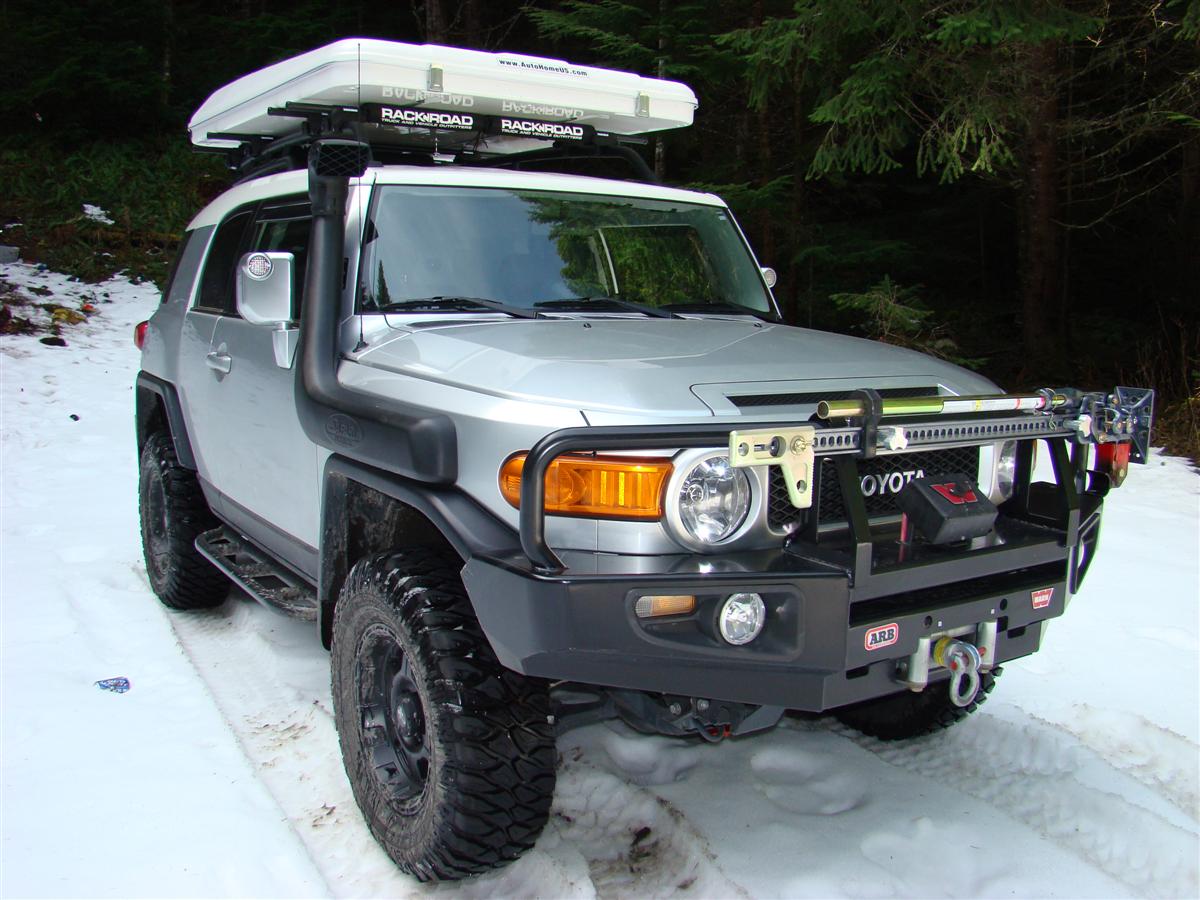
Picasa has very cool special effects to turn a pic black and white, sharpen, and other preset and custom filters.
The crop thing worked pretty good too, as I was able to cut stuff out of the picture that I did not want.
However I did not see anywhere in the program to take the 1200x900 picture and reduce it to avatar size at 160x120.
I will have to play around with it more today.
Installed Irfanview, much simpler app than Picasa.
I was able to resize the 1200x900 picture right away in the menu to 160x120.
However I do not see a tool for cropping to take out unneeded surroundings from the picture.
See why I liked MS's Picture It! 99?
Such an old app from '99, yet it did all of the combined stuff these two apps do.
What happens when I reinstall Picture It! is I can not save any JPG files.
I can open up a JPG and resave it to a BMP, GIF, PNG, ect, but I can not edit it to resize, crop, nada.
Some other app I have installed has fubared it.
I did install the newest Nero software a month back for video editing and other stuff, perhaps it screwed with the stuff needed for Picture It! to run correctly.
And when I uninstall the Picture It! app and reinstall, it says pictureit.exe is already in use, and the app will not install all the way.
However if I fire up the setup file again, it goes through.
And the first time I run the app the JPG save features are not grayed out.
However they are the next time the app is run.
That is a shame when your favorite apps becomes totally useless because they are in conflict with some other app.
I use to have another favorite picture app I used years ago, and the same thing happened when I went from Windows 98 to XP.
It would no longer run under XP, that is when I started using Picture It! then.
Picture It!, you will be greatly missed
Picasa and Irfanview.
Picasa is very extent, and wants to catalog all of your pics for you.
I let it run for awhile while it did its thing.
I then opened up this picture in it.
Picasa has very cool special effects to turn a pic black and white, sharpen, and other preset and custom filters.
The crop thing worked pretty good too, as I was able to cut stuff out of the picture that I did not want.
However I did not see anywhere in the program to take the 1200x900 picture and reduce it to avatar size at 160x120.
I will have to play around with it more today.
Installed Irfanview, much simpler app than Picasa.
I was able to resize the 1200x900 picture right away in the menu to 160x120.
However I do not see a tool for cropping to take out unneeded surroundings from the picture.
See why I liked MS's Picture It! 99?
Such an old app from '99, yet it did all of the combined stuff these two apps do.
What happens when I reinstall Picture It! is I can not save any JPG files.
I can open up a JPG and resave it to a BMP, GIF, PNG, ect, but I can not edit it to resize, crop, nada.
Some other app I have installed has fubared it.
I did install the newest Nero software a month back for video editing and other stuff, perhaps it screwed with the stuff needed for Picture It! to run correctly.
And when I uninstall the Picture It! app and reinstall, it says pictureit.exe is already in use, and the app will not install all the way.
However if I fire up the setup file again, it goes through.
And the first time I run the app the JPG save features are not grayed out.
However they are the next time the app is run.
That is a shame when your favorite apps becomes totally useless because they are in conflict with some other app.
I use to have another favorite picture app I used years ago, and the same thing happened when I went from Windows 98 to XP.
It would no longer run under XP, that is when I started using Picture It! then.
Picture It!, you will be greatly missed
Apr 20, 2008 | 07:52 AM
#15
Thread Starter
Co-Founder/Administrator
iTrader: (1)
Joined: May 2002
Posts: 32,242
Likes: 21
From: Auburn, Washington
I played with Picasa a bit more, I do not see an image resizer in it.
If I want to edit pics with it, I will then have to right click the pics in a folder and use Microsoft's free PowerToy app called Image Resizer.
Problem with the PowerToy app is it does not have a compression slider to reduce the file size, and an avatar can often come up to 20 kb or more.
With Picture It! you used a manual slider bar in percentages that could reduce the file size perfectly to 6 kb or less, and still look good.
Anyways, I do like the special effects of Picasa.
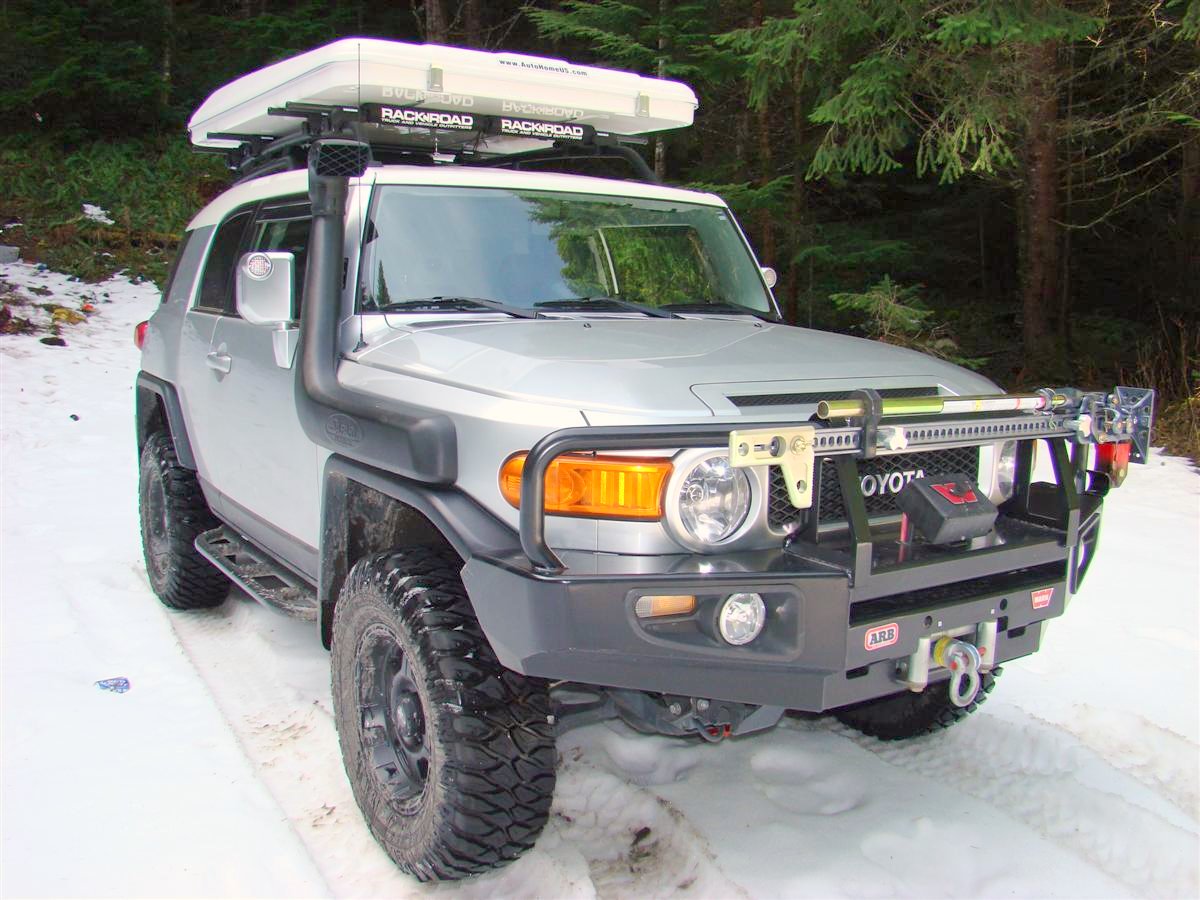
The first pic below is untouched, the second one has a slider bar effect called "Fill Light" that lets you brighten up stuff in the background such as the trees.
Look how the foliage behind the rig stands out more in the second picture.
I almost never apply filtration to any of my photos from my digicam.
I just upload them to my server after resizing them.
Some of these effects are pretty cool.
To bad Picasa does not have a built in image resizer though.
If it did, I would give it two thumbs up.
If I want to edit pics with it, I will then have to right click the pics in a folder and use Microsoft's free PowerToy app called Image Resizer.
Problem with the PowerToy app is it does not have a compression slider to reduce the file size, and an avatar can often come up to 20 kb or more.
With Picture It! you used a manual slider bar in percentages that could reduce the file size perfectly to 6 kb or less, and still look good.
Anyways, I do like the special effects of Picasa.
The first pic below is untouched, the second one has a slider bar effect called "Fill Light" that lets you brighten up stuff in the background such as the trees.
Look how the foliage behind the rig stands out more in the second picture.
I almost never apply filtration to any of my photos from my digicam.
I just upload them to my server after resizing them.
Some of these effects are pretty cool.
To bad Picasa does not have a built in image resizer though.
If it did, I would give it two thumbs up.
Apr 20, 2008 | 09:10 AM
#16
Contributing Member
Joined: Oct 2002
Posts: 5,918
Likes: 1
From: Da Gorge, Oregon
Great pic, Corey.
Here are links to Picasa resizing tutorials.
http://picasa.google.com/support/bin...n&answer=13821
http://www.pinelake-marketing.com/pi...ize-image.html
Here are links to Picasa resizing tutorials.
http://picasa.google.com/support/bin...n&answer=13821
http://www.pinelake-marketing.com/pi...ize-image.html
Apr 20, 2008 | 09:23 AM
#17
Thread Starter
Co-Founder/Administrator
iTrader: (1)
Joined: May 2002
Posts: 32,242
Likes: 21
From: Auburn, Washington
Thanks Bob!
Hey, just read the first link, very good info.
I will have to read up on that.
It worked like a charm too.
I took one of the pics above and choose export, and I got the screen to adjust the percentage of file size plus pixel size.
Now I can give this app two thumbs up
It will take awhile to get use to this new app since I am so use to my old Picture It! 99 app.
I sure do like the easy toys in this Picasa app to bring up stuff in the background of the pictures.
I will have to redo all of the pictures in my online folder for the six year anniversary movie that Elvota will be working on here shortly.
Hey, you need to submit some pics for that too
Hey, just read the first link, very good info.
I will have to read up on that.
It worked like a charm too.
I took one of the pics above and choose export, and I got the screen to adjust the percentage of file size plus pixel size.
Now I can give this app two thumbs up
It will take awhile to get use to this new app since I am so use to my old Picture It! 99 app.
I sure do like the easy toys in this Picasa app to bring up stuff in the background of the pictures.
I will have to redo all of the pictures in my online folder for the six year anniversary movie that Elvota will be working on here shortly.
Hey, you need to submit some pics for that too
Apr 21, 2008 | 11:15 AM
#19
Registered User
Joined: May 2007
Posts: 2,175
Likes: 2
From: Denver metro area-CO
I do not mean to be hi jacking the thread-I finally opened up a Photobucket account as I think quite a few people recommended it for posting up pictures to this forum and others.
But none of this is intuitive to me, and although my Photobucket account now holds some of my photos-I still lack the understanding of how to make a picture appear in one of my postings.
Can you photo guys point me in the right direction? I used search and it led me to this thread, and the bird one.
But none of this is intuitive to me, and although my Photobucket account now holds some of my photos-I still lack the understanding of how to make a picture appear in one of my postings.
Can you photo guys point me in the right direction? I used search and it led me to this thread, and the bird one.
Apr 21, 2008 | 01:23 PM
#20
Contributing Member
Joined: Oct 2002
Posts: 5,918
Likes: 1
From: Da Gorge, Oregon


