


Cannot Edit Signature
 Jan 6, 2016 | 11:40 AM
#1

Thread Starter
Registered User
Joined: Nov 2004
Posts: 130
Likes: 5
From: Arizona
Cannot Edit Signature
Hello Moderators,
I was going to try to edit my signature to reflect my recent 4Runner purchase but do not have an edit button on my profile page like I do for the other fields. Here is a screen shot. Am I being dense?

I was going to try to edit my signature to reflect my recent 4Runner purchase but do not have an edit button on my profile page like I do for the other fields. Here is a screen shot. Am I being dense?
 Jan 6, 2016 | 11:53 AM
#2
Registered User
Joined: Jan 2007
Posts: 6,106
Likes: 27
You obviously did it once before. Dense? Forgetful at least.
Under your user name on the toolbar at the top of the page. Click User CP(Control Panel). Then under Settings & Options > Edit Signature.
Under your user name on the toolbar at the top of the page. Click User CP(Control Panel). Then under Settings & Options > Edit Signature.
Jan 6, 2016 | 03:36 PM
#3
Thread Starter
Registered User
Joined: Nov 2004
Posts: 130
Likes: 5
From: Arizona


 Jun 15, 2016 | 03:46 PM
#5

Registered User


Joined: Aug 2013
Posts: 4,256
Likes: 681
From: Southern Arizona
I can't find any user CP since the most recent forum changes.
When I click on my user name all I get is my profile page.
Anybody care to point out how helpless I am?? Please.
When I click on my user name all I get is my profile page.
Anybody care to point out how helpless I am?? Please.
Jun 15, 2016 | 03:51 PM
#6

Contributing Member

Joined: Sep 2005
Posts: 8,245
Likes: 495
From: mo
Hey millball, There's two user names up there, the upper one above the search bar is where you click. You'll get a drop-down with 'user control panel' being the first choice.
Jun 15, 2016 | 03:56 PM
#7
Registered User
Joined: Aug 2013
Posts: 4,256
Likes: 681
From: Southern Arizona
Only one I can see on my page.
The one above the time of last visit and private message notifications.
I can't figure how to log out either.
The one above the time of last visit and private message notifications.
I can't figure how to log out either.
Trending Topics
Jun 15, 2016 | 05:21 PM
#8
Contributing Member
Joined: Sep 2005
Posts: 8,245
Likes: 495
From: mo
It should be above that one and just a slight tad to the left, with a little drop-down arrow next to it....beyond that it's someone else's turn, 'cause I'd be out of thinkers on it.
Upper righthand corner... log out's in the drop-down too.
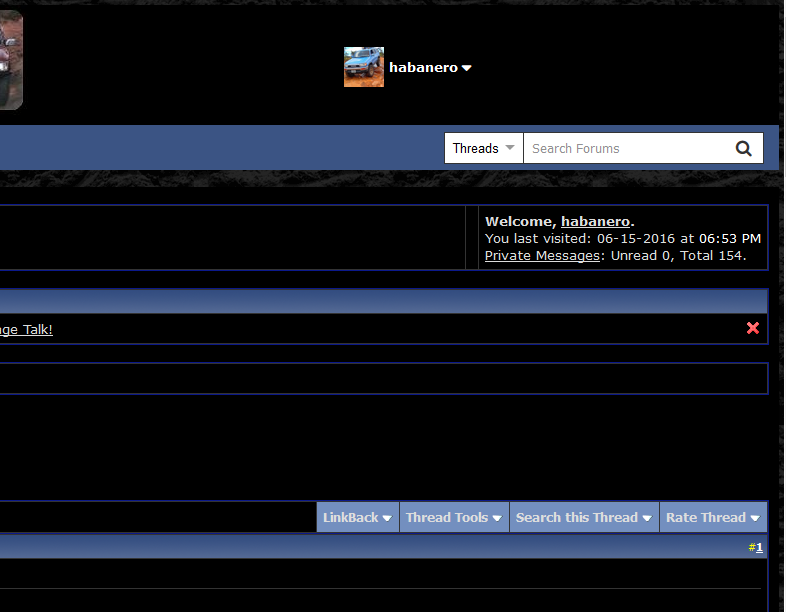
Upper righthand corner... log out's in the drop-down too.
Last edited by habanero; Jun 15, 2016 at 05:39 PM.


 Jun 16, 2016 | 09:53 AM
#10
Registered User
Joined: Aug 2013
Posts: 4,256
Likes: 681
From: Southern Arizona
Thats not what my screen looks like.
Heres a screen shot of what I see:
The pictures go all the way across where the CP selection should be???

Heres a screen shot of what I see:
The pictures go all the way across where the CP selection should be???
 Jun 16, 2016 | 10:15 AM
#11
Contributing Member
Joined: Sep 2005
Posts: 8,245
Likes: 495
From: mo
Try 'Control 0' to make your image smaller....and if that's still too big try 'Control -' to make it even smaller. You prolly know, but hit the Ctrl key and the 0 key (that's a zero) at the same time.
You must be even more farsighted than me!
You must be even more farsighted than me!
Last edited by habanero; Jun 16, 2016 at 10:16 AM.
Jun 16, 2016 | 11:48 AM
#12
Registered User
Joined: Aug 2013
Posts: 4,256
Likes: 681
From: Southern Arizona
Wow, who knew??
Now I can see it!!
I told ya I was clueless.
Thanks Hab!
Now I can see it!!
I told ya I was clueless.
Thanks Hab!
Last edited by millball; Jun 16, 2016 at 11:52 AM.
Jun 16, 2016 | 12:12 PM
#13
Contributing Member
Joined: Sep 2005
Posts: 8,245
Likes: 495
From: mo
Sweet! You're certainly not clueless and you're welcome. 

Thread
Thread Starter
Forum
Replies
Last Post
Albeydarned
General Electrical & Lighting Related Topics
9
Dec 19, 2015 09:05 AM
992d
86-95 Trucks & 4Runners
5
Dec 17, 2015 11:44 AM
Zealous84milo
86-95 Trucks & 4Runners
4
Dec 15, 2015 03:08 PM


