


Wireless router questions
 Dec 22, 2007 | 04:36 PM
#1

Thread Starter
Co-Founder/Administrator
iTrader: (1)
Joined: May 2002
Posts: 32,242
Likes: 21
From: Auburn, Washington
Wireless router questions
I do not know much about wireless routers except that you have to secure them to keep peeps from using your bandwidth or snooping on your PC if you have a wireless router.
What I have not is a Linksys RT31P2 Broadband Router with two phone ports.
This was provided by the Vonage company, my telephone service.
It connects to my Motorola Surfboard 5100 cable modem.
The router has three cat 5 ports on the back to connect up to three PCs.
Is it possible to get a wireless device to connect to this somehow so I can use a laptop out in the living room without having to use my 100' cat 5 cable I have and have used before with an old laptop?
Another option would be to see if Vonage offers one and I can switch this router out for it.
But if I can get one to work with the setup now, that would be cool too.
What I have not is a Linksys RT31P2 Broadband Router with two phone ports.
This was provided by the Vonage company, my telephone service.
It connects to my Motorola Surfboard 5100 cable modem.
The router has three cat 5 ports on the back to connect up to three PCs.
Is it possible to get a wireless device to connect to this somehow so I can use a laptop out in the living room without having to use my 100' cat 5 cable I have and have used before with an old laptop?
Another option would be to see if Vonage offers one and I can switch this router out for it.
But if I can get one to work with the setup now, that would be cool too.
Dec 22, 2007 | 05:07 PM
#3


Joined: Jan 2003
Posts: 17,692
Likes: 58
From: Marysville, WA
AFAIK, they dont include the wireless access points with the router. Not really sure why, since you pay so much for the router. Then they want you to pay even more to be able to use the thing!
Some things like laptops have that built in i believe. My girlfriends laptop searches for the wireless network everytime she starts her laptop up, though we dont have a wireless router. Ours is all wired.
Some things like laptops have that built in i believe. My girlfriends laptop searches for the wireless network everytime she starts her laptop up, though we dont have a wireless router. Ours is all wired.
Dec 22, 2007 | 05:13 PM
#4
Thread Starter
Co-Founder/Administrator
iTrader: (1)
Joined: May 2002
Posts: 32,242
Likes: 21
From: Auburn, Washington
That sounds easier than getting this from Vonage.
http://www.vonage.com/device.php?typ...ct_more_VT2542
That is a four port one compared to my 3 port one.
Both though support up to two telephones.
So this Linksys here would do the trick?
If so, it is the same shape as my current Linksys, and it will fit on top of mine actually.

http://www.vonage.com/device.php?typ...ct_more_VT2542
That is a four port one compared to my 3 port one.
Both though support up to two telephones.
So this Linksys here would do the trick?
If so, it is the same shape as my current Linksys, and it will fit on top of mine actually.
Dec 22, 2007 | 05:15 PM
#5
Thread Starter
Co-Founder/Administrator
iTrader: (1)
Joined: May 2002
Posts: 32,242
Likes: 21
From: Auburn, Washington
The current router I have they gave to me when I signed up with them about three years ago.
Current Vonage service runs me about $28 a month, cheaper than QWest was which I canceled a few years ago,
Dec 22, 2007 | 05:26 PM
#6

Contributing Member
Joined: Mar 2006
Posts: 393
Likes: 0
From: Wauconda, IL
you have 2 options.
1. get the access point and just plug it into the RJ45 port in the router.
2. replace the Linksys router with a wireless model.
problem with the first option is that now you have 2 devices that need to be configured. oh and by the way, make sure that you get the same brand otherwise they may not work well together
I've been working in IT for 15 years and personally would opt for #1.
but that's just me.
Dave H.
MCP,DCSE, ASP
1. get the access point and just plug it into the RJ45 port in the router.
2. replace the Linksys router with a wireless model.
problem with the first option is that now you have 2 devices that need to be configured. oh and by the way, make sure that you get the same brand otherwise they may not work well together
I've been working in IT for 15 years and personally would opt for #1.
but that's just me.
Dave H.
MCP,DCSE, ASP
Dec 22, 2007 | 05:33 PM
#7
Thread Starter
Co-Founder/Administrator
iTrader: (1)
Joined: May 2002
Posts: 32,242
Likes: 21
From: Auburn, Washington
Thanks Dave, so that Linksys above I linked to would be a good one to buy?
I know how to configure my current one, as I have had to open up ports for game hosting.
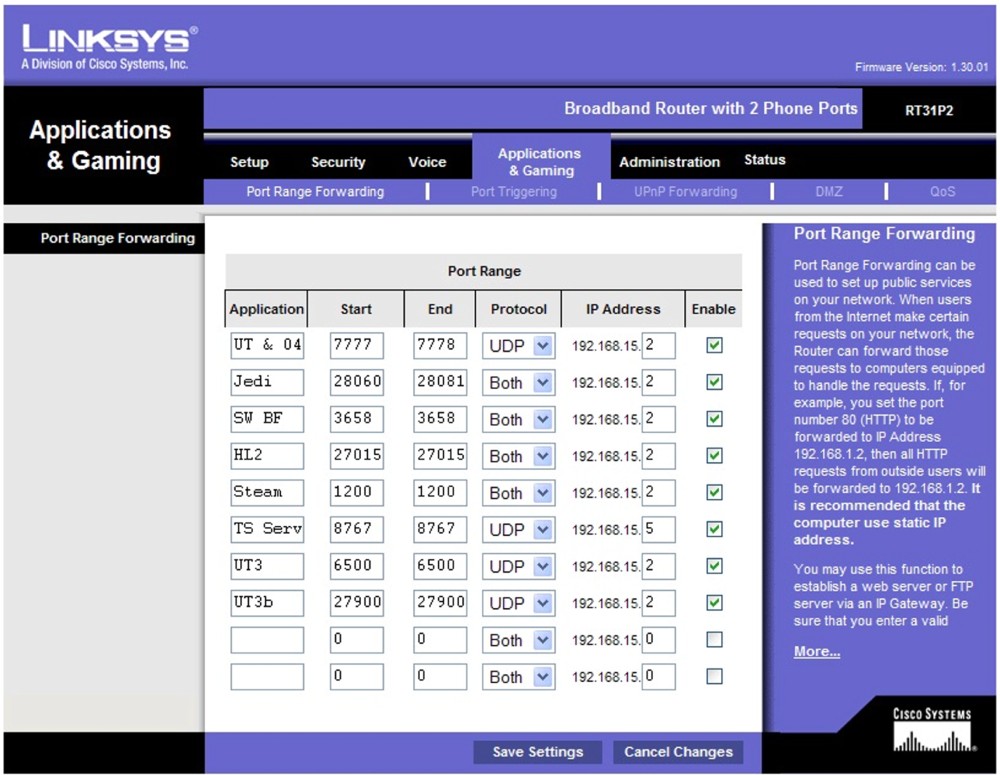
Would I have to enter that same setup page above to add the access point to it?
And what about configuring the access point, would it too have an URL I type in on the PC to access it separately from my main Vonage/Linksys router?
Option 1 would be easier than ordering up a new wireless router from Vonage since they have to hardcode my telephone number somehow into it.
I know how to configure my current one, as I have had to open up ports for game hosting.
Would I have to enter that same setup page above to add the access point to it?
And what about configuring the access point, would it too have an URL I type in on the PC to access it separately from my main Vonage/Linksys router?
Option 1 would be easier than ordering up a new wireless router from Vonage since they have to hardcode my telephone number somehow into it.
Trending Topics
Dec 22, 2007 | 05:47 PM
#8

Contributing Member

Joined: Nov 2005
Posts: 856
Likes: 0
From: Gladstone, Oregon
Should be able to pick up a wireless router, and configure the WAN so that it goes to gateway (that gateway would be your wired router) then your wired router would hand it off to your modem and presto. Or i have found sometimes it takes extra work to use the WAN port so you can use one of the cat5 ports often found on wireless routers instead with little or no setup.
In the drawing you would set the wireless router to connect to a gateway of 192.168.0.1, this is assuming that you have a wired router not a wired switch. Sorry, i could be all wrong i have a hard time visulizeing how things are from a written description, i like to get in there and really look at things.
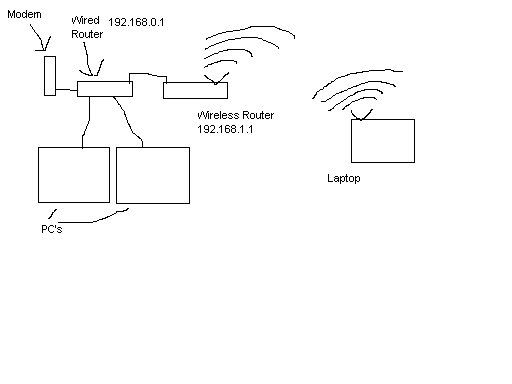
In the drawing you would set the wireless router to connect to a gateway of 192.168.0.1, this is assuming that you have a wired router not a wired switch.
Sorry, i could be all wrong i have a hard time visulizeing how things are from a written description, i like to get in there and really look at things.
Dec 22, 2007 | 06:05 PM
#9
Thread Starter
Co-Founder/Administrator
iTrader: (1)
Joined: May 2002
Posts: 32,242
Likes: 21
From: Auburn, Washington
Thanks, yeah my gateway is is one number smaller than my internal IP, the gateway is 192.168.15.1, different than the 192.168.0.1 you listed.
So the wireless one I listed above would work?
And it has both a WAN and cat 5 port on the rear of it?
As my current Linksys only has three cat 5 ports on the rear of it, and the two telco ports.
Here is my current router.
http://www.voipsupply.com/product_in...roducts_id=318

So the wireless one I listed above would work?
And it has both a WAN and cat 5 port on the rear of it?
As my current Linksys only has three cat 5 ports on the rear of it, and the two telco ports.
Here is my current router.
http://www.voipsupply.com/product_in...roducts_id=318
Dec 22, 2007 | 06:10 PM
#10
Contributing Member
Joined: Nov 2005
Posts: 856
Likes: 0
From: Gladstone, Oregon
Thanks, yeah my gateway is is one number smaller than my internal IP, the gateway is 192.168.15.1, different than the 192.168.0.1 you listed.
So the wireless one I listed above would work?
And it has both a WAN and cat 5 port on the rear of it?
As my current Linksys only has three cat 5 ports on the rear of it, and the two telco ports.
Here is my current router, except this model number has four cat 5 ports, mine has three.
http://www.voipsupply.com/product_in...roducts_id=318
So the wireless one I listed above would work?
And it has both a WAN and cat 5 port on the rear of it?
As my current Linksys only has three cat 5 ports on the rear of it, and the two telco ports.
Here is my current router, except this model number has four cat 5 ports, mine has three.
http://www.voipsupply.com/product_in...roducts_id=318
So the RJ11 ports goes to your phones, One RJ45 port goes to your modem, and the other two RJ45 Ports are for any computers you have?
Is the port that goes to your modem labled anything special? or is it just one of the three?
That wireless router should work, but i have never had to work with a router setup for VOIP with VONAGE, so i am not sure how they are doing it.
If you want an easer setup you may want to opt for a wireless access point, as a wireless router is more than you need, but often i have found it cheaper to get a router than an access point.
A wireless access point often has just the one RJ45 plug and you plug it into your wired router and it will just kind of interact with the wireless router like a PC client and forward your packets on through.
Last edited by linuxrunner; Dec 22, 2007 at 06:15 PM.
Dec 22, 2007 | 06:22 PM
#11
Thread Starter
Co-Founder/Administrator
iTrader: (1)
Joined: May 2002
Posts: 32,242
Likes: 21
From: Auburn, Washington
Yes, but from seeing the router I listed above that is like mine, I think what they do is take the serial number and tie it to a phone number you pick.
When I first got on Vonage they tossed my current phone number at me and asked if I wanted it, and I said yes, so all they probably do is tie that to the serial or MAC number.
I can actually take my router and go to your home and plug it in, and if someone calls my phone number, it will ring at your house.
It has four of those cat 5 RJ45 ports.
One by itself that goes to my cable modem, the other three for three computers.
The wireless I listed earlier is an access point.
When I first got on Vonage they tossed my current phone number at me and asked if I wanted it, and I said yes, so all they probably do is tie that to the serial or MAC number.
I can actually take my router and go to your home and plug it in, and if someone calls my phone number, it will ring at your house.
It has four of those cat 5 RJ45 ports.
One by itself that goes to my cable modem, the other three for three computers.
The wireless I listed earlier is an access point.
Dec 22, 2007 | 06:34 PM
#12
Thread Starter
Co-Founder/Administrator
iTrader: (1)
Joined: May 2002
Posts: 32,242
Likes: 21
From: Auburn, Washington
PS, they have a good PDF file there to read on how to set one of these up.
The unit I listed will indeed work with my current Vonage Linksys router.
For security purposes, they list these, I wonder which is the best to go with.
Select the level of security you want to use: WEP, WPA/WPA2 Personal, WPA-Enterprise, or Linksys
Wireless Guard. WEP stands for Wired Equivalent Privacy, and WPA stands for Wi-Fi Protected Access.
The unit I listed will indeed work with my current Vonage Linksys router.
For security purposes, they list these, I wonder which is the best to go with.
Select the level of security you want to use: WEP, WPA/WPA2 Personal, WPA-Enterprise, or Linksys
Wireless Guard. WEP stands for Wired Equivalent Privacy, and WPA stands for Wi-Fi Protected Access.
Dec 22, 2007 | 09:30 PM
#13

Contributing Member
Joined: Apr 2006
Posts: 988
Likes: 0
From: Vacaville,California
The Access point you listed is good to go.
We use them all the time when we wire houses.
The modem and router are in the structured panel and we set up wireless access points in key spots sometimes.
Dlink even has ceiling mount ones that work good. But for you to just add the wireless capability use the matching linksys one.
We use them all the time when we wire houses.
The modem and router are in the structured panel and we set up wireless access points in key spots sometimes.
Dlink even has ceiling mount ones that work good. But for you to just add the wireless capability use the matching linksys one.
Dec 23, 2007 | 05:33 PM
#14
Thread Starter
Co-Founder/Administrator
iTrader: (1)
Joined: May 2002
Posts: 32,242
Likes: 21
From: Auburn, Washington
Thanks Reggie.
Going to Best Buy tomorrow to get one.
Youngest son if bringing over his Dell XPS gaming laptop, and it will be nice to not have to pull out my old tower in the other room and disconnect the cat 5 and plug it into his.
Will be loading up the new Unreal Tournament III on his laptop, and then we can test out how it works over wireless to connect to the UT III gaming server we have elsewhere.
Going to Best Buy tomorrow to get one.
Youngest son if bringing over his Dell XPS gaming laptop, and it will be nice to not have to pull out my old tower in the other room and disconnect the cat 5 and plug it into his.
Will be loading up the new Unreal Tournament III on his laptop, and then we can test out how it works over wireless to connect to the UT III gaming server we have elsewhere.
Dec 24, 2007 | 11:23 AM
#15
Thread Starter
Co-Founder/Administrator
iTrader: (1)
Joined: May 2002
Posts: 32,242
Likes: 21
From: Auburn, Washington
Bought it no workie.
Ran the setup wizard for the past 3 hours.
Default login to access the webpage is suppose to be admin admin.
The wizard gives it an IP of 192.168.1.245
Weird, as my local network and Vonage/Linksys router is 192.168.15.1
It has a 15 in there instead of the 1.
I have tried everything, may get the geek squad to come out here next month.
They are booked up until the 9th.
I hate wireless, but I need to start using it.
I have also tried both dhcp and static in the setup wizard.
If I could access the webpage management with Firefox, I could get it setup all the way.
Ran the setup wizard for the past 3 hours.
Default login to access the webpage is suppose to be admin admin.
The wizard gives it an IP of 192.168.1.245
Weird, as my local network and Vonage/Linksys router is 192.168.15.1
It has a 15 in there instead of the 1.
I have tried everything, may get the geek squad to come out here next month.
They are booked up until the 9th.
I hate wireless, but I need to start using it.
I have also tried both dhcp and static in the setup wizard.
If I could access the webpage management with Firefox, I could get it setup all the way.
Dec 24, 2007 | 02:36 PM
#16
Thread Starter
Co-Founder/Administrator
iTrader: (1)
Joined: May 2002
Posts: 32,242
Likes: 21
From: Auburn, Washington
Fixed, I think.
Will not know for sure until my youngest son brings over his laptop Christmas morning.
On the browser when the admin name and password box pops up, I was inputting admin first, then my password.
Just read on Linksys's support page you leave the username blank, and just type in the password below it.
Finally got in, now I can adjust it.
Will not know for sure until my youngest son brings over his laptop Christmas morning.
On the browser when the admin name and password box pops up, I was inputting admin first, then my password.
Just read on Linksys's support page you leave the username blank, and just type in the password below it.
Finally got in, now I can adjust it.
Dec 25, 2007 | 05:00 PM
#17
Registered User
Joined: Jun 2006
Posts: 2,243
Likes: 5
From: Calgary, AB
Make sure you enable one of the wireless protective schemes. If you don't, you could do what I'm doing. I'm out of town and need to access the internet, so I've found a spot near my brother's house that has and unsecured Linksys router and in about 2 minutes, I'm in and surfing.
It isn't that hard to do. And I know only a little bit more about wireless protocols than you do.
It isn't that hard to do. And I know only a little bit more about wireless protocols than you do.
Dec 25, 2007 | 05:18 PM
#18
Thread Starter
Co-Founder/Administrator
iTrader: (1)
Joined: May 2002
Posts: 32,242
Likes: 21
From: Auburn, Washington
Thanks, it is secured with
WPA2-Personal.
He found me right away, then all he had to do was type in the password I setup.
Is the security setting I am using good enough?
Below are all the options.
WPA2-Personal.
He found me right away, then all he had to do was type in the password I setup.
Is the security setting I am using good enough?
Below are all the options.
Wireless Security
The access point supports many different types of security settings for your network.
Wi-Fi Protected Access WPA-Personal, WPA2-Personal, WPA2-Mixed, WPA Remote Access Dial In User Service (WPA-Enterprise), RADIUS, and Wired Equivalent Privacy (WEP).
To learn more about using Linksys Wireless Guard service, please click here.
Security Modes
WPA-Personal There are two encryption options for WPA-Personal, TKIP and AES.
TKIP stands for Temporal Key Integrity Protocol. TKIP utilizes dynamic keys and incorporates Message Integrity Code (MIC) to provide protection against hackers.
AES stands for Advanced Encryption System, which utilizes a symmetric 128-Bit block data encryption.
WPA2-Personal WPA2 is the second generation of WPA security; providing users with a high level encryption.
It utilizes AES encryption method.
WPA2-Mixed Select WPA2-Mixed if you want to use both WPA and WPA2 Personal at the same time.
WPA-Enterprise WPA-Enterprise uses an external RADIUS server in conjunction with TKIP or AES to perform user authentication.
To use WPA-Enterprise, enter the IP address of the RADIUS server, the RADIUS Port (default is 1812) and the shared secret from the RADIUS server.
RADIUS RADIUS utilizes a RADIUS server for authentication and WEP for data encryption.
To utilize RADIUS, enter the IP address of the RADIUS server and its shared secret.
Select the desired encryption bit (64 or 128) for WEP and enter either a passphrase or a manual WEP key.
WEP There are two levels of WEP encryption, 64-bit and 128-bit.
The higher the encryption bit, the more secure your network, however, speed is sacrificed at higher bit levels.
To utilize WEP, select the desired encryption bit, and enter a passphrase or a WEP key in hexadecimal
The access point supports many different types of security settings for your network.
Wi-Fi Protected Access WPA-Personal, WPA2-Personal, WPA2-Mixed, WPA Remote Access Dial In User Service (WPA-Enterprise), RADIUS, and Wired Equivalent Privacy (WEP).
To learn more about using Linksys Wireless Guard service, please click here.
Security Modes
WPA-Personal There are two encryption options for WPA-Personal, TKIP and AES.
TKIP stands for Temporal Key Integrity Protocol. TKIP utilizes dynamic keys and incorporates Message Integrity Code (MIC) to provide protection against hackers.
AES stands for Advanced Encryption System, which utilizes a symmetric 128-Bit block data encryption.
WPA2-Personal WPA2 is the second generation of WPA security; providing users with a high level encryption.
It utilizes AES encryption method.
WPA2-Mixed Select WPA2-Mixed if you want to use both WPA and WPA2 Personal at the same time.
WPA-Enterprise WPA-Enterprise uses an external RADIUS server in conjunction with TKIP or AES to perform user authentication.
To use WPA-Enterprise, enter the IP address of the RADIUS server, the RADIUS Port (default is 1812) and the shared secret from the RADIUS server.
RADIUS RADIUS utilizes a RADIUS server for authentication and WEP for data encryption.
To utilize RADIUS, enter the IP address of the RADIUS server and its shared secret.
Select the desired encryption bit (64 or 128) for WEP and enter either a passphrase or a manual WEP key.
WEP There are two levels of WEP encryption, 64-bit and 128-bit.
The higher the encryption bit, the more secure your network, however, speed is sacrificed at higher bit levels.
To utilize WEP, select the desired encryption bit, and enter a passphrase or a WEP key in hexadecimal
Dec 26, 2007 | 01:54 PM
#19

Registered User
Joined: Aug 2006
Posts: 1,523
Likes: 0
From: Maryland
i have the linksys, about $70 @wallyworld. works great easy to set up, the laptop, and PS3. totally secure, lets you know if anyone is trying to hack in, but it would be hard as hell, you need the 20-some digit encryption code and password, to use it.
Jan 6, 2008 | 10:47 PM
#20

Registered User
Joined: Dec 2003
Posts: 221
Likes: 0
From: Dallas, TX
Corey,
WPA2 Personal is what you want to use, so you're good. Enterprise or RADIUS would be even better, but you won't have the hardware to support those, they're geared toward the corporate world. You definitely want to stay away from WEP if possible, WEP can be broken (even 256 bit encrypted WEP) in about 10-15 minutes if someone knows what they're doing. WPA2 can be broken also, but it takes a lot more knowledge, skill, and time. Some other things that you can do to help secure your wireless network:
SSID Change this from its default setting. You can change it to anything you want to, but essentially this is the name of your wireless network. Try not to use something that can identify you personally, like your name, address, etc.
SSID BroadcastYou want to disable this. If you have this turned on, your WAP will broadcast its SSID for everyone to see. That's the first thing that someone needs to know in order to start breaking into your wireless connection.
MAC Address FilteringYou probably want to turn this on. You'll need to enter the MAC Addresses of all your wireless adapters. The MAC Address is a unique physical address that identifies a specific network device. If you turn this on, only network cards with MAC addresses that you've added will be able to access your wireless network. The only reason you would want to turn this off is if you'll often have people coming over with wireless adapters that you might not be able to add to the filter table. It's not hard to add a MAC address later, but sometimes it can be a hassle.
None of these things will stop a determined hacker. MAC addresses can be spoofed, SSIDs can be identified, etc. It's basically the equivalent of locking your front door, closing windows, turning on an alarm, etc - they are all obstacles that a hacker will have to overcome in order to break into your wireless network, and thus they will take a hacker more and more time. Therefore, I'd recommend you take two more steps. The first step, and the easiest step (especially since you have a separate access point that is not part of your router) is to turn off your wireless access point whenever you're not using the wireless network. Nobody can hack it when it's off, and you probably don't need your wireless network up and running 24 hours a day. This is the single biggest and easiest thing you can do to guarantee the continuing security of your wireless network. If you have a switched outlet you can plug it into, then you have a switch that you use to turn your wireless access off and on.
The second thing you want to do is change your WPA key occassionally. How often depends on how often you use your wireless network, how dense the area you live in, and how paranoid you are. If you live in an apartment complex and leave your wireless network on 24 hours a day, I'd suggest changing it as often as once every 2-3 weeks. On the other hand, if you live in a rural area where the nearest neighbor isn't within shouting distance, you might not even bother to change it. I live in a house, only about 5 houses within wireless range of me, I use my wireless network about 5-6 hours a week, and I change my WPA key once a season.
If you have any questions about anything I posted here, feel free to ask.
Regards,
Bill
WPA2 Personal is what you want to use, so you're good. Enterprise or RADIUS would be even better, but you won't have the hardware to support those, they're geared toward the corporate world. You definitely want to stay away from WEP if possible, WEP can be broken (even 256 bit encrypted WEP) in about 10-15 minutes if someone knows what they're doing. WPA2 can be broken also, but it takes a lot more knowledge, skill, and time. Some other things that you can do to help secure your wireless network:
SSID Change this from its default setting. You can change it to anything you want to, but essentially this is the name of your wireless network. Try not to use something that can identify you personally, like your name, address, etc.
SSID BroadcastYou want to disable this. If you have this turned on, your WAP will broadcast its SSID for everyone to see. That's the first thing that someone needs to know in order to start breaking into your wireless connection.
MAC Address FilteringYou probably want to turn this on. You'll need to enter the MAC Addresses of all your wireless adapters. The MAC Address is a unique physical address that identifies a specific network device. If you turn this on, only network cards with MAC addresses that you've added will be able to access your wireless network. The only reason you would want to turn this off is if you'll often have people coming over with wireless adapters that you might not be able to add to the filter table. It's not hard to add a MAC address later, but sometimes it can be a hassle.
None of these things will stop a determined hacker. MAC addresses can be spoofed, SSIDs can be identified, etc. It's basically the equivalent of locking your front door, closing windows, turning on an alarm, etc - they are all obstacles that a hacker will have to overcome in order to break into your wireless network, and thus they will take a hacker more and more time. Therefore, I'd recommend you take two more steps. The first step, and the easiest step (especially since you have a separate access point that is not part of your router) is to turn off your wireless access point whenever you're not using the wireless network. Nobody can hack it when it's off, and you probably don't need your wireless network up and running 24 hours a day. This is the single biggest and easiest thing you can do to guarantee the continuing security of your wireless network. If you have a switched outlet you can plug it into, then you have a switch that you use to turn your wireless access off and on.
The second thing you want to do is change your WPA key occassionally. How often depends on how often you use your wireless network, how dense the area you live in, and how paranoid you are. If you live in an apartment complex and leave your wireless network on 24 hours a day, I'd suggest changing it as often as once every 2-3 weeks. On the other hand, if you live in a rural area where the nearest neighbor isn't within shouting distance, you might not even bother to change it. I live in a house, only about 5 houses within wireless range of me, I use my wireless network about 5-6 hours a week, and I change my WPA key once a season.
If you have any questions about anything I posted here, feel free to ask.
Regards,
Bill


