


New to yotatech
 Aug 7, 2003 | 12:25 PM
#21

Co-Founder/Administrator
iTrader: (1)
Joined: May 2002
Posts: 32,242
Likes: 21
From: Auburn, Washington
Yep, and to put the pic in the post, you right click on your picture and get the properties of it, then use the code URL in the link I put above in front of your pic, and it should show up here.

You can right click the pic above and see the URL of it which includes anonymiers's URL, and yours put together.
You can right click the pic above and see the URL of it which includes anonymiers's URL, and yours put together.

 Aug 7, 2003 | 01:05 PM
#26

Contributing Member
Joined: Oct 2002
Posts: 761
Likes: 2
From: Loob na kubo kubo ko
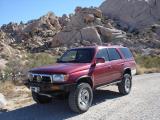
Welcome, nice to see another White Runner  nice set up, including the pooch! Something you should be aware of, I think the moderators here own stock in LendingTree.com
nice set up, including the pooch! Something you should be aware of, I think the moderators here own stock in LendingTree.com

 Aug 7, 2003 | 01:11 PM
#29
Thread Starter
Registered User
Joined: Aug 2003
Posts: 987
Likes: 0
From: San Diego, CA
Thanks
let see
[url]http://invis.free.anonymizer.com/http://community.webshots.com/photo/84698606/84699453qwLgrc[url]
nope .. i notice the file you used said image and not photo.
Man this site is addictive, I gotta get some work done!
C
let see
[url]http://invis.free.anonymizer.com/http://community.webshots.com/photo/84698606/84699453qwLgrc[url]
nope .. i notice the file you used said image and not photo.
Man this site is addictive, I gotta get some work done!
C
Last edited by Roadtripr; Aug 7, 2003 at 01:20 PM.
Aug 7, 2003 | 01:16 PM
#30
Registered User
Joined: Jun 2003
Posts: 1,954
Likes: 0
From: Kirkland, WA
here is what you put for the last picture that you wanted to post:
http://invis.free.anonymizer.com/htt...84699453qwLgrc
really what you want to do is right click on the picture and select properties then it will have a place where it shows the url then just copy that and use the "IMG" button for posting and put the address in there. so this is the address that you would want
http://invis.free.anonymizer.com/htt...84699453qwLgrc
um ok well i don't know why both of those addresses look to be the same. hmmm
ok well apperently i don't know what the hell im talking about. it worked on my thing.
http://invis.free.anonymizer.com/htt...84699453qwLgrc
really what you want to do is right click on the picture and select properties then it will have a place where it shows the url then just copy that and use the "IMG" button for posting and put the address in there. so this is the address that you would want
http://invis.free.anonymizer.com/htt...84699453qwLgrc
um ok well i don't know why both of those addresses look to be the same. hmmm
ok well apperently i don't know what the hell im talking about. it worked on my thing.
 Aug 7, 2003 | 01:43 PM
#34
Contributing Member
Joined: Jul 2003
Posts: 8,807
Likes: 3
From: Montreal, QC Canada
OK I have no idea what I am doing wrong here?
here is my command line inside the img brackets
hxxp://invis.free.anonymizer.com/http://community.webshots.com/photo/81331158/81331452cQZmNj
obviously replace hxxp with http
Corey still need help!
here is my command line inside the img brackets
hxxp://invis.free.anonymizer.com/http://community.webshots.com/photo/81331158/81331452cQZmNj
obviously replace hxxp with http
Corey still need help!
Aug 7, 2003 | 01:46 PM
#35
Contributing Member
Joined: Jul 2003
Posts: 8,807
Likes: 3
From: Montreal, QC Canada
Never mind.
Guess you use URL instead of IMG for the proxy server.
Let's try again!!!
[url]http://invis.free.anonymizer.com/http://community.webshots.com/photo/81331158/81331452cQZmNj[url]
Guess you use URL instead of IMG for the proxy server.
Let's try again!!!
[url]http://invis.free.anonymizer.com/http://community.webshots.com/photo/81331158/81331452cQZmNj[url]
Aug 7, 2003 | 01:54 PM
#36
Thread Starter
Registered User
Joined: Aug 2003
Posts: 987
Likes: 0
From: San Diego, CA
I think you put [img*] before you hxxp//....and [/img*] afterwards (without the * of course). also, choose the webshot and rightclick to get the proper link (says /image/xxx not /photo/xxxx
[img*]hxxp://invis.free.anonymizer.com/http://community.webshots.com/s/image6/3/14/52/81331452cQZmNj_ph.jpg[/img*]

Carsten
[img*]hxxp://invis.free.anonymizer.com/http://community.webshots.com/s/image6/3/14/52/81331452cQZmNj_ph.jpg[/img*]
Carsten
Last edited by Roadtripr; Aug 7, 2003 at 02:01 PM.

 .......



