


How To Change Your Clock Color!
 Mar 12, 2012 | 08:13 PM
#1

Thread Starter
Registered User
Joined: Nov 2009
Posts: 77
Likes: 0
From: Altoona, PA
How To Change Your Clock Color!
Yes, it is possible! You CAN change the color of your clock. Ive seen this question asked countless times, and didnt find a definitive write-up on here for it yet, so i figured i would make one. 
Required:
Phillips Head Screwdriver, Medium size tip works best.
Clear REMOVABLE/REUSABLE double sided scotch tape.
Colored Material
Note: This mod requires a decent amount of trial and error. You may not get your color perfect on the first try, and may find yourself ripping your clock apart multiple times.
First Off, remove your clock from your dashboard. I didnt include any write-up on this, there are multiple out there for each generation, and each generation is different.
Clock Removed:

Next, remove the 4 Phillips head screws on each corner of the clock.

Remove the black cover:

Pull the clock out and lay it flat in the table.

Be careful not to lose the "buttons" that allow you to set the time shown below:

Now, find your material that you are using for your clock color. Use a semi-transparent material in the color you desire. Some ideas are a kaboom bottle, transparent solo party cups, gel color swatches, hobby airplane film, etc. I chose to use this blue plastic container:

Carefully trim a piece of material off with an Xacto knife:

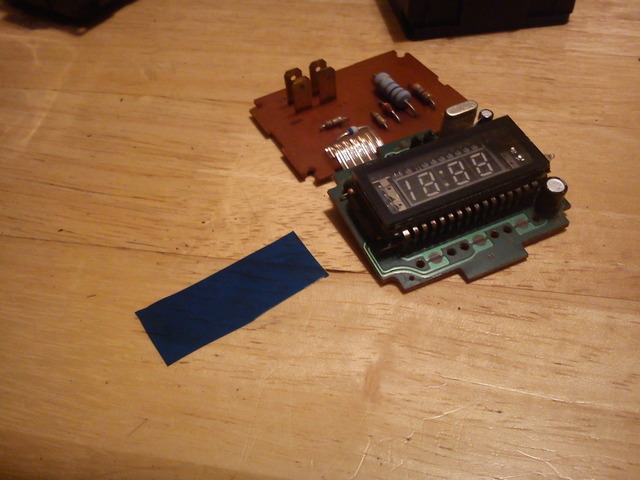
Next, cut a piece of double sided CLEAR scotch tape the same size as your clock screen, and place it on, and then place your material on top of that, Like shown below:

Now, you may have to place multiple layers on in order to get a bolder color, or to get the tone you desire.
Reinstall the clock and turn on the key:

Lastly, enjoy your color matched clock!

Required:
Phillips Head Screwdriver, Medium size tip works best.
Clear REMOVABLE/REUSABLE double sided scotch tape.
Colored Material
Note: This mod requires a decent amount of trial and error. You may not get your color perfect on the first try, and may find yourself ripping your clock apart multiple times.
First Off, remove your clock from your dashboard. I didnt include any write-up on this, there are multiple out there for each generation, and each generation is different.
Clock Removed:
Next, remove the 4 Phillips head screws on each corner of the clock.
Remove the black cover:
Pull the clock out and lay it flat in the table.
Be careful not to lose the "buttons" that allow you to set the time shown below:
Now, find your material that you are using for your clock color. Use a semi-transparent material in the color you desire. Some ideas are a kaboom bottle, transparent solo party cups, gel color swatches, hobby airplane film, etc. I chose to use this blue plastic container:
Carefully trim a piece of material off with an Xacto knife:
Next, cut a piece of double sided CLEAR scotch tape the same size as your clock screen, and place it on, and then place your material on top of that, Like shown below:
Now, you may have to place multiple layers on in order to get a bolder color, or to get the tone you desire.
Reinstall the clock and turn on the key:
Lastly, enjoy your color matched clock!


 Mar 13, 2012 | 05:29 AM
#5
Thread Starter
Registered User
Joined: Nov 2009
Posts: 77
Likes: 0
From: Altoona, PA
Join the club, does the list ever stop growing?


Glad i could help! It was originally the stock off-greenish color, and i wanted it to match the blue LEDS im puttting in the dash.

Thread
Thread Starter
Forum
Replies
Last Post
the1998sr5
95.5-2004 Tacomas & 96-2002 4Runners
15
Jul 14, 2020 08:35 PM
FS[SouthEast]: Mercury Villager Fan & DCC Fan Controller
coryc85
Misc Stuff (Vehicle Related)
6
Sep 9, 2015 06:24 AM
GreatLakesGuy
The Classifieds GraveYard
8
Sep 4, 2015 09:27 AM
terminator
Misc Stuff (Vehicle Related)
3
Jul 27, 2015 07:13 PM


