


PC tips
 01-03-2005, 03:28 PM
#21
Registered User

Join Date: Nov 2003
Location: Portland, Oregon
Posts: 1,537
Likes: 0
Received 0 Likes
on
0 Posts
 01-06-2005, 03:46 PM
#22
Registered User

Trying to decide what kind of network gear you want? Check this link out...
http://www.wi-fiplanet.com/reviews/C...le.php/1585191
http://www.wi-fiplanet.com/reviews/C...le.php/1585191
01-09-2005, 01:12 PM
#23

Steam, the Halflife & Counterstrike client
When you install Halflife 2 for it and Counterstrike Source, it uses an app called Steam that runs in the background with an icon by your clock.
This is the client that auto updates your games and the app itself.
Whenever I install a new game and hit the Internet to play some online action, the Windows SP2 firewall appears behind the game and I see it after I shut the game down.
It asks me if I want to block the game or allow it, and I tell it to allow it.
It doe snot open up any ports, it just lets the exe file of the game run.
Every once in awhile the app would give me an error upon boot up or rebooting saying the app could not connect to the Internet, and I could choose a few buttons to OK it or ignore.
This started to happen every time now upon booting since I installed the Linksys router the other day.
I was getting tired of this and I already had the router configured to open up port 1200 via UDP.
I checked the Windows firewall too, and Steam was in there, but only for the exe file.
I clicked on add port from the firewalls menu and gave it a name of "Steam at Win startup" and entered port 1200 via UDP in there also, and this cured it.
Opening the port
Six reboots already, and the error message window has gone away.
Hope this helps someone who may be thinking about buying this game.
Ya gotta buy it, all the mags and reviews say it will take the Game Of The Year awards.
This is the client that auto updates your games and the app itself.
Whenever I install a new game and hit the Internet to play some online action, the Windows SP2 firewall appears behind the game and I see it after I shut the game down.
It asks me if I want to block the game or allow it, and I tell it to allow it.
It doe snot open up any ports, it just lets the exe file of the game run.
Every once in awhile the app would give me an error upon boot up or rebooting saying the app could not connect to the Internet, and I could choose a few buttons to OK it or ignore.
This started to happen every time now upon booting since I installed the Linksys router the other day.
I was getting tired of this and I already had the router configured to open up port 1200 via UDP.
I checked the Windows firewall too, and Steam was in there, but only for the exe file.
I clicked on add port from the firewalls menu and gave it a name of "Steam at Win startup" and entered port 1200 via UDP in there also, and this cured it.
Opening the port
Six reboots already, and the error message window has gone away.
Hope this helps someone who may be thinking about buying this game.
Ya gotta buy it, all the mags and reviews say it will take the Game Of The Year awards.
01-29-2005, 11:07 AM
#24
Oiling noisy fans
On an old Creative Labs Ge Force video card I ran years ago, the fan started to go out on me, and became very noisy.
I would take off the sticker on it and put a few drops of sewing machine oil in there and that would cure it for awhile.
Just ran across this link from a hardware forum I use on how to oil a noisy fan.
http://www.dansdata.com/fanmaint.htm
I would take off the sticker on it and put a few drops of sewing machine oil in there and that would cure it for awhile.
Just ran across this link from a hardware forum I use on how to oil a noisy fan.
http://www.dansdata.com/fanmaint.htm
01-29-2005, 03:58 PM
#25
TV/sound out from PC to TV
My ATI 9600 Pro card came with a 6' cable that has S video on one end for the vid card, and a RCA plug on the other end that goes into the TV sets aux. input so I can view anything on the PC on the TV.
I also have a Monster Cable 40' extension cable for it with two male plugs and a small female adaptor to join the two cable together.
Needless to say, I lost the 6' cable somewhere.
I ran across a cool site the other day that sells all kinds of cables.
I had called up Radio Shack earlier today, and he told me that type of 6' cable goes for $50.
Typical Radio Shack rip off.
Here it is for under $14.
http://www.svideo.com/svideorca.html
I was looking on their site and came across a better cable which I will get later.
It is the same type of cable, but also with the left & right audio channel cabling so you can plug one end into your soundcards output, and the other two ends into the left & right input on the TV set.
This way you can see and hear your PC on your big screen TV set or whatever size TV you have.
http://www.svideo.com/prosvideo24.html
There is a Flash video at the above URL.
This would be pretty cool, especially if I had a wireless keyboard to go along with my wireless mouse.
I could sit in my easy chair and play a game on the PC and view it on my TV in the living room.
Hope this site is of value for anyone looking for good cabling for even better prices.
I also have a Monster Cable 40' extension cable for it with two male plugs and a small female adaptor to join the two cable together.
Needless to say, I lost the 6' cable somewhere.
I ran across a cool site the other day that sells all kinds of cables.
I had called up Radio Shack earlier today, and he told me that type of 6' cable goes for $50.
Typical Radio Shack rip off.
Here it is for under $14.
http://www.svideo.com/svideorca.html
I was looking on their site and came across a better cable which I will get later.
It is the same type of cable, but also with the left & right audio channel cabling so you can plug one end into your soundcards output, and the other two ends into the left & right input on the TV set.
This way you can see and hear your PC on your big screen TV set or whatever size TV you have.
http://www.svideo.com/prosvideo24.html
There is a Flash video at the above URL.
This would be pretty cool, especially if I had a wireless keyboard to go along with my wireless mouse.
I could sit in my easy chair and play a game on the PC and view it on my TV in the living room.
Hope this site is of value for anyone looking for good cabling for even better prices.
01-29-2005, 05:21 PM
#26
Contributing Member

Join Date: Jul 2004
Posts: 2,370
Likes: 0
Received 0 Likes
on
0 Posts
as a side note too that svideo.com has good prices on HDMI cables.....I paid about 120 bucks for a 6 foot cable at best buy..... svideo.com has a 10 ft for 50 bucks!!...thats a great deal!!
http://www.svideo.com/hdmi3.html
http://www.svideo.com/hdmi3.html
02-13-2005, 05:07 AM
#27
More TV out...
This one explains how to enable the ops in your video properties to get TV out to your TV set from the PC, ran across it last night Googling TV out info.
http://www.weethet.nl/english/video_pc2tv_ati.php
The one above is for ATI vid card users, but there is NVIDIA info there as well.
I learned something on that site last night.
I can get the desktop no problemo from the PC to the TV, but have never been able to get a vid to show up on the TV with Media Player, it only showed the player.
You have to click on a circle icon to make the TV the primary screen, then vids will show up.
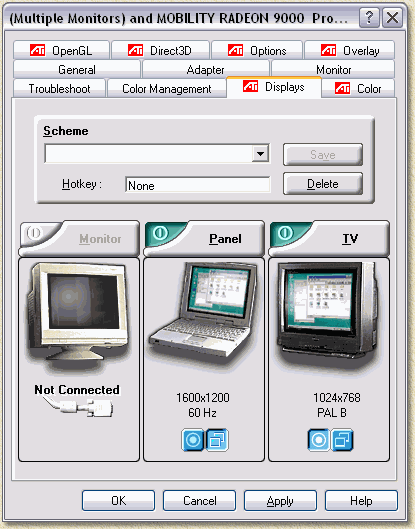
http://www.weethet.nl/english/video_pc2tv_ati.php
The one above is for ATI vid card users, but there is NVIDIA info there as well.
I learned something on that site last night.
I can get the desktop no problemo from the PC to the TV, but have never been able to get a vid to show up on the TV with Media Player, it only showed the player.
You have to click on a circle icon to make the TV the primary screen, then vids will show up.
Klikking the  button is needed to set the TV as a PRIMARY screen. This is needed for video. As Video (DivX etc) will ONLY display on the PRIMARY display! This is for both extended screens and duplicated/cloned screens!
button is needed to set the TV as a PRIMARY screen. This is needed for video. As Video (DivX etc) will ONLY display on the PRIMARY display! This is for both extended screens and duplicated/cloned screens!
02-14-2005, 09:32 PM
#28
Registered User

Join Date: Feb 2005
Location: thunder bay, ontario
Posts: 895
Likes: 0
Received 0 Likes
on
0 Posts
Quick little tweak for windows XP/2003, definetely speeds up menu browsing and the windows desktop in general.
1. Right-click on 'My Computer', click on 'Properties'.
2. Click on the 'Advanced' tab, then under performance click on 'Settings'
3. Click on 'adjust for best performance', then scroll to the bottom of the list and re-click the last 2.
This will make everything run smoother, and keep the same windows XP look, i.e. the backdrops for the desktop icons (behind the text, so its not a box like in 98), and the fancy toolbar at the bottom.
1. Right-click on 'My Computer', click on 'Properties'.
2. Click on the 'Advanced' tab, then under performance click on 'Settings'
3. Click on 'adjust for best performance', then scroll to the bottom of the list and re-click the last 2.
This will make everything run smoother, and keep the same windows XP look, i.e. the backdrops for the desktop icons (behind the text, so its not a box like in 98), and the fancy toolbar at the bottom.
02-14-2005, 09:52 PM
#29
Registered User
Join Date: Feb 2005
Location: thunder bay, ontario
Posts: 895
Likes: 0
Received 0 Likes
on
0 Posts
Main programs I use for spyware removal are Adaware SE Personal, Spybot 1.3, HiJackThis 1.98, and CoolWebShredder 2.0.
BUT, I only run these programs once I've removed as much spyware as possible, manually...
1. Go to Start>Control Panel>Add/Remove Programs, and go through and remove whatever you don't recognize installing, usually programs around 0.02MB aren't much more then spyware, use your best judgement.
2. Go to Start>Run, type in 'regedit'. Now, navigate to...
HKEY_LOCAL_MACHINE>SOFTWARE>Microsoft>Windows>Curr ent Version>Run
In here, delete any entries that look like random characters, or that you don't need running at startup. ** If you have an antivirus, make sure to take a close look at the entries before deleting them, ensuring you're antivirus stays in tact.
Do the same in the following folders... HKEY_LOCAL_MACHINE>SOFTWARE>Microsoft>Windows>Curr ent Version>RunOnce
HKEY_LOCAL_MACHINE>SOFTWARE>Microsoft>Windows>Curr ent Version>RunOnceEx
HKEY_LOCAL_MACHINE>SOFTWARE>Microsoft>Windows>Curr ent Version>RunServices
HKEY_LOCAL_MACHINE>SOFTWARE>Microsoft>Windows>Curr ent Version>RunServicesEX
3. The only windows this step doesn't apply to is Win95.
Go to Start>Run, type in 'msconfig' (On some windows 98 and ME machines, you might have to manually open the file, 'C:\Windows\System32\msconfig' least, i think its there.. been a while since i used either.. if all else fails, use windows search/find to locate it.)
In here, click on the 'Startup' tab, and de-select any and all things that you don't recognize, or don't need, again... being careful not to disturb your antivirus settings. (You may notice some of the things you already deleted in registry, the reason for this is in the registry those were the machines settings, where as in msconfig, its the users settings) Click OK, and you will be prompted to reboot.
4. Now that you have reduced the amount of startup items on your computer and killed as much spyware as possible by yourself, time to start running the programs, really in no particular order, usually i go:
a. adaware se(get latest update (released weekly), then full system scan),
b. spybot (get latest updates, then immunize and scan),
c. coolwebshredder and finally...
d. hijackthis, in this program you have to be just as careful as in the registry and the startup config, if you remove the wrong items you can make alot of things on your computer stop working. Go through slowly and remove things based upon your best judgment, and things that you know you don't want. Items beginning with R0 and R1 can be removed, they are just homepage settings, by removing all of those, your homepage will be set to 'default:blank', you can then re set it as you please.
If you managed through all that, congratulations, your computer is now, about 95-98% free of spyware... and more then likely running quite a bit faster. Repeat the above steps about once a month, or sooner, depending on how many warez sites you visit.
** All programs mentioned above can be obtained here. **
!!EDIT!!
Ooops, forgot to add, you have to do steps 3 and 4 in ALL user profiles for WindowsXP, I know... it's a huge pain, but worth it in the end, promise!
BUT, I only run these programs once I've removed as much spyware as possible, manually...
1. Go to Start>Control Panel>Add/Remove Programs, and go through and remove whatever you don't recognize installing, usually programs around 0.02MB aren't much more then spyware, use your best judgement.
2. Go to Start>Run, type in 'regedit'. Now, navigate to...
HKEY_LOCAL_MACHINE>SOFTWARE>Microsoft>Windows>Curr ent Version>Run
In here, delete any entries that look like random characters, or that you don't need running at startup. ** If you have an antivirus, make sure to take a close look at the entries before deleting them, ensuring you're antivirus stays in tact.
Do the same in the following folders... HKEY_LOCAL_MACHINE>SOFTWARE>Microsoft>Windows>Curr ent Version>RunOnce
HKEY_LOCAL_MACHINE>SOFTWARE>Microsoft>Windows>Curr ent Version>RunOnceEx
HKEY_LOCAL_MACHINE>SOFTWARE>Microsoft>Windows>Curr ent Version>RunServices
HKEY_LOCAL_MACHINE>SOFTWARE>Microsoft>Windows>Curr ent Version>RunServicesEX
3. The only windows this step doesn't apply to is Win95.
Go to Start>Run, type in 'msconfig' (On some windows 98 and ME machines, you might have to manually open the file, 'C:\Windows\System32\msconfig' least, i think its there..
been a while since i used either.. if all else fails, use windows search/find to locate it.)In here, click on the 'Startup' tab, and de-select any and all things that you don't recognize, or don't need, again... being careful not to disturb your antivirus settings. (You may notice some of the things you already deleted in registry, the reason for this is in the registry those were the machines settings, where as in msconfig, its the users settings) Click OK, and you will be prompted to reboot.
4. Now that you have reduced the amount of startup items on your computer and killed as much spyware as possible by yourself, time to start running the programs, really in no particular order, usually i go:
a. adaware se(get latest update (released weekly), then full system scan),
b. spybot (get latest updates, then immunize and scan),
c. coolwebshredder and finally...
d. hijackthis, in this program you have to be just as careful as in the registry and the startup config, if you remove the wrong items you can make alot of things on your computer stop working. Go through slowly and remove things based upon your best judgment, and things that you know you don't want. Items beginning with R0 and R1 can be removed, they are just homepage settings, by removing all of those, your homepage will be set to 'default:blank', you can then re set it as you please.
If you managed through all that, congratulations, your computer is now, about 95-98% free of spyware... and more then likely running quite a bit faster. Repeat the above steps about once a month, or sooner, depending on how many warez sites you visit.
** All programs mentioned above can be obtained here. **
!!EDIT!!
Ooops, forgot to add, you have to do steps 3 and 4 in ALL user profiles for WindowsXP, I know... it's a huge pain, but worth it in the end, promise!
Last edited by green91runner; 02-15-2005 at 09:08 PM.
02-14-2005, 10:10 PM
#30
Registered User
Join Date: Feb 2005
Location: thunder bay, ontario
Posts: 895
Likes: 0
Received 0 Likes
on
0 Posts
One more tip that comes to mind at this late hour will benefit laptop users the most, but really it's just an all around great tool that everyone should have, it being.. Daemon Tools.
Downloaded here.
This nifty little program lets you mount virtual optical drives, from ISO's, Cue's and a couple outher image files that I can't think of at this moment. You can have up to 4 drives, the benefits of this are.. saving on the amount of burnt discs, or with laptops, if you haven't found a no-cd crack for a game yet, you just mount the image and your computer thinks the cd is in there.. because the motor in the cd-drive isn't being used, you will get a ton of extra battery life.
Downloaded here.
This nifty little program lets you mount virtual optical drives, from ISO's, Cue's and a couple outher image files that I can't think of at this moment. You can have up to 4 drives, the benefits of this are.. saving on the amount of burnt discs, or with laptops, if you haven't found a no-cd crack for a game yet, you just mount the image and your computer thinks the cd is in there.. because the motor in the cd-drive isn't being used, you will get a ton of extra battery life.
02-14-2005, 10:21 PM
#31
Registered User
Join Date: Feb 2005
Location: thunder bay, ontario
Posts: 895
Likes: 0
Received 0 Likes
on
0 Posts
Originally Posted by Churnd
If you don't know where to get a good antivirus program from and don't want to pay for one:
AVG Free Edition
Also, 2 good free firewall programs:
ZoneAlarm Firewall
Sygate Personal Firewall
AVG Free Edition
Also, 2 good free firewall programs:
ZoneAlarm Firewall
Sygate Personal Firewall
I would also like to recommend using Housecall. This is a free online virus scan, which you can use in combination with your existing one, twice the security, same price

As for the 2 firewalls mentioned, I've used both, Sygate wasn't too bad, but ZoneAlarm drove me mad, constantly popping up and asking 'is this ok'... and since i have a laptop, moving from network to network also brought up more annoyances with it learning the new network architecture, although this is what you want in a firewall, it's something I would rather live without. Also, both programs take a fair amount of system resources, especially on older machines.. ZoneAlarm much more so then Sygate.
If you have a router, you have a firewall (99.9% of the time).. which means you don't need to clog up your system with either of these 2 annoying products, and if you don't already have a router I suggest getting one. I mean for $20-30 (less then the cost of some firewall software), you get a firewall and (if your using dsl) a constant connection to the internet, so you don't have to dial-up all the time. Makes it easier to setup a little LAN game at your house too.
03-08-2005, 08:58 PM
#32
Registered User

Join Date: May 2003
Location: Boston, MA
Posts: 201
Likes: 0
Received 0 Likes
on
0 Posts
Originally Posted by Dr. Zhivago
To vastly improve the performance and stability on Windows 98/98SE/ME if you are still using one of those operating systems, do the following.
This is called the "System Performance Hack"
1. Right-click My Computer.
2. Click the Device Manager Tab.
3. Open the Disk Drives Category and check the properties pages of all the HDD's. Make sure that the HDD's are using DMA. Put a check in the DMA checkbox if it's empty. It's on the Settings tab. Okay your way out.
4. Do the same for the CDROM/DVD/CDRW drives.
5. Ignore the warnings that enabling DMA will cause major flooding and erectile dysfunction.
5. Open the System Devices Category and open the Direct Memory Access Controller properties. Set the DMA Buffer size to 64. That's the largest value supported.
6. Ok your way out of all the dialogs. Cancel ALL prompts to reboot.
7. Go to the Performance tab.
8. Click the File System button.
9. Set the typical role to Network Server.
10. Make sure Read Ahead Optimization is set to Full. Ok your way out.
11. Click the Virtual Memory button.
12. Select "Let me choose" and set the Minimum size to a value equal to 1.5 x Physical RAM. (See below for relative values.) Leave the Maximum value alone. If they have more than one HDD, put the Swapfile on the second disk.
13. Ok your way out.
14. Ignore the warning about Windows eating your first born...
16. Close System Properties. Cancel all prompts to reboot.
17. Start\Run\msconfig
18. Click the System.ini tab.
19. Click the [386Enh] folder, not the + sign next to it.
20. Click the New button.
21. Type: ConservativeSwapfileUsage=1
22. Press [Enter]
It will look like this:
[386Enh]
ConservativeSwapfileUsage=1
23. Click "Ok"
24. Reboot.
25. Done
Swapfile Sizes:
64MB RAM = 96 Swapfile Size
128MB RAM = 192 Swapfile Size
256MB RAM = 384 Swapfile Size
384MB RAM = 512 Swapfile Size
512MB RAM = 768 Swapfile Size
768MB RAM = 1024 Swapfile Size
1024MB RAM = 1024 Swapfile Size
Windows 98/ME does not support more than 1GB of RAM nor can it access more than 2GB of Memory Space, which is why the last entry is equal to the RAM value. Any larger values are simply ignored.
We used to do this all the time when I was a Dell Support Technician and I also trained all my new and existing Techs to do this. This resolved about 90% of our support calls as out of the box, Windows 9x doesn't use memory or system resources very efficiently.
These changes makes a HUGE difference in the way Windows handles memory, the swapfile and greatly accelerates the opening of programs, allows you to actually multitask and run modern 3D games without pauses, hitches and various other problems as long as you have enough memory to hold all the programs and not have to use the swapfile.
By default, Windows will use the swapfile, even if you have plenty of RAM to store the data that's in use and that causes slow downs and instability. Plus, you spend a lot of time "waiting" for your computer while it moves data to and from the harddrive while it's opening or switching programs.
Peace.
G
This is called the "System Performance Hack"
1. Right-click My Computer.
2. Click the Device Manager Tab.
3. Open the Disk Drives Category and check the properties pages of all the HDD's. Make sure that the HDD's are using DMA. Put a check in the DMA checkbox if it's empty. It's on the Settings tab. Okay your way out.
4. Do the same for the CDROM/DVD/CDRW drives.
5. Ignore the warnings that enabling DMA will cause major flooding and erectile dysfunction.
5. Open the System Devices Category and open the Direct Memory Access Controller properties. Set the DMA Buffer size to 64. That's the largest value supported.
6. Ok your way out of all the dialogs. Cancel ALL prompts to reboot.
7. Go to the Performance tab.
8. Click the File System button.
9. Set the typical role to Network Server.
10. Make sure Read Ahead Optimization is set to Full. Ok your way out.
11. Click the Virtual Memory button.
12. Select "Let me choose" and set the Minimum size to a value equal to 1.5 x Physical RAM. (See below for relative values.) Leave the Maximum value alone. If they have more than one HDD, put the Swapfile on the second disk.
13. Ok your way out.
14. Ignore the warning about Windows eating your first born...
16. Close System Properties. Cancel all prompts to reboot.
17. Start\Run\msconfig
18. Click the System.ini tab.
19. Click the [386Enh] folder, not the + sign next to it.
20. Click the New button.
21. Type: ConservativeSwapfileUsage=1
22. Press [Enter]
It will look like this:
[386Enh]
ConservativeSwapfileUsage=1
23. Click "Ok"
24. Reboot.
25. Done
Swapfile Sizes:
64MB RAM = 96 Swapfile Size
128MB RAM = 192 Swapfile Size
256MB RAM = 384 Swapfile Size
384MB RAM = 512 Swapfile Size
512MB RAM = 768 Swapfile Size
768MB RAM = 1024 Swapfile Size
1024MB RAM = 1024 Swapfile Size
Windows 98/ME does not support more than 1GB of RAM nor can it access more than 2GB of Memory Space, which is why the last entry is equal to the RAM value. Any larger values are simply ignored.
We used to do this all the time when I was a Dell Support Technician and I also trained all my new and existing Techs to do this. This resolved about 90% of our support calls as out of the box, Windows 9x doesn't use memory or system resources very efficiently.
These changes makes a HUGE difference in the way Windows handles memory, the swapfile and greatly accelerates the opening of programs, allows you to actually multitask and run modern 3D games without pauses, hitches and various other problems as long as you have enough memory to hold all the programs and not have to use the swapfile.
By default, Windows will use the swapfile, even if you have plenty of RAM to store the data that's in use and that causes slow downs and instability. Plus, you spend a lot of time "waiting" for your computer while it moves data to and from the harddrive while it's opening or switching programs.
Peace.
G
Doctor....
I appreciate you posting your Windows 98 optimization tips. I never thought I'd find such good computer advice on a Toyota forum! I am moderately computer savy (we'll see if you disagree after reading my question), but I am having a bit of trouble with the virtual memory step. I am supposed to specify a value that is 1.5X greater than the size of my hard drive, correct? My hard drive shows a capacity of 57.2GB with 20.7 available. 57200 X 2 = 85800. Would this be my minimum value? My maximum value was preset at 21273. Does it make sense for the max to be less than the min? When I adjust my settings this way and then go back to check on them, the Minimum shows "0" again. Hmmm...
03-08-2005, 09:38 PM
#33
Registered User
Join Date: Feb 2005
Location: thunder bay, ontario
Posts: 895
Likes: 0
Received 0 Likes
on
0 Posts
Originally Posted by Jeff_M
Doctor....
I appreciate you posting your Windows 98 optimization tips. I never thought I'd find such good computer advice on a Toyota forum! I am moderately computer savy (we'll see if you disagree after reading my question), but I am having a bit of trouble with the virtual memory step. I am supposed to specify a value that is 1.5X greater than the size of my hard drive, correct? My hard drive shows a capacity of 57.2GB with 20.7 available. 57200 X 2 = 85800. Would this be my minimum value? My maximum value was preset at 21273. Does it make sense for the max to be less than the min? When I adjust my settings this way and then go back to check on them, the Minimum shows "0" again. Hmmm...
I appreciate you posting your Windows 98 optimization tips. I never thought I'd find such good computer advice on a Toyota forum! I am moderately computer savy (we'll see if you disagree after reading my question), but I am having a bit of trouble with the virtual memory step. I am supposed to specify a value that is 1.5X greater than the size of my hard drive, correct? My hard drive shows a capacity of 57.2GB with 20.7 available. 57200 X 2 = 85800. Would this be my minimum value? My maximum value was preset at 21273. Does it make sense for the max to be less than the min? When I adjust my settings this way and then go back to check on them, the Minimum shows "0" again. Hmmm...
256mb RAM = 384mb Min. Virtual, 512mb RAM = 768mb Min. Virtual, etc.
03-08-2005, 09:42 PM
#34
Contributing Member

Join Date: Apr 2003
Location: Riverview, FL
Posts: 534
Likes: 0
Received 0 Likes
on
0 Posts
Originally Posted by Jeff M
I appreciate you posting your Windows 98 optimization tips. I never thought I'd find such good computer advice on a Toyota forum! I am moderately computer savy (we'll see if you disagree after reading my question), but I am having a bit of trouble with the virtual memory step. I am supposed to specify a value that is 1.5X greater than the size of my hard drive, correct? My hard drive shows a capacity of 57.2GB with 20.7 available. 57200 X 2 = 85800. Would this be my minimum value? My maximum value was preset at 21273. Does it make sense for the max to be less than the min? When I adjust my settings this way and then go back to check on them, the Minimum shows "0" again. Hmmm...
I haven't used Windows 98 in quite a while, but if I remember right you can find out how much RAM (memory) your computer has by opening an MS-DOS prompt and entering "mem" at the command line (without the quotes of course).
EDIT: Uh, yeah, what green91runner said...
Last edited by jimrockford; 03-08-2005 at 09:43 PM.
05-10-2005, 09:29 AM
#36
Contributing Member

Join Date: Jul 2003
Location: Sacramento, CA
Posts: 662
Likes: 0
Received 0 Likes
on
0 Posts
 entering a web site
when using internet explorer OR firefox..
instead of typing in the address bar: "www.yahoo.com"
just type in the main part of the address (i.e. "yahoo") and hit CTRL+ENTER
it will fill in the "www." and the ".com" at the end. pretty nice feature, and saves some time.
-Russell
instead of typing in the address bar: "www.yahoo.com"
just type in the main part of the address (i.e. "yahoo") and hit CTRL+ENTER
it will fill in the "www." and the ".com" at the end. pretty nice feature, and saves some time.
-Russell
06-26-2005, 03:52 PM
#37
More power to ya...
Wanna free up some horsepower for better gaming?
Hit Ctrl Alt Delete to bring up your Task Manager.
Before a game I always right click the various icons down by the system clock and turn them off such as my anti virus app and others.
However there is a lot of extra stuff running that you do not need to have that can free up as many as 10 or more running processes and free up 100 MB or more of extra RAM for you.
When you get into the Task Manager, hit the Processes tab.
Then click on Username to sort them.
Choose your name and shut down them all except for explorer.exe and taskmgr.exe.
You need the former for Windows shell, and the latter is the app you are in doing this.
When I do mine I go from around 32 processes down to 22, and free up about 100 MB of memory.
You should find that your game will now run better than before.
This tip I just read today in the Battlefield 2 manual on improving performance.
BF2 is a memory hog.
Hit Ctrl Alt Delete to bring up your Task Manager.
Before a game I always right click the various icons down by the system clock and turn them off such as my anti virus app and others.
However there is a lot of extra stuff running that you do not need to have that can free up as many as 10 or more running processes and free up 100 MB or more of extra RAM for you.
When you get into the Task Manager, hit the Processes tab.
Then click on Username to sort them.
Choose your name and shut down them all except for explorer.exe and taskmgr.exe.
You need the former for Windows shell, and the latter is the app you are in doing this.
When I do mine I go from around 32 processes down to 22, and free up about 100 MB of memory.
You should find that your game will now run better than before.
This tip I just read today in the Battlefield 2 manual on improving performance.
BF2 is a memory hog.
07-03-2005, 04:47 AM
#38
7 tips to a cleaner PC
Saw this on CNets site.
http://reviews.cnet.com/4520-10163_7....html?tag=bnav
Lots of vids there too.
Keeping your PC clean, especially inside the case is important to the life of it.
http://reviews.cnet.com/4520-10163_7....html?tag=bnav
Lots of vids there too.
Keeping your PC clean, especially inside the case is important to the life of it.
07-11-2005, 08:44 AM
#39
Contributing Member

Join Date: Nov 2003
Location: Escondido, CA
Posts: 1,082
Likes: 0
Received 0 Likes
on
0 Posts
This site will help you out.
Best computer info in here period.
[H]ard ocp
http://www.hardforum.com/
Best computer info in here period.
[H]ard ocp
http://www.hardforum.com/
08-03-2005, 05:33 AM
#40
Registered User
Free up some memory by going to Start - Run - type "regedit", then:
1. Find the key [HKEY_LOCAL_MACHINESOFTWAREMicrosoftWindowsCurrentV ersionExplorer].
2. Create a new DWORD sub-key named ‘AlwaysUnloadDLL’ and set the default value to equal ‘1′ to disable Windows caching the DLL in memory.
3. Restart Windows for the change to take effect.
As always, make a backup of your registry if you've never tried editing it before.
1. Find the key [HKEY_LOCAL_MACHINESOFTWAREMicrosoftWindowsCurrentV ersionExplorer].
2. Create a new DWORD sub-key named ‘AlwaysUnloadDLL’ and set the default value to equal ‘1′ to disable Windows caching the DLL in memory.
3. Restart Windows for the change to take effect.
As always, make a backup of your registry if you've never tried editing it before.


